

Fake antivirus program called Your Protection is the latest variant of Paladin Antivirus. It was being promoted by means of fake online antivirus website that was uploaded to spread Your Protectionas a legitimate Windows security tool. This malware will pretend to have security features such as Antivirus and Antispyware protection, Network Shield (Firewall), Automatic Updates, Scheduled Scans and RAM Protection. Though it is believable by the way how its graphical user interface have presented itself, security experts warns public users that Your Protection files does not include any scan engine so it is impossible for this program to remove virus and protect a computer.
Fake antivirus programs like Your Protection should be remove from a computer immediately. It has the ability to strengthen itself and become more harmful as it attempts to connect to a remote server and update itself. This update may lead to disability of installed antivirus programs and modification of system files that will result to malfunction of Windows components. Use only trusted antivirus and anti-malware program to remove Your Protection.
What are the Symptoms of “Your Protection” Infection?
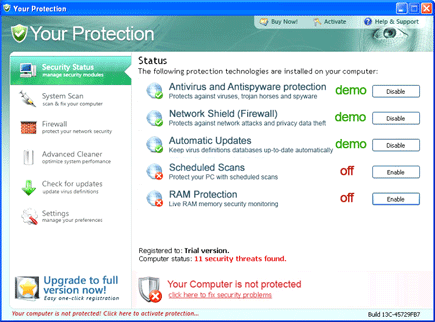
It will display alert messages and virus scan with falsified results to persuade users into having the Your Protection activation key. Some of the alerts will have this warning statement:
User’s activity loggers detected!
It’s strongly recommended to remove detected threats right now!
Antivirus Alert – Critical threat detected
Warning: Network attack detected
Network attack has been detected. Process is attempting to access your private data.
Your computer is being attacked from a remote PC.
Process is trying to steal your passwords listed below. It is highly recommended to block this threat now.
It will modify Windows Registry and add the following entries:
- HKEY_CURRENT_USER\Software\Microsoft\Windows\Current Version\Run “Your Protection”
- HKEY_CURRENT_USER\Software\Microsoft\Windows\Current Version\Run “mplay32xe.exe”
- HKEY_CLASSES_ROOT\CLSID\{5E2121EE-0300-11D4-8D3B-444553540000}
- HKEY_LOCAL_MACHINE\SOFTWARE\Microsoft\Windows\Current Version\Uninstall\Your Protection
- HKEY_LOCAL_MACHINE\SOFTWARE\Your Protection
- HKEY_CURRENT_USER\Software\Microsoft\Windows\Current Version\Policies\System “DisableTaskMgr” = “1”
- HKEY_CLASSES_ROOT\*\shellex\ContextMenuHandlers\SimpleShlExt “(Default)” = “{5E2121EE-0300-11D4-8D3B-444553540000}”
- HKEY_CLASSES_ROOT\Folder\shellex\ContextMenuHandlers\SimpleShlExt “(Default)” = “{5E2121EE-0300-11D4-8D3B-444553540000}”
- HKEY_LOCAL_MACHINE\SOFTWARE\Microsoft\Windows\Current Version\policies\system “DisableTaskMgr” = “1”
- HKEY_LOCAL_MACHINE\SOFTWARE\Microsoft\Windows\Current Version\Shell Extensions\Approved “{5E2121EE-0300-11D4-8D3B-444553540000}”
The threat will drop the following malicious files:
- c:\Program Files\Your Protection\about.ico
- c:\Program Files\Your Protection\activate.ico
- c:\Program Files\Your Protection\buy.ico
- c:\Program Files\Your Protection\help.ico
- c:\Program Files\Your Protection\scan.ico
- c:\Program Files\Your Protection\settings.ico
- c:\Program Files\Your Protection\splash.mp3
- c:\Program Files\Your Protection\Uninstall.exe
- c:\Program Files\Your Protection\update.ico
- c:\Program Files\Your Protection\urp.db
- c:\Program Files\Your Protection\urpext.dll
- c:\Program Files\Your Protection\urphook.dll
- c:\Program Files\Your Protection\urpprot.exe
- c:\Program Files\Your Protection\virus.mp3
- c:\Documents and Settings\All Users\Application Data\fiosejgfse.dll
- %Temp%\4otjesjty.mof
- %Temp%\asd1.tmp
- %Temp%\mplay32xe.exe
- %Temp%\urp.dat
- %Temp%\urpr.dat
- %UserProfile%\Application Data\Microsoft\Internet Explorer\Quick Launch\Your Protection.lnk
- %UserProfile%\Desktop\Your Protection Support.lnk
- %UserProfile%\Desktop\Your Protection.lnk
- %UserProfile%\Start Menu\Programs\Your Protection\About.lnk
- %UserProfile%\Start Menu\Programs\Your Protection\Activate.lnk
- %UserProfile%\Start Menu\Programs\Your Protection\Buy.lnk
- %UserProfile%\Start Menu\Programs\Your Protection\Scan.lnk
- %UserProfile%\Start Menu\Programs\Your Protection\Settings.lnk
- %UserProfile%\Start Menu\Programs\Your Protection\Update.lnk
- %UserProfile%\Start Menu\Programs\Your Protection\Your Protection Support.lnk
- %UserProfile%\Start Menu\Programs\Your Protection\Your Protection.lnk
How to Remove “Your Protection” Manually
1. Restart your computer in SafeMode
– After Power-On the computer, just before Windows start, press F8
– From the selections, Select SafeMode
2. Remove Registry entries that the threat added. You MUST BACKUP YOUR REGISTRY FIRST.
– Click Start > Run
– Type in the field, regedit
– Navigate and look for the registry entries mentioned above and delete if necessary
3. Delete malicious files that the threat added:
– Base on the given location above, browse and delete the file
– If no location is given, click Start>Search> and search for the files.
– If cannot be deleted, press Ctrl+Alt+Del to access Task Manager, see if the file is running in the process. If it is, select the file and click End Process. Perform file delete again.
4. Scan computer with Antivirus Program
– Update antivirus program
– Scan computer and delete all detected threats.
How to Easily Remove “Your Protection” Virus
1. Download and run Removal Tool to remove this threat.
