

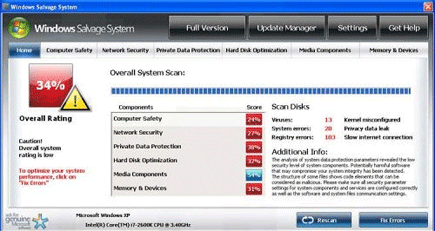
Windows Salvage System is a potentially unwanted application that may be installed on computer without users full knowledge of its original intention. Windows Salvage System will be promoted as a legitimate security software that has a functionalities of network security, data protection, hard drive optimization and so on. In fact, this software was developed by the same people who have spread Windows Profile System and Windows Accidents Prevention, both are rogue programs. It can easily deceive users by promoting itself on fake online virus scanner web sites that will scan visitors computer and provide false detection. The site will suggest a virus removal by downloading an unregistered version of Windows Salvage System.
Once installed on the computer, Windows Salvage System will begin to manipulate the system to be able to persuade users into purchasing the paid version of the program. A bunch of fake warning messages will be observe on victims computer. A virus scan is performed every boot of Windows and normally it will display a fake scan results. Internet browser will be redirected to various unsolicited and malicious web sites to download additional threats. To minimize the damage, remove Windows Salvage System immediately by running a full scan of the compromised computer using a legitimate anti-malware program. It is best to run a separate scan of anti-virus application to remove any hidden system files dropped by Windows Salvage System.
What are the Symptoms of Windows Salvage System Infection?
It will modify Windows Registry and add the following entries:
HKEY_LOCAL_MACHINE\SOFTWARE\Microsoft\Windows NT\CurrentVersion\Image File Execution Options\afwserv.exe “Debugger” = ‘svchost.exe’
HKEY_LOCAL_MACHINE\SOFTWARE\Microsoft\Windows\CurrentVersion\Internet Settings “WarnOnHTTPSToHTTPRedirect” = ’0?
HKEY_LOCAL_MACHINE\SOFTWARE\Microsoft\Windows NT\CurrentVersion\SystemRestore “DisableSR ” = ’1?
HKEY_LOCAL_MACHINE\SOFTWARE\Microsoft\Windows NT\CurrentVersion\Image File Execution Options\avastsvc.exe “Debugger” = ‘svchost.exe’
HKEY_LOCAL_MACHINE\SOFTWARE\Microsoft\Windows NT\CurrentVersion\Image File Execution Options\msascui.exe “Debugger” = ‘svchost.exe’
HKEY_LOCAL_MACHINE\SOFTWARE\Microsoft\Windows NT\CurrentVersion\Image File Execution Options\msmpeng.exe “Debugger” = ‘svchost.exe’
HKEY_LOCAL_MACHINE\SOFTWARE\Microsoft\Windows NT\CurrentVersion\Image File Execution Options\msseces.exe “Debugger” = ‘svchost.exe’
HKEY_LOCAL_MACHINE\SOFTWARE\Microsoft\Windows NT\CurrentVersion\Image File Execution Options\avastui.exe “Debugger” = ‘svchost.exe’
HKEY_LOCAL_MACHINE\SOFTWARE\Microsoft\Windows NT\CurrentVersion\Image File Execution Options\egui.exe “Debugger” = ‘svchost.exe’
HKEY_LOCAL_MACHINE\SOFTWARE\Microsoft\Windows NT\CurrentVersion\Image File Execution Options\ekrn.exe “Debugger” = ‘svchost.exe’
HKEY_CURRENT_USER\Software\Microsoft\Windows\CurrentVersion\Internet Settings “WarnOnHTTPSToHTTPRedirect” = ’0?
The threat will drop the following malicious files:
%Documents and Settings%\All Users\Application Data\[random]\
%Documents and Settings%\All Users\Application Data\[random]\[random].exe
%Documents and Settings%\All Users\Application Data\[random]\[random].mof
%Documents and Settings%\All Users\Application Data\[random]\[random].dll
%Documents and Settings%\All Users\Application Data\[random]\[random].ocx
%Documents and Settings%\All Users\Application Data\[random]\[random]\
%UserProfile%\Application Data\Windows Salvage System\
%UserProfile%\Application Data\Windows Salvage System\cookies.sqlite
%UserProfile%\Application Data\Windows Salvage System\Instructions.ini
How to Remove Windows Salvage System Manually
1. Restart your computer in SafeMode
– After Power-On the computer, just before Windows start, press F8
– From the selections, Select SafeMode
2. Remove Registry entries that the threat added. You MUST BACKUP YOUR REGISTRY FIRST.
– Click Start > Run
– Type in the field, regedit
– Navigate and look for the registry entries mentioned above and delete if necessary
3. Delete malicious files that the threat added:
– Base on the given location above, browse and delete the file
– If no location is given, click Start>Search> and search for the files.
– If cannot be deleted, press Ctrl+Alt+Del to access Task Manager, see if the file is running in the process. If it is, select the file and click End Process. Perform file delete again.
4. Scan computer with Antivirus Program
– Update antivirus program
– Scan computer and delete all detected threats.
How to Easily Remove Windows Salvage System
1. Download and run Removal Tool to remove this computer threat.
