
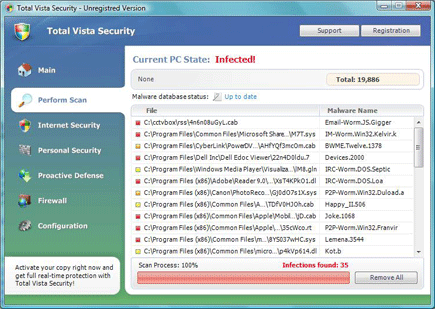
Total Vista Security is a potentially unwanted program that was promoted on its own website as a legitimate antivirus product. Total XP Security uses common trick as any other rogue security programs and that is via browser hijacking. Search results from victim’s PC will be pointed to a malicious online virus scanner web site that will act to download this malware. Once inside the system, Total XP Security will alter system settings and registry, adding its own entry that will make itself to run when Windows starts.
Robert La Nguyen
Remove Total XP Security

Total XP Security is a bogus computer security program that will endorse itself as a genuine security tool for Windows. Total XP Security spreads over the Internet while utilizing different tactics. The most common is by propagating a Trojan that will be able to alter system registry, which makes Internet browser to redirect to a Total XP Security web sites.
Antivirus 7

Antivirus 7 also known as Antivirus7 is a misleading application that can harm a computer and disabled security programs installed on victims computer. Antivirus 7 may spread on computers by utilizing search optimization arriving on its malicious websites when a term, word or phrase was searched on the Internet. When users visits Antivirus 7 malevolent websites, a script will be triggered to download and install the rogue application with or without users approval.
Smart Security

Smart Security also known as SmartSecurity is a rogue anti-spyware application that spreads on the Internet with the use of a Trojan. Smart Security is being promoted as a legitimate software to protect your computer from viruses and similar threats. A Trojan associated with it can dropped and install this program on computers secretly. To be able to achieve that, Smart Security Trojan will disable any security programs or antivirus applications found on target computer. It also spread by means of fake security websites, a malicious scripts hosted on these websites can automate the installation of Smart Security on visitors computer. Its presence on computer may trigger unstoppable pop-up alerts and warning messages intended to persuade its victim to obtain the Smart Security activation key for a certain amount.
Win 7 Guardian 2010

Win 7 Guardian 2010 is a fake antivirus program created specifically for the Windows 7 operating system. Win 7 Guardian 2010 virus commonly infect a computers that download a file from an infected server. This malware will inspect the system and install itself in relation to its environment. It can also install itself as XP Guardian 2010 or Vista Guardian 2010 respectively. While on the computer, Win 7 Guardian 2010 can alter system settings and add its own entries on the registry to ensure that it will load when Windows 7 is started. A fake virus scan will be launched and a number of infected files will be presented to convince users that a register version must be obtained to be able to remove these threats.
Remove Dr. Guard

Dr. Guard is another unsafe security program that was categorized as rogue because of its fraudulent activities being carried online. Dr. Guard will force itself to be installed on computers by means of a Trojan and computer virus. Infected websites can also be a carrier of this malware that can drop the threat on visitor’s computer without their knowledge. As of this writing, Dr. Guard and all of its associated Trojan remains undetected by antivirus programs. Once penetrated a computer it also has the ability to stop any installed security application by destroying files associated with it.
Remove Control Manager (Fake AV)
Control Manager is a rogue computer security application that may get into the computers in different ways. First, a Trojan was created to infect users by exploiting certain vulnerabilities on Internet browser. When compromised, Control Manager Trojan will redirect users to a website that will automatically scans a computer for threats. A number of viruses will be detected aiming to encourage visitors to download and install a copy of Control Manager on to their computers. Another way to acquire this is by downloading executable files from untrusted websites or file-sharing networks. Control Manager can also be dropped and installed directly on to computers by another virus infection merely created for this purpose. Once installed on computers, Control Manager shows various pop-up alerts and warning messages that aims to convince users that it was severely infected with virus and malware. A self virus scan will also be launch displaying falsified results. Control Manager will offer to remove these fabricated threats in the condition that a Control Manager activation code and registration key must be purchase online. This method clearly indicates that it was a rogue program developed only to fool users and earn a profit from its fraudulent activities.
Remove W32.Spybot.AVEO
W32.Spybot.AVEO also performs the following payloads: It will modify Windows Registry and add the following entries: HKEY_LOCAL_MACHINE\SOFTWARE\Microsoft\Windows\CurrentVersion\Run\”Windows Firewall Updater” = “windowsupdate.exe” HKEY_LOCAL_MACHINE\SOFTWARE\Microsoft\Windows\CurrentVersion\RunServices\”Windows Firewall Updater” = “windowsupdate.exe” HKEY_LOCAL_MACHINE\SOFTWARE\Microsoft\Ole\”EnableRemoteConnect” = “N” HKEY_LOCAL_MACHINE\SYSTEM\CurrentControlSet\Control\SecurityProviders\SCHANNEL\Protocols\PCT1.0\Server\”Enabled” = “0” HKEY_LOCAL_MACHINE\SYSTEM\CurrentControlSet\Services\lanmanserver\parameters\”AutoShareWks” = “0” HKEY_LOCAL_MACHINE\SYSTEM\CurrentControlSet\Services\lanmanserver\parameters\”AutoShareServer” = “0” HKEY_LOCAL_MACHINE\SYSTEM\CurrentControlSet\Services\SharedAccess\Parameters\FirewallPolicy\StandardProfile\AuthorizedApplications\List\C:\WINDOWS\system32\”windowsupdate.exe” = “C:\WINDOWS\system32\windowsupdate.exe:*:Enabled:Windows Firewall Updater” HKEY_LOCAL_MACHINE\SYSTEM\CurrentControlSet\Services\Tcpip\Parameters\”AllowUnqualifiedQuery” = “0” HKEY_LOCAL_MACHINE\SYSTEM\CurrentControlSet\Services\Tcpip\Parameters\”PrioritizeRecordData” = “1” HKEY_LOCAL_MACHINE\SYSTEM\CurrentControlSet\Services\Tcpip\Parameters\”TCP1320Opts” = “3” HKEY_LOCAL_MACHINE\SYSTEM\CurrentControlSet\Services\Tcpip\Parameters\”KeepAliveTime” = “23280” … Read more
Antivirus Live 2010

Antivirus Live 2010 is another rogue security software that was created primarily to encourage its victim into purchasing the licensed version of the program. It will display fake security warnings on computer and prompts user to obtain the Antivirus Live 2010 activation or registration key with the assurance of removing detected threats on the computer. To some, this fraudulent activities may not be familiar and easily fall and pay for the registered version of Antivirus Live 2010. In fact, even having the full version will not help it resolving security threats on the computer, it was just a complete waste of money and a revenue for the fake software developer who serves their purpose once again. The only way to remove Antivirus Live 2010 is by scanning a computer with trusted antivirus application. This will not only remove Antivirus Live 2010 but also other malicious files associated with it.
Anti-Virus Elite v5.0
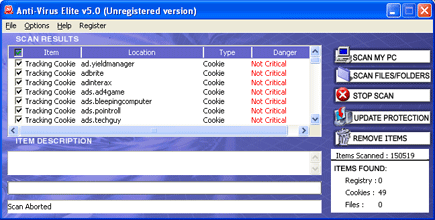
Anti-Virus Elite v5.0 also simply called Antivirus Elite is another light rogue security program that is not as aggressive as other of its kind. Anti-Virus Elite v5.0 scans computer and will only detect cookies and adware that will not cause so much harm on the affected computer. Though, its similarity to rogue programs can be obvious when it starts to convince users into obtaining the license version of the Anti-Virus Elite v5.0. Also, this fake security software create its entry on the Add/Remove Program of Windows but removing it from there will not get rid of it completely. To remove Anti-Virus Elite v5.0, aside from automatic removal, it is advised to scan computer with legitimate anti-virus and anti-malware program to ensure that computer is clean and free from any malware-related files.