

Vista Guardian 2010 is another fake antivirus program detected as part of a large family of rogue applications being spread on the Internet with the use of fake security websites. Vista Guardian 2010 can also be installed on computer as XP Guardian 2010 and Win 7 Guardian 2010, depending on its target operating system. Upon infection, Vista Guardian 2010 Trojan will attempt to communicate to a remote computer to execute more malware that can add harm to the already compromised system. To trick its victim into purchasing the Vista Guardian 2010 activation key and serial number, a bunch of warning alerts and messages will be issued on computer. It was learned that this threat detected posted by Vista Guardian 2010 were falsified and does not even exists on the computer.
What are the Symptoms of Vista Guardian 2010 Infection?
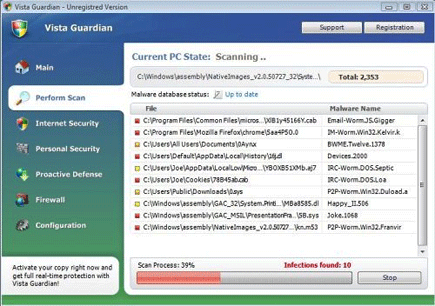
A virus scan by this rogue program will mislead users to acquire the Vista Guardian 2010 activation key and serial number.
It will modify Windows Registry and add the following entries:
- HKEY_CURRENT_USER\Software\Classes\.exe\shell\open\command “(Default)” = “av.exe” /START “%1? %*
- HKEY_CURRENT_USER\Software\Classes\secfile\shell\open\command “(Default)” = “av.exe” /START “%1? %*
- HKEY_CLASSES_ROOT\.exe\shell\open\command “(Default)” = “av.exe” /START “%1? %*
- HKEY_CLASSES_ROOT\secfile\shell\open\command “(Default)” = “av.exe” /START “%1? %*
- HKEY_LOCAL_MACHINE\SOFTWARE\Clients\StartMenuInternet\FIREFOX.EXE\shell\open\command “(Default)” = “av.exe” /START “firefox.exe”
- HKEY_LOCAL_MACHINE\SOFTWARE\Clients\StartMenuInternet\FIREFOX.EXE\shell\safemode\command “(Default)” = “av.exe” /START “firefox.exe” -safe-mode
- HKEY_LOCAL_MACHINE\SOFTWARE\Clients\StartMenuInternet\IEXPLORE.EXE\shell\open\command “(Default)” = “av.exe” /START “iexplore.exe”
- HKEY_LOCAL_MACHINE\SOFTWARE\Microsoft\Security Center “AntiVirusOverride” = “1?
- HKEY_LOCAL_MACHINE\SOFTWARE\Microsoft\Security Center “FirewallOverride” = “1?
The threat will drop the following malicious files:
- %Documents and Settings%\[UserName]\Application Data\av.exe
- %Documents and Settings%\[UserName]\Application Data\WRblt8464P
- %Documents and Settings%\[UserName]\Application Data\[random]
How to Remove Vista Guardian 2010 Manually
1. Restart your computer in SafeMode
– After Power-On the computer, just before Windows start, press F8
– From the selections, Select SafeMode
2. Remove Registry entries that the threat added. You MUST BACKUP YOUR REGISTRY FIRST.
– Click Start > Run
– Type in the field, regedit
– Navigate and look for the registry entries mentioned above and delete if necessary
3. Delete malicious files that the threat added:
– Base on the given location above, browse and delete the file
– If no location is given, click Start>Search> and search for the files.
– If cannot be deleted, press Ctrl+Alt+Del to access Task Manager, see if the file is running in the process. If it is, select the file and click End Process. Perform file delete again.
4. Scan computer with Antivirus Program
– Update antivirus program
– Scan computer and delete all detected threats.
How to Easily Remove Vista Guardian 2010
1. Download and run Removal Tool to remove Vista Guardian 2010

I ended up getting the Vista Guardian virus from TPB (but I didn’t download anything). I looked at a few suggested fixes online, but foolishly decided to follow the manual removal instructions above. Result? My PC could no longer open ANY .exe files, and I had to completely wipe the drives and start from scratch. MAJOR pain in the balls, so I highly recommend getting Malwarebytes’ Anti-Malware, because that’s the best program for getting rid of av.exe