

Anti-Virus Elite v5.0 also simply called Antivirus Elite is another light rogue security program that is not as aggressive as other of its kind. Anti-Virus Elite v5.0 scans computer and will only detect cookies and adware that will not cause so much harm on the affected computer. Though, its similarity to rogue programs can be obvious when it starts to convince users into obtaining the license version of the Anti-Virus Elite v5.0. Also, this fake security software create its entry on the Add/Remove Program of Windows but removing it from there will not get rid of it completely. To remove Anti-Virus Elite v5.0, aside from automatic removal, it is advised to scan computer with legitimate anti-virus and anti-malware program to ensure that computer is clean and free from any malware-related files.
What are the Symptoms of Anti-Virus Elite v5.0 Infection?
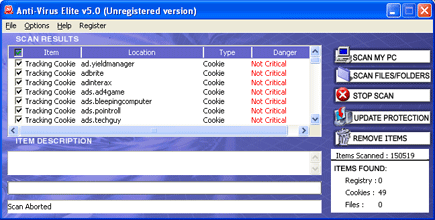
It will modify Windows Registry and add the following entries:
- HKEY_LOCAL_MACHINE\SOFTWARE\Microsoft\Windows\Current Version\Uninstall\Anti-Virus Elite 5.0_is1
- HKEY_CURRENT_USER\Software\Anti-Virus Elite
The threat will drop the following malicious files:
- %Program Files%\Anti-Virus Elite
- %Program Files%\Anti-Virus Elite\UninstlDll.dll
- %Program Files%\Anti-Virus Elite\unins000.exe
- %Program Files%\Anti-Virus Elite\unins000.dat
- %Program Files%\Anti-Virus Elite\adgutils.dll
- %Program Files%\Anti-Virus Elite\Anti-Virus Elite.exe
- %Program Files%\Anti-Virus Elite\noadware4_081909.na
- %UserProfile%\Desktop\Anti-Virus Elite.lnk
- %UserProfile%\Start Menu\Programs\Anti-Virus Elite
- %UserProfile%\Start Menu\Programs\Anti-Virus Elite\Anti-Virus Elite.lnk
- %UserProfile%\Start Menu\Programs\Anti-Virus Elite\Uninstall Anti-Virus Elite.lnk
How to Remove Anti-Virus Elite v5.0 Manually
1. Restart your computer in SafeMode
– After Power-On the computer, just before Windows start, press F8
– From the selections, Select SafeMode
2. Remove Registry entries that the threat added. You MUST BACKUP YOUR REGISTRY FIRST.
– Click Start > Run
– Type in the field, regedit
– Navigate and look for the registry entries mentioned above and delete if necessary
3. Delete malicious files that the threat added:
– Base on the given location above, browse and delete the file
– If no location is given, click Start>Search> and search for the files.
– If cannot be deleted, press Ctrl+Alt+Del to access Task Manager, see if the file is running in the process. If it is, select the file and click End Process. Perform file delete again.
4. Scan computer with Antivirus Program
– Update antivirus program
– Scan computer and delete all detected threats.
How to Easily Remove Anti-Virus Elite v5.0
1. Download and run Removal Tool to remove Anti-Virus Elite v5.0
