

Smart Security also known as SmartSecurity is a rogue anti-spyware application that spreads on the Internet with the use of a Trojan. Smart Security is being promoted as a legitimate software to protect your computer from viruses and similar threats. A Trojan associated with it can dropped and install this program on computers secretly. To be able to achieve that, Smart Security Trojan will disable any security programs or antivirus applications found on target computer. It also spread by means of fake security websites, a malicious scripts hosted on these websites can automate the installation of Smart Security on visitors computer. Its presence on computer may trigger unstoppable pop-up alerts and warning messages intended to persuade its victim to obtain the Smart Security activation key for a certain amount.
This fake program can configure itself to run automatically by altering Windows registry. Various messages coming from taskbar will be presented to scare computer users and some of it were written below:
Smart Security Warning
Spyware.IEMonster activity detected. This is spyware that attempts to steal passwords from Internet Explorer, Mozilla Firefox, Outlook and other programs.
Click here to remove it immediately with Smart Security.
Smart Security Warning
Some critical system files of your computer were modified by malicious program. It may cause system instability and data loss.
Click here to block unauthorised modification by removing threats (Recommended)
What are the Symptoms of Smart Security Infection?
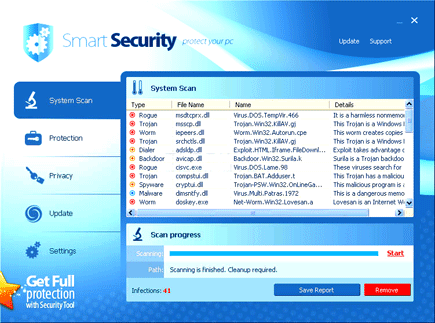
After Windows is started, a virus scan will be performed and dozens of threats will be displayed to convince its victim into obtaining the Smart Security registration code.
It will modify Windows Registry and add the following entries:
- HKEY_CURRENT_USER\Software\Smart Security
- HKEY_LOCAL_MACHINE\SOFTWARE\Microsoft\Windows\Current Version\Run “6124451278”
The threat will drop the following malicious files:
- %UserProfile%\Application Data\6124451278
- %UserProfile%\Application Data\6124451278\6124451278.bat
- %UserProfile%\Application Data\6124451278\6124451278.cfg
- %UserProfile%\Application Data\6124451278\6124451278.exe
- %UserProfile%\Desktop\Smart Security.lnk
- %UserProfile%\Start Menu\Programs\Smart Security.lnk
How to Remove Smart Security Manually
1. Restart your computer in SafeMode
– After Power-On the computer, just before Windows start, press F8
– From the selections, Select SafeMode
2. Remove Registry entries that the threat added. You MUST BACKUP YOUR REGISTRY FIRST.
– Click Start > Run
– Type in the field, regedit
– Navigate and look for the registry entries mentioned above and delete if necessary
3. Delete malicious files that the threat added:
– Base on the given location above, browse and delete the file
– If no location is given, click Start>Search> and search for the files.
– If cannot be deleted, press Ctrl+Alt+Del to access Task Manager, see if the file is running in the process. If it is, select the file and click End Process. Perform file delete again.
4. Scan computer with Antivirus Program
– Update antivirus program
– Scan computer and delete all detected threats.
How to Easily Remove Smart Security
1. Download and run Removal Tool to remove Smart Security
