

Many Windows 10 users use third-party applications to keep their system’s drivers up to date. When you search on Google for the best driver updater software, you will find thousands of options. However, not all of them are good for the device.
One of those thousand options is Driver Restore. In this post, we will find out whether Driver Restore is safe for your system or not.
What is Driver Restore?
Driver Restore is a software program that pretends to be a robust tool to maximize the system performance by automatically updating the drivers. At first, you don’t find anything wrong with the program, and it seems completely harmless.
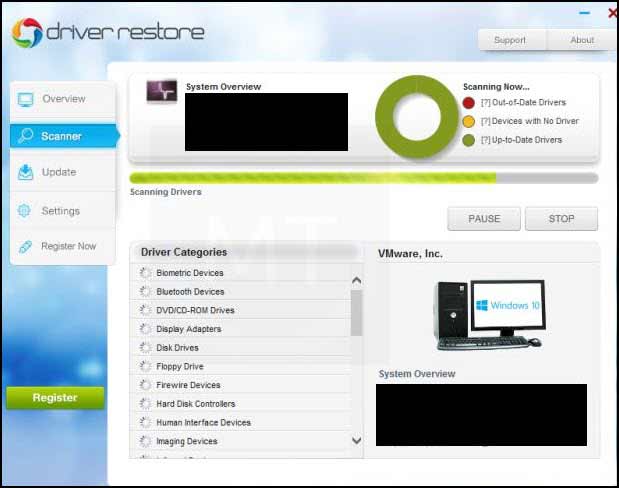
However, it is a hoax. When you scan your system with Driver Restore, it will show the fake requirements for driver updates. When you try to update the driver, it will prompt you to purchase the full version of the software for completing the update.
Is Driver Restore Safe?
It is clear that Driver Restore asks users to get the full version of the software for updating the drivers. However, that does not make it threatening for the system. So is Driver Restore safe? Or is there something else to bother about?
See, usually, users do not install the Driver Restore willingly on their system. It comes bundled with any other software installed in the system. So, as per that, this application can be termed as a Potentially Unwanted Program (PUP).
A Potentially Unwanted Application might look harmless at the bare sight but can secretly create havoc in the system. Besides collecting browsing information like history, key logs, IP address, etc., and bombarding your system with irrelevant ads, a PUP can also become a medium for other more significant threats to enter the system. Since Driver Restore is also a PUP, it cannot be trusted and can be considered a harmful application.
To make my statement more genuine, I scanned its installer with VirusTotal, and unsurprisingly five antivirus engines detected it as a threat.
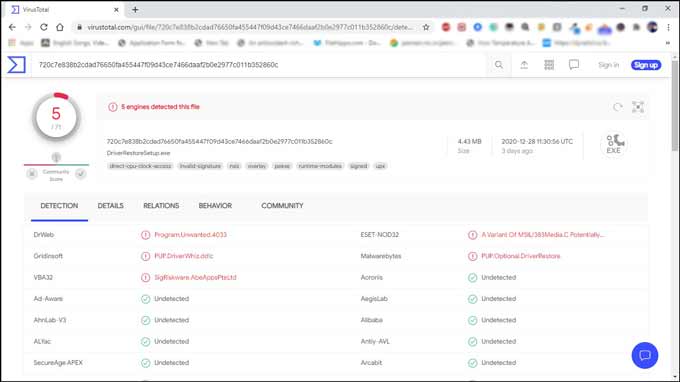
Now, it is apparent that Driver Restore is not a safe application for the system.
How to remove the Driver Restore?
Now that you know the reality of the Driver Restore app, you might want to remove it from your system. It is essential to get rid of the PUPs like it as soon as possible because the longer they stay on your PC, the more they will damage it.
There are two ways to remove this malicious program – Manual and Automatic. It is recommended to follow the Automatic way to remove the malicious PUP entirely and efficiently. The automatic method is actually cleaning the PC using an antimalware program.
Remove Driver Restore Manually
Step 1 – Uninstall Driver Restore Program from Control Panel
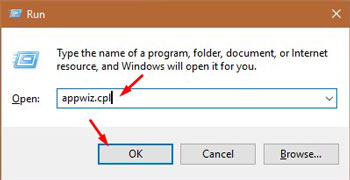
Press Win+R button to open the Run box.
Type appwiz.cpl in the box then press OK.
There you will see the list of all the programs. Find the suspicious applications, right-click on them, and choose Uninstall.
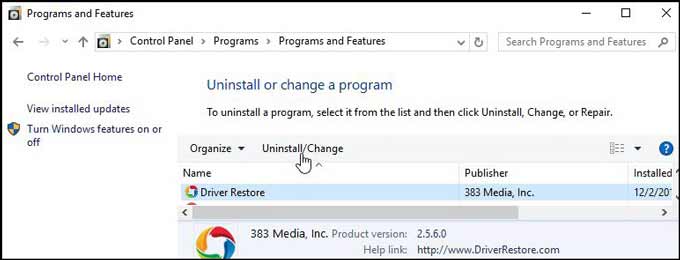
Now follow the instructions to uninstall the application.
Step 2 – Reset the Browsers to Remove Malicious Programs
Malicious program Browser hijacker hijacks the settings of your browser like homepage, new tab, and default search engine. It can cause unintentional downloads like Driver Restore or other PUPs. You cannot change the settings without removing the hijacker. To remove it you need to reset the browsers. Reset any or all of your browsers by following the instructions provided in the below guides.
- Google Chrome Reset Guide
- Mozilla Firefox Reset Guide
- Microsoft Edge Reset Guide
- Internet Explorer Reset Guide
Automatically Remove Driver Restore
To remove this PUP automatically, we will be taking the help of a strong antimalware MalwareFox. The MalwareFox is capable of detecting, cleaning, and stoping threats like ransomware, spyware, keyloggers, rootkits, adware, and PUPs. Download MalwareFox to proceed with the steps.
Open the MalwareFox installer and follow the instructions to install MalwareFox on your computer.
Once the MalwareFox installation completes, let it update the program and the signature database.

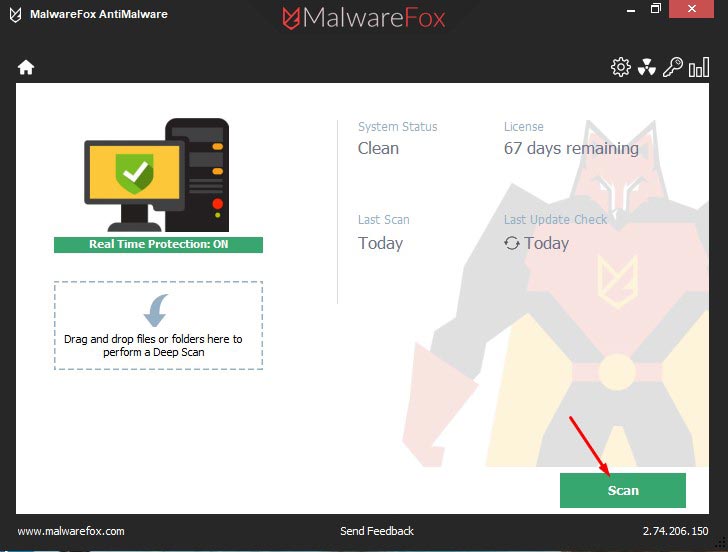
Now click on the Scan button.
Once the scan completes, click on Next to remove the threats from your PC.
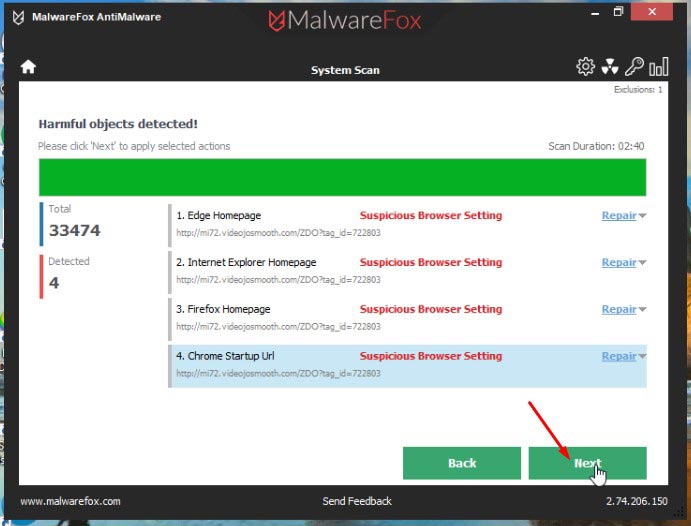
You have successfully removed the Driver Restore from your PC.
How to keep your System safe from Driver Restore?
It is essential to stay away from PUP such as Driver Restore as they may cause many more significant threats to the system. Here are the tips to stay away from harmful unwanted programs.
- Carefully monitor the applications you are installing and uncheck any unnecessary app getting installed along with the primary software.
- Do not click any intriguing ad banner in the greed of getting freeware.
- Avoid downloading and installing applications from unverified and untrustworthy sources.
- Some malicious programs like browser hijacker can control the browser and automatically download the PUPs. Ensure to detect and remove such malware.
- Always keep installed a robust antimalware like MalwareFox on your system. It is better to get it beforehand rather than after the malware infection.
Bottom Line
Manually updating the system drivers can be a tedious task, and therefore taking the help of the third-party driver updating software is a regular practice for many Windows users. However, in the desperation of getting the updater quickly, many users blindly install the unknown, malicious software without looking at the reviews and verifying it.
If you want a reliable and robust driver updater for your system, you can go for Driver Booster. It is the product from a reputed software manufacturer company IObit. Before buying, you can also check the full unbiased review of Driver Booster 8 PRO.
It is advised to never go for any program before verifying its authenticity and checking its reviews. This would ensure that your system stays away from harmful PUPs.
