

QWCiPhErEd Trojan can be detected by TrendMicro as TROJ_RANSOM.CYEA. It is a Trojan that will encrypt selected files on the infected computer .QWCiPhErEd Trojan will enter your computer as a file coming from another malware. Visiting malicious web site is the primary cause of the infection. It can be dropped on your machine without a notice.
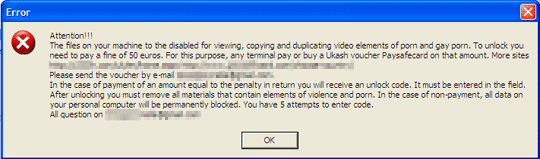
When you try to open a file bearing .QWCiPhErEd extension, it will display the following message:
Attention!!!
The files on your machine are disabled for viewing, copying and duplicating video elements of p–n and gay p–n. To unlock you need to pay a fine of 50 euros. For this purpose, any terminal pay or buy a Ukash voucher Paysafecard on that amount. More sites http://.[URL Removed] http://www.[URL Removed]Please send the voucher by e-mail tenagliamirella@gmail.com.
In the case of payment of an amount equal to the penalty in return you will receive an unlock code. It must be entered in the field. After unlocking you must remove all materials that contain elements of violence and porn. In the case of non-payment, all data on your personal computer will be permanently blocked. You have 5 attempts to enter code.
All questions on tenagliamirella@gmail.com
As you can see, all victims of QWCiPhErEd Trojan are asked to pay the amount of 50 euros. Upon verification, attacker will send a code to unlock or decrypt .QWCiPhErEd files on victim’s computer.
With the advanced encryption method of this Trojan, you may need specialized tool to decrypt affected files. In some ways, anti-virus scan may help removed the Trojan but it is not useful in restoring affected files.
What are the Symptoms of .QWCiPhErEd Trojan Infection?
QWCiPhErEd Trojan will lock files on the computer. All encrypted files will have an extension . QWCiPhErEd. It will also drop a file “HOW TO DECRYPT FILES.txt” in all affected folder. It will contain the same message as the error already stated earlier. See refence image below.
How to Remove .QWCiPhErEd Trojan Manually
1. Restart your computer in SafeMode
– After Power-On the computer, just before Windows start, press F8
– From the selections, Select SafeMode
2. Remove Registry entries that the threat added. You MUST BACKUP YOUR REGISTRY FIRST.
– Click Start > Run
– Type in the field, regedit
– Navigate and look for the registry entries mentioned above and delete if necessary
3. Delete malicious files that the threat added:
– Base on the given location above, browse and delete the file
– If no location is given, click Start>Search> and search for the files.
– If cannot be deleted, press Ctrl+Alt+Del to access Task Manager, see if the file is running in the process. If it is, select the file and click End Process. Perform file delete again.
4. Scan computer with Antivirus Program
– Update antivirus program
– Scan computer and delete all detected threats.
Automatic Removal of .QWCiPhErEd Trojan
1. Download and run MalwareBytes AntiMalware to remove .QWCiPhErEd Trojan. You can obtain this tool from this download link.
How to Remove File Encryption
1. Download the tool from this link:
ftp://ftp.drweb.com/pub/drweb/tools/te94decrypt.exe
2. Save a copy of encrypted file to a USB drive. Test the tool to more than 3 affected files that has .QWCiPhErEd extensions.
3. Copy the file on the root of your USB drive.
4. Press {Windows Key} + {R} on your keyboard or open the Run command from Start Menu.
5. Type this parameter. This assumes that your USB drive is E:
E:\te94decrypt.exe -k 106
6. If you have an existing antivirus program, please update it and run a complete scan to be sure that computer is already free from viruses and Trojans.
