

XP Antivirus Pro 2010 is untrusted security application that was categorized as rogue. It was found that XP Antivirus Pro 2010 is associated with various Trojan and Viruses that helps in propagating it. XP Antivirus Pro 2010 can penetrate into computer without users full knowledge because of its stealthy installation that is even undetectable by anti-virus programs. This is because the Trojan that works with it can disable security applications on the victims computer. Aside from that, XP Antivirus Pro 2010 also alters Windows registry to make sure that the malwarewill be loaded once the system is started. XP Antivirus Pro 2010 will excessively display warnings on computer that aims to deceive users and attract them to purchase the licensed version of the program. From time to time, XP Antivirus Pro 2010 will perform virus scan that detects non-existent threats to further convince users into acquiring the registered version. Most experts and computer users who previously affected by XP Antivirus Pro 2010 suggest immediate removal and discourage to patronize this potentially unwanted program. For future prevention, internet users must keep away from unknown security websites where rogue programs like XP Antivirus Pro 2010 can be downloaded unknowingly.
What are the Symptoms of XP Antivirus Pro 2010 Infection?
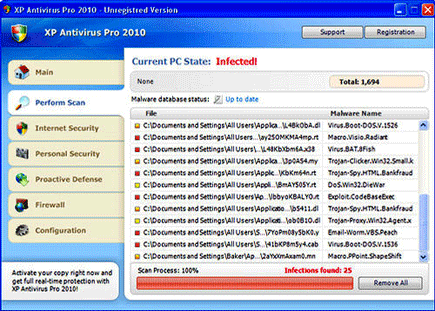
A virus scan provided by XP Antivirus Pro 2010 contains fake scan results that attempts to mislead users.
It will modify Windows Registry and add the following entries:
- HKEY_CURRENT_USER\Software\Classes\.exe\shell\open\command “(Default)” = “%UserProfile%\Local Settings\Application Data\av.exe” /START “%1” %*
- HKEY_CURRENT_USER\Software\Classes\secfile\shell\open\command “(Default)” = “%UserProfile%\Local Settings\Application Data\av.exe” /START “%1” %*
- HKEY_CLASSES_ROOT\.exe\shell\open\command “(Default)” = “%UserProfile%\Local Settings\Application Data\av.exe” /START “%1” %*
- HKEY_CLASSES_ROOT\secfile\shell\open\command “(Default)” = “%UserProfile%\Local Settings\Application Data\av.exe” /START “%1” %*
- HKEY_LOCAL_MACHINE\SOFTWARE\Clients\StartMenuInternet\FIREFOX.EXE\shell\open\command “(Default)” = “%UserProfile%\Local Settings\Application Data\av.exe” /START “C:\Program Files\Mozilla Firefox\firefox.exe”
- HKEY_LOCAL_MACHINE\SOFTWARE\Clients\StartMenuInternet\FIREFOX.EXE\shell\safemode\command “(Default)” = “%UserProfile%\Local Settings\Application Data\av.exe” /START “C:\Program Files\Mozilla Firefox\firefox.exe” -safe-mode
- HKEY_LOCAL_MACHINE\SOFTWARE\Clients\StartMenuInternet\IEXPLORE.EXE\shell\open\command “(Default)” = “%UserProfile%\Local Settings\Application Data\av.exe” /START “C:\Program Files\Internet Explorer\iexplore.exe”
- HKEY_LOCAL_MACHINE\SOFTWARE\Microsoft\Security Center “AntiVirusOverride” = “1”
- HKEY_LOCAL_MACHINE\SOFTWARE\Microsoft\Security Center “FirewallOverride” = “1”
XP Antivirus Pro 2010 threat will drop the following malicious files:
- %UserProfile%\Local Settings\Application Data\av.exe
- %UserProfile%\Local Settings\Application Data\WRblt8464P
- %UserProfile%\AppData\Local\XP Antivirus Pro 2010
- %UserProfile%\AppData\Local\av.exe
How to Remove XP Antivirus Pro 2010 Manually
1. Restart your computer in SafeMode
– After Power-On the computer, just before Windows start, press F8
– From the selections, Select SafeMode
2. Remove Registry entries that the threat added. You MUST BACKUP YOUR REGISTRY FIRST.
– Click Start > Run
– Type in the field, regedit
– Navigate and look for the registry entries mentioned above and delete if necessary
3. Delete malicious files that the threat added:
– Base on the given location above, browse and delete the file
– If no location is given, click Start>Search> and search for the files.
– If cannot be deleted, press Ctrl+Alt+Del to access Task Manager, see if the file is running in the process. If it is, select the file and click End Process. Perform file delete again.
4. Scan computer with Antivirus Program
– Update antivirus program
– Scan computer and delete all detected threats.
How to Easily Remove XP Antivirus Pro 2010
1. Download and run Removal Tool to remove XP Antivirus Pro 2010
