

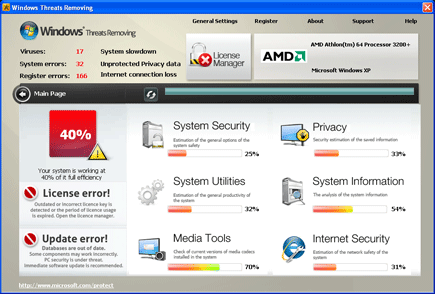
Windows Threats Removing is a counterfeit application that was a mimic of an old program. Coming from the group who also developed Windows Troubles Remover, this new released will surely entice users with a fake virus scan results that was made to look legitimate. Since the day this program was installed, it will make users think that everything it does concerns the security of the computer, but in reality it will attempt to mislead victims and later force them to obtain the licensed version of the program.
Its presence on the computer will be visible with abundant annoyances. It will showcase falsified information only to trick computer to remove detected threats, this will trigger to open-up a new browser window where the paid version can be paid by using credit card account. Instead of acquiring this rogue application, we advise to download an effective and known anti-malware product and immediate scan the computer to remove Windows Troubles Remover. Getting rid of this malicious software will bring back computer to its previous good working condition.
What are the Symptoms of Windows Threats Removing Infection?
It will modify Windows Registry and add the following entries:
HKCU\Software\Microsoft\Windows NT\CurrentVersion\Winlogon\Shell “%AppData%\[random].exe”
HKEY_LOCAL_MACHINE\\SOFTWARE\\Microsoft\\Windows NT\\CurrentVersion\\Image File Execution Options\\msmpeng.exe “Debugger” = ‘svchost.exe’
HKEY_LOCAL_MACHINE\\SOFTWARE\\Microsoft\\Windows NT\\CurrentVersion\\Image File Execution Options\\msseces.exe “Debugger” = ‘svchost.exe’
HKEY_LOCAL_MACHINE\\SOFTWARE\\Microsoft\\Windows NT\\CurrentVersion\\Image File Execution Options\\msascui.exe “Debugger” = ‘svchost.exe’ HKEY_LOCAL_MACHINE\\SOFTWARE\\Microsoft\\Windows NT\\CurrentVersion\\Image File Execution Options\\ekrn.exe “Debugger” = ‘svchost.exe’
HKEY_LOCAL_MACHINE\\SOFTWARE\\Microsoft\\Windows NT\\CurrentVersion\\Image File Execution Options\\avastui.exe “Debugger” = ‘svchost.exe’
HKEY_LOCAL_MACHINE\\SOFTWARE\\Microsoft\\Windows NT\\CurrentVersion\\Image File Execution Options\\egui.exe “Debugger” = ‘svchost.exe’
HKEY_LOCAL_MACHINE\\SOFTWARE\\Microsoft\\Windows NT\\CurrentVersion\\SystemRestore “DisableSR ” = ‘1’
The threat will drop the following malicious files:
%AppData%\[random].exe
How to Remove Windows Threats Removing Manually
1. Restart your computer in SafeMode
– After Power-On the computer, just before Windows start, press F8
– From the selections, Select SafeMode
2. Remove Registry entries that the threat added. You MUST BACKUP YOUR REGISTRY FIRST.
– Click Start > Run
– Type in the field, regedit
– Navigate and look for the registry entries mentioned above and delete if necessary
3. Delete malicious files that the threat added:
– Base on the given location above, browse and delete the file
– If no location is given, click Start>Search> and search for the files.
– If cannot be deleted, press Ctrl+Alt+Del to access Task Manager, see if the file is running in the process. If it is, select the file and click End Process. Perform file delete again.
4. Scan computer with Antivirus Program
– Update antivirus program
– Scan computer and delete all detected threats.
How to Easily Remove Windows Threats Removing
1. Download and run Removal Tool to remove this computer threat.
