

Windows Defender 2010 is another malicious application that was known to be a part of large Internet scam operation already sold millions of fake program with fraudulent online transactions. Windows Defender 2010 intentionally clone the legitimate Microsoft’s security tool to further deceive people and think that Windows Defender 2010 is also from the same company. Average users may find it hard to distinguish which is real and fake. With this tactics, Windows Defender 2010 developers will easily have their bogus program spread over the Internet and taking advantage of users innocence on computer security. When installed on the computer, Windows Defender 2010 will alter system settings particularly Windows registry to ensure that the program will run when Windows is started. Several alerts and warning messages will be issued on the computer desktop informing user that computer is at risks. Windows Defender 2010 will prompt to purchase the registered version to be able to remove these threats.
What are the Symptoms of Windows Defender 2010 Infection?
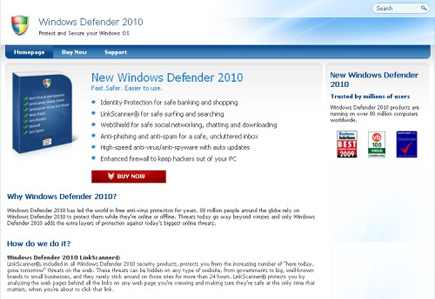
New rogue program Windows Defender 2010 is promoted on fake security website as shown in image above.
It will modify Windows Registry and add the following entries:
- HKEY_LOCAL_MACHINE\SOFTWARE\Microsoft\Windows\Current Version\Uninstall\Windows Defender 2010
- HKEY_LOCAL_MACHINE\SOFTWARE\Microsoft\Windows\Current Version\Run “Windows Defender 2010″
- HKEY_CURRENT_USER\Software\Windows Defender 2010
Windows Defender 2010 threat will drop the following malicious files:
- %Documents and Settings%\All Users\Desktop\Windows Defender 2010.lnk
- %Documents and Settings%\All Users\Start Menu\Programs\Windows Defender 2010
How to Remove Windows Defender 2010 Manually
1. Restart your computer in SafeMode
– After Power-On the computer, just before Windows start, press F8
– From the selections, Select SafeMode
2. Remove Registry entries that the threat added. You MUST BACKUP YOUR REGISTRY FIRST.
– Click Start > Run
– Type in the field, regedit
– Navigate and look for the registry entries mentioned above and delete if necessary
3. Delete malicious files that the threat added:
– Base on the given location above, browse and delete the file
– If no location is given, click Start>Search> and search for the files.
– If cannot be deleted, press Ctrl+Alt+Del to access Task Manager, see if the file is running in the process. If it is, select the file and click End Process. Perform file delete again.
4. Scan computer with Antivirus Program
– Update antivirus program
– Scan computer and delete all detected threats.
How to Easily Remove Windows Defender 2010
1. Download and run Removal Tool to remove Windows Defender 2010
