

Win Security 360 is a fake security program that is hazardous to computer when it will be dropped by an associated Trojan. Win Security 360 uses a fake online virus scanner website to propagate itself and infect computers merely by pretending as an antivirus program. When a fake security website was visited, it will exhibit a commanding alert messages that prompts users to download and install Win Security 360. After successful installation, users may think that the problem will be gone but in reality it was just get worsen. Since the Win Security 360 virus is already on the computer. Alterations to system settings and registry will be carried to strengthen its presence and disable all installed antivirus programs. Pop-up alerts and Taskbar warning will continue to display that aims to induce computer users to purchase the registered version of the program. Buying this fake application should not be consider. It will not do any good on end-users side, instead it will bring profit to its creators. Remove Win Security 360 with legit antivirus and anti-malware products. Some of this program are readily available for free.
What are the Symptoms of Win Security 360 Infection?
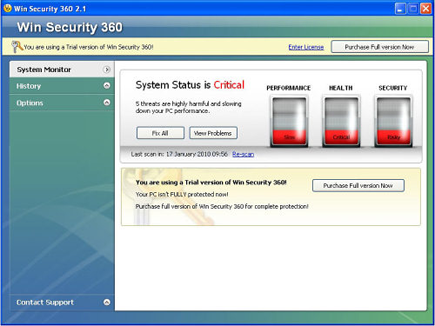
Win Security 360 will exhibit its own virus scan that will produce fake detection.
It will modify Windows Registry and add the following entries:
- HKEY_CURRENT_USER\Software\Microsoft\Windows\Current Version\Run “WinSecurity360.exe”
HKEY_LOCAL_MACHINE\SOFTWARE\Win Security 360
HKEY_LOCAL_MACHINE\SOFTWARE\Microsoft\Windows\Current Version\Uninstall\Win Security 360
Win Security 360 threat will drop the following malicious files:
- %Documents and Settings%\[User Name]\Desktop\Win Security 360.lnk
- %Documents and Settings%\[User Name]\Start Menu\Programs\Startup\Win Security 360.lnk
- %Documents and Settings%\[User Name]\Start Menu\Programs\Win Security 360\Website.lnk
- %Documents and Settings%\[User Name]\Start Menu\Programs\Win Security 360\Win Security 360 Help.lnk
- %Documents and Settings%\[User Name]\Start Menu\Programs\Win Security 360\Win Security 360.lnk
- %Documents and Settings%\[User Name]\Application Data\WinSecurity360\WinSecurity360.ini
- %Documents and Settings%\[User Name]\Application Data\WinSecurity360\vlc.dat
- %Documents and Settings%\[User Name]\Application Data\WinSecurity360\history.dat
- %Program Files%\WinSecurity360\
- %Program Files%\WinSecurity360\sk.lst
- %Program Files%\WinSecurity360\Win Security 360 Help.url
- %Program Files%\WinSecurity360\Win Security 360.url
- %Program Files%\WinSecurity360\WinSecurity360.exe
How to Remove Win Security 360 Manually
1. Restart your computer in SafeMode
– After Power-On the computer, just before Windows start, press F8
– From the selections, Select SafeMode
2. Remove Registry entries that the threat added. You MUST BACKUP YOUR REGISTRY FIRST.
– Click Start > Run
– Type in the field, regedit
– Navigate and look for the registry entries mentioned above and delete if necessary
3. Delete malicious files that the threat added:
– Base on the given location above, browse and delete the file
– If no location is given, click Start>Search> and search for the files.
– If cannot be deleted, press Ctrl+Alt+Del to access Task Manager, see if the file is running in the process. If it is, select the file and click End Process. Perform file delete again.
4. Scan computer with Antivirus Program
– Update antivirus program
– Scan computer and delete all detected threats.
How to Easily Remove WinSecurity 360
1. Download and run Removal Tool to remove WinSecurity 360
