

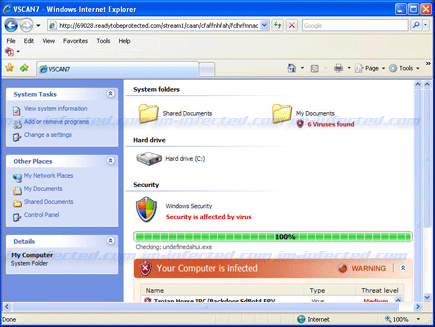
VSCAN7 is a rogue security software designed to have a graphical user interface and perform like a legitimate antivirus application. System scanning for various and other type of threats is VSCAN7’s trick to get its victim’s trust. Dozens of fabricated virus will be shown in the scan result and asked users to remove them. When executed, it will connect to a distant computer and download addition threats. VSCAN7 also installs system tray where another bunch of alert messages will be originated. Another way to scare computer users and make them believe that computer is really under attack, infected or unsecured.
Every attempt of VSCAN7 to persuade you into getting the registered version of it must be ignored. Getting the licensed version of this program will require you to go through their online payment website and it can acquire your credit card information that will be charged for excessive charges. Remove VSCAN7 as soon as possible with manual removal or automatically with the help of trusted anti-malware program.
What are the Symptoms of VSCAN7 Infection?
It will modify Windows Registry and add the following entries:
- HKEY_CURRENT_USER\Software\VSCAN7
- HKEY_CLASSES_ROOT\CLSID\{E2BFE352-A303-4EA8-88FE-CE35361D7E8B}
- HKEY_LOCAL_MACHINE\SOFTWARE\Microsoft\Windows\CurrentVersion\Explorer\Browser Helper Objects\{E2BFE352-A303-4EA8-88FE-CE35361D7E8B}
- HKEY_CURRENT_USER\Software\Microsoft\Windows\CurrentVersion\Run “VSCAN7”
- HKEY_LOCAL_MACHINE\SOFTWARE\Microsoft\Windows\CurrentVersion\Internet Settings\5.0\User Agent\Post Platform “WinNT-EVI 12.03.2010”
The threat will drop the following malicious files:
- c:\Documents and Settings\All Users\Start Menu\VSCAN7
- c:\Documents and Settings\All Users\Start Menu\VSCAN7\VSCAN7.lnk
- c:\Documents and Settings\All Users\Start Menu\VSCAN7\Uninstall.lnk
- c:\Program Files\VSCAN7
- c:\Program Files\VSCAN7\VSCAN7.exe
- c:\WINDOWS\SoftwareDistribution\DataStore\Logs\tmp.edb
- c:\WINDOWS\system32\UpdateExplorer.dll
- %UserProfile%\Desktop\VSCAN7.lnk
How to Remove VSCAN7 Manually
1. Restart your computer in SafeMode
– After Power-On the computer, just before Windows start, press F8
– From the selections, Select SafeMode
2. Remove Registry entries that the threat added. You MUST BACKUP YOUR REGISTRY FIRST.
– Click Start > Run
– Type in the field, regedit
– Navigate and look for the registry entries mentioned above and delete if necessary
3. Delete malicious files that the threat added:
– Base on the given location above, browse and delete the file
– If no location is given, click Start>Search> and search for the files.
– If cannot be deleted, press Ctrl+Alt+Del to access Task Manager, see if the file is running in the process. If it is, select the file and click End Process. Perform file delete again.
4. Scan computer with Antivirus Program
– Update antivirus program
– Scan computer and delete all detected threats.
How to Easily Remove VSCAN7
1. Download and run Removal Tool to remove VSCAN7
