

Vista Antispyware 2010 is a mutating computer virus that contaminates computers running in Windows Vista operating system. Other version from different operating systems are Win 7 Antispyware 2010 and XP Antispyware 2010. This malware can adopt itself based on the system it targets. This method can assured that Vista Antispyware 2010 completely disguise as part of the system. Warning and pop-up alerts also created and exhibited on the computer that can fully encourage its victim to get the full version of the program.
What are the Symptoms of Vista Antispyware 2010 Infection?
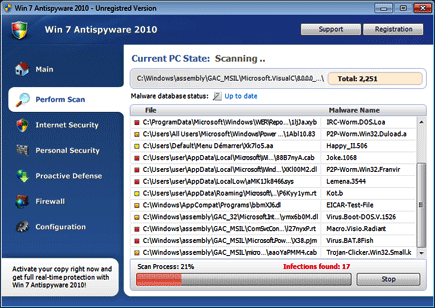
Vista Antispyware 2010 will automatically scan the computer and produces fake scan results.
It will modify Windows Registry and add the following entries:
- HKEY_CURRENT_USER\Software\Classes\.exe\shell\open\command “(Default)” = “%UserProfile%\Local Settings\Application Data\av.exe” /START “%1” %*
- HKEY_CURRENT_USER\Software\Classes\secfile\shell\open\command “(Default)” = “%UserProfile%\Local Settings\Application Data\av.exe” /START “%1” %*
- HKEY_CLASSES_ROOT\.exe\shell\open\command “(Default)” = “%UserProfile%\Local Settings\Application Data\av.exe” /START “%1” %*
- HKEY_CLASSES_ROOT\secfile\shell\open\command “(Default)” = “%UserProfile%\Local Settings\Application Data\av.exe” /START “%1” %*
- HKEY_LOCAL_MACHINE\SOFTWARE\Clients\StartMenuInternet\FIREFOX.EXE\shell\open\command “(Default)” = “%UserProfile%\Local Settings\Application Data\av.exe” /START “C:\Program Files\Mozilla Firefox\firefox.exe”
- HKEY_LOCAL_MACHINE\SOFTWARE\Clients\StartMenuInternet\FIREFOX.EXE\shell\safemode\command “(Default)” = “%UserProfile%\Local Settings\Application Data\av.exe” /START “C:\Program Files\Mozilla Firefox\firefox.exe” -safe-mode
- HKEY_LOCAL_MACHINE\SOFTWARE\Clients\StartMenuInternet\IEXPLORE.EXE\shell\open\command “(Default)” = “%UserProfile%\Local Settings\Application Data\av.exe” /START “C:\Program Files\Internet Explorer\iexplore.exe”
- HKEY_LOCAL_MACHINE\SOFTWARE\Microsoft\Security Center “AntiVirusOverride” = “1”
- HKEY_LOCAL_MACHINE\SOFTWARE\Microsoft\Security Center “FirewallOverride” = “1”
The threat will drop the following malicious files:
- %UserProfile%\Local Settings\Application Data\av.exe
- %UserProfile%\Local Settings\Application Data\WRblt8464P
- %UserProfile%\AppData\Local\av.exe
- %UserProfile%\AppData\Local\WRblt8464P
How to Remove Vista Antispyware 2010, Win7 Antispyware 2010 and Vista Antispyware 2010 Manually
1. Restart your computer in SafeMode
– After Power-On the computer, just before Windows start, press F8
– From the selections, Select SafeMode
2. Remove Registry entries that the threat added. You MUST BACKUP YOUR REGISTRY FIRST.
– Click Start > Run
– Type in the field, regedit
– Navigate and look for the registry entries mentioned above and delete if necessary
3. Delete malicious files that the threat added:
– Base on the given location above, browse and delete the file
– If no location is given, click Start>Search> and search for the files.
– If cannot be deleted, press Ctrl+Alt+Del to access Task Manager, see if the file is running in the process. If it is, select the file and click End Process. Perform file delete again.
4. Scan computer with Antivirus Program
– Update antivirus program
– Scan computer and delete all detected threats.
How to Easily Remove Vista Antispyware 2010
1. Download and run Removal Tool to remove Vista Antispyware 2010

I have purchased the vista antispyware version and I don’t have the number to put in the when I want to get in my email. I’m now using my friends computer to let someone know. how can I get it I have called my credit card company and they said there is no number there to call and find out I’m very upset because now it is not even letting me go on line.
You have been ripped off, this is malware. Call your credit card company and see if you can still cancel the payment and your credit card. Then follow the steps above.