

Virus Protector is a harmful application that will pretend to be another useful antivirus program. Distribution channels of Virus Protector are mainly fake online virus scanner websites and Trojan that can easily dropped and install it on computer without users knowledge and can make itself undetectable to anti-virus programs. When Virus Protector compromises a computer, it will show immediately common symptoms such as never-ending pop-up alerts and task bar messages coming from the bottom of the screen from time-to-time. Added to that, Virus Protector can alter the system registry that will make it to automatically load on Windows start-up. With this functionalities, infected computers may experience browser redirection and leave antivirus programs useless. It is very fortunate that security experts already found that Virus Protector virus is in the wild and have warn users and Internet visitors as well about the danger of this unwanted program.
What are the Symptoms of Virus Protector Infection?
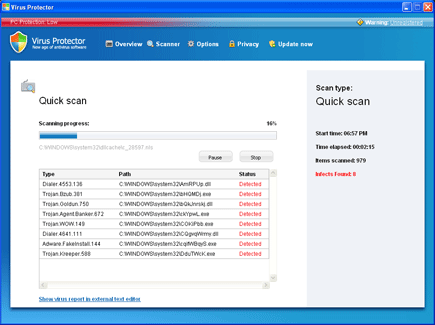
Rogue program Virus Protector will scan computer and issues fake reports to encourage users into purchasing the registered version of it.
It will modify Windows Registry and add the following entries:
- HKEY_CURRENT_USER\Software\Microsoft\Windows\Current Version\Run “Virus Protector“
- HKEY_LOCAL_MACHINE\SOFTWARE\Microsoft\Windows\Current Version\Run “Virus Protector“
- HKEY_CURRENT_USER\Software\AvScan
- HKEY_CURRENT_USER\Software\Microsoft\Internet Explorer\Download “RunInvalidSignatures” = “1?
- HKEY_CURRENT_USER\Software\Microsoft\Windows\CurrentVersion\Internet Settings “ProxyOverride” = “”
- HKEY_CURRENT_USER\Software\Microsoft\Windows\CurrentVersion\Internet Settings “ProxyServer” = “http=127.0.0.1:5555?
The threat will drop the following malicious files:
- %Documents and Settings%\All Users\Start Menu\AV
- %Documents and Settings%\All Users\Start Menu\AV\Virus Protector.lnk
- %Documents and Settings%\All Users\Start Menu\AV\Uninstall.lnk
- %Program Files%\AV
- %Program Files%\AV\virusprotector.exe
- %Program Files%\Common Files\Uninstall
- %Program Files%\Common Files\Uninstall\AV
- %Program Files%\Common Files\Uninstall\AV\Uninstall.lnk
- %WINDOWS%\system32\UpdateCheck.dll
- %UserProfile%\Desktop\Virus Protector.lnk
How to Remove Virus Protector Manually
1. Restart your computer in SafeMode
– After Power-On the computer, just before Windows start, press F8
– From the selections, Select SafeMode
2. Remove Registry entries that the threat added. You MUST BACKUP YOUR REGISTRY FIRST.
– Click Start > Run
– Type in the field, regedit
– Navigate and look for the registry entries mentioned above and delete if necessary
3. Delete malicious files that the threat added:
– Base on the given location above, browse and delete the file
– If no location is given, click Start>Search> and search for the files.
– If cannot be deleted, press Ctrl+Alt+Del to access Task Manager, see if the file is running in the process. If it is, select the file and click End Process. Perform file delete again.
4. Scan computer with Antivirus Program
– Update antivirus program
– Scan computer and delete all detected threats.
How to Easily Remove Virus Protector
1. Download and run Removal Tool to remove Virus Protector

I can’t find any of the value that you mentioned in Registry.
Worse is the AV has override my Windows and I can’t even see my Windows Start icon and the Taskbar. It’s the same in Safe Mode.
Any idea how to remove this permanently?