

SpyEraser is a fake anti-spyware program that should be rejected whem a scam websites prompts you to download this program. SpyEraser can be installed on computer with or without a notification when being spread using a Trojan. Upon entering the computer, SpyEraser will alter system settings and create its own start-up items on the Windows registry. This will ensure that SpyEraser will load when Windows is started. Aside from that, SpyEraser will try to connect to a remote computer to download additional malware and enhance its presence on the affected system. SpyEraser exhibit self-launched viru scanner with forge results to convince user to purchase the registered version of the program. A fake interception of non-existent treats resulting to excessive alerts and warning messages will be displayed to further mislead computer owners.
To remove SpyEraser and all of its hidden contents, a legitimate security programs must be used. Never acquire SpyEraser as it would do nothing but to scrap you out of your hard-earned money.
What are the Symptoms of SpyEraser Infection?
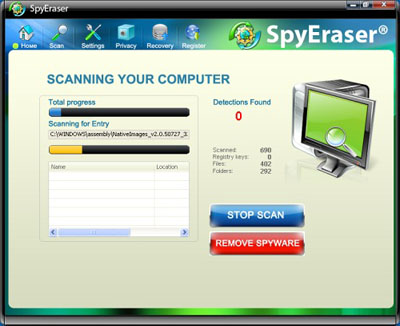
It will modify Windows Registry and add the following entries:
- HKEY_LOCAL_MACHINE\software\microsoft\SpyEraser
- HKEY_LOCAL_MACHINE\software\Classes\Installer\Features\2E4272A663E5E2F4B9D3A41776473B9F
- HKEY_LOCAL_MACHINE\software\Classes\Installer\Products\2E4272A663E5E2F4B9D3A41776473B9F
- HKEY_LOCAL_MACHINE\software\Classes\Installer\Products\2E4272A663E5E2F4B9D3A41776473B9F\SourceList
- HKEY_LOCAL_MACHINE\software\Classes\Installer\Products\2E4272A663E5E2F4B9D3A41776473B9F\SourceList\Media
- HKEY_LOCAL_MACHINE\software\Classes\Installer\Products\2E4272A663E5E2F4B9D3A41776473B9F\SourceList\Net
- HKEY_LOCAL_MACHINE\software\Classes\Installer\UpgradeCodes\21B289D0EDBF1BD48A4C39C60AF74DE9
- HKEY_LOCAL_MACHINE\software\microsoft\Windows\Current Version\Installer\UpgradeCodes\21B289D0EDBF1BD48A4C39C60AF74DE9
- HKEY_LOCAL_MACHINE\software\microsoft\Windows\Current Version\Installer\UserData\S-1-5-18\Components\EA061871792C67E4997020ED0AF0253E
- HKEY_LOCAL_MACHINE\software\microsoft\Windows\Current Version\Installer\UserData\S-1-5-18\Components\EBAB827A17F9D9B40B5A18854589281C
- HKEY_LOCAL_MACHINE\software\microsoft\Windows\Current Version\Installer\UserData\S-1-5-18\Products\2E4272A663E5E2F4B9D3A41776473B9F
- HKEY_LOCAL_MACHINE\software\microsoft\Windows\Current Version\Installer\UserData\S-1-5-18\Products\2E4272A663E5E2F4B9D3A41776473B9F\Features
- HKEY_LOCAL_MACHINE\software\microsoft\Windows\Current Version\Installer\UserData\S-1-5-18\Products\2E4272A663E5E2F4B9D3A41776473B9F\InstallProperties
- HKEY_LOCAL_MACHINE\software\microsoft\Windows\Current Version\Installer\UserData\S-1-5-18\Products\2E4272A663E5E2F4B9D3A41776473B9F\Patches
- HKEY_LOCAL_MACHINE\software\microsoft\Windows\Current Version\Installer\UserData\S-1-5-18\Products\2E4272A663E5E2F4B9D3A41776473B9F\Usage
- HKEY_LOCAL_MACHINE\software\microsoft\Windows\Current Version\Uninstall\{6A2724E2-5E36-4F2E-9B3D-4A716774B3F9}
SpyEraser threat will drop the following malicious files:
- %ProgramFiles%\SpyEraser\SpyEraser.exe
- %ProgramFiles%\SpyEraser\Uninstall.exe
- %ProgramFiles%\SpyEraser\data.dll
- %AllUsersProfile%\Desktop\SpyEraser.lnk
- %AllUsersProfile%\Start Menu\Programs\SpyEraser\SpyEraser\Launch SpyEraser.exe.lnk
- %AllUsersProfile%\Start Menu\Programs\SpyEraser\SpyEraser\SpyEraser Uninstall.exe.lnk
- %UserProfile%\Local Settings\Application Data\Downloaded Installations\{E5FF35CB-AAE1-4CD6-BFDE-D0BCE9CCBA4C}\SpyEraser.msi
- %SystemRoot%\Installer\{6A2724E2-5E36-4F2E-9B3D-4A716774B3F9}\SpyEraser.exe1_5D3FA81F1A6D4924AD5250A57005F147.exe
How to Remove SpyEraser Manually
1. Restart your computer in SafeMode
– After Power-On the computer, just before Windows start, press F8
– From the selections, Select SafeMode
2. Remove Registry entries that the threat added. You MUST BACKUP YOUR REGISTRY FIRST.
– Click Start > Run
– Type in the field, regedit
– Navigate and look for the registry entries mentioned above and delete if necessary
3. Delete malicious files that the threat added:
– Base on the given location above, browse and delete the file
– If no location is given, click Start>Search> and search for the files.
– If cannot be deleted, press Ctrl+Alt+Del to access Task Manager, see if the file is running in the process. If it is, select the file and click End Process. Perform file delete again.
4. Scan computer with Antivirus Program
– Update antivirus program
– Scan computer and delete all detected threats.
How to Easily Remove SpyEraser
1. Download and run Removal Tool to remove SpyEraser
