

Shield Safeness is another variant of malicious security application coming from the developer who also created and propagated the family of Wini, Trust, Safety and Soft rogue programs. Shield Safeness commonly acquired by visiting a website that disguise as an online virus scanner that will simulate a process as if actially scanning computer for viruses. After, it will display dozens of detected threats and will advise computer users to download a program Shield Safeness that will remove these malware.
Users who think that all these activities are normal security protection procedure will be convince and download the said fake application. Unknown to them, downloading and installing Shield Safeness may add harm on computer because of its fraudulent activities. Shield Safeness can disable system process and end security-related files particularly of those belongs to antivirus programs. Removing threats on computer may come completely by removing the root itself – Shield Safeness.
What are the Symptoms of Shield Safeness Infection?
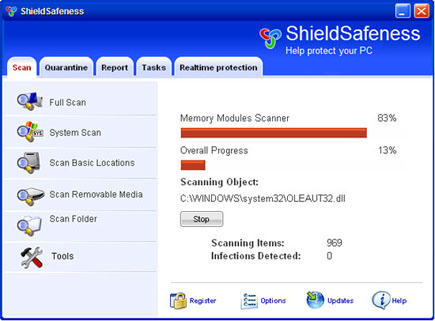
It will modify Windows Registry and add the following entries:
- HKEY_CURRENT_USER\Software\Microsoft\Windows\Current Version\Run “ShieldSafeness”
- HKEY_CURRENT_USER\Software\Microsoft\Windows\Current Version\Run “bfg7.tmp.exe”
- HKEY_CURRENT_USER\Software\ShieldSafeness
- HKEY_LOCAL_MACHINE\SOFTWARE\Microsoft\Windows\Current Version\Uninstall\ShieldSafeness
- HKEY_LOCAL_MACHINE\SOFTWARE\ShieldSafeness
The threat will drop the following malicious files:
- c:\Documents and Settings\All Users\Desktop\ShieldSafeness.lnk
c:\Documents and Settings\All Users\Start Menu\Programs\ShieldSafeness\1 ShieldSafeness.lnk
c:\Documents and Settings\All Users\Start Menu\Programs\ShieldSafeness\2 Homepage.lnk
c:\Documents and Settings\All Users\Start Menu\Programs\ShieldSafeness\3 Uninstall.lnk
c:\Program Files\ShieldSafeness Software\ShieldSafeness\ShieldSafeness.exe
c:\Program Files\ShieldSafeness Software\ShieldSafeness\uninstall.exe
c:\WINDOWS\10359virzs509.cpl
c:\WINDOWS\10380ha95tozl126.bin
c:\WINDOWS\10623spy65z9.bin
c:\WINDOWS\system32\2ed19pyz5re2156.bin
c:\WINDOWS\system32\2f53vir193z.bin
c:\WINDOWS\system32\2z075t59j48c.exe
%Temp%\bfg7.tmp.exe
How to Remove ShieldSafeness Manually
1. Restart your computer in SafeMode
– After Power-On the computer, just before Windows start, press F8
– From the selections, Select SafeMode
2. Remove Registry entries that the threat added. You MUST BACKUP YOUR REGISTRY FIRST.
– Click Start > Run
– Type in the field, regedit
– Navigate and look for the registry entries mentioned above and delete if necessary
3. Delete malicious files that the threat added:
– Base on the given location above, browse and delete the file
– If no location is given, click Start>Search> and search for the file.
– If cannot be deleted, press Ctrl+Alt+Del to access Task Manager, see if the file is running in the process. If it is, select the file and click End Process. Perform file delete again.
4. Scan computer with Antivirus Program
– Update antivirus program
– Scan computer and delete all detected threats.
How to Easily Remove Shield Safeness
1. Print this procedure as we need to close all programs running later.
2. Download AntiMalware Application here and save it to your Desktop.
3. Close all open applications.
4. Double-Click on the downloaded mbam-setup.exe to start the installation. If unable to execute, infections on computer is preventing it from running, rename the file mbam-setup.exe to anything (like myfile.exe)
5. Run the installation on the default settings. No changes are necessary.
6. Just before completing the installation, make sure that the following are marked check.
– Update the program
– Launch the program
7. The tool will run and update itself after installation. Close it after the update.
8. Restart your computer in SafeMode
– After Power-On the computer, just before Windows start, press F8
– From the selections, Select SafeMode
9. Click on the icon and start to Perform Full Scan to begin scanning your computer for ShieldSafeness related files.
10. After scanning, a message will appear stating that the scan is completed successfully. Click OK.
11. Click Show Results and detected threats will be displayed.
12. Make sure that all threats are marked check, then click Remove Selected to begin removal of the malicious files.
13. Exit AntiMalware Apps and restart your computer.
14. ShieldSafeness and all its files are now removed from your computer. To guard your computer from this threat and avoid future infections, you may want real-time protection from a full version of anti-malware program..
