

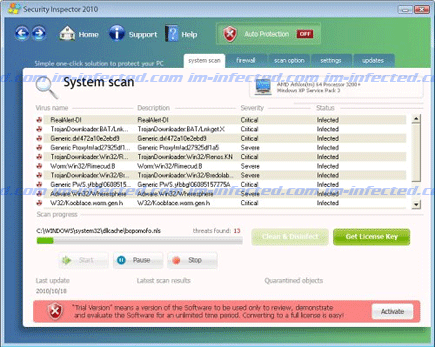
Security Inspector 2010 will pretend as an antivirus program for Windows operating system. It promotes itself by means of fake online virus scanner web sites. Security Inspector 2010 virus will be able to install itself on a victims computer by exploiting Internet browser’s vulnerabilities. Contracted web sites such as mentioned and also fake video hosting sites will be able to drop and execute a copy of this harmful program on visitor’s machine without a notice. Other channels used by cyber criminals to spread Security Inspector 2010 include social networking sites and spam email messages where harmful code is attached. Normally, attackers can convince victims to open the attach file by giving it a very interesting file name.
Once it gets into the system, a modification will be done on the registry to allow Security Inspector 2010 to run with Windows. When launched automatically, a virus scan will be performed showing threats detected locally. A prompt to remove identified threats can only be removed from the system by having the registered version of Security Inspector 2010. This prompt will continuously pop-up on desktop screen until you are convinced.
Security Inspector 2010 will do everything it can just to please users and make them believe that it was a legitimate program needed to resolve computer issues. In reverse, security experts already dubbed this one as a rogue. It cannot remove any virus nor serve as a computer protection. Security Inspector 2010 is a must-removed program, no more, no less.
Follow the guide on this page for complete uninstall procedure to get rid of this malware. Be sure to update the database of suggested tool for it to be more effective in dealing with Security Inspector 2010.
What are the Symptoms of Security Inspector 2010 Infection?
It will modify Windows Registry and add the following entries:
HKEY_LOCAL_MACHINE\SOFTWARE\Microsoft\Windows\CurrentVersion\Run “[random].exe“
HKEY_LOCAL_MACHINE\SOFTWARE\Microsoft\Windows\CurrentVersion\Run “Security Inspector 2010″
HKEY_CURRENT_USER\Software\Microsoft\Windows NT\CurrentVersion\Winlogon “Shell” = “C:\Program Files\Security Inspector 2010\Security Inspector 2010.exe”
HKEY_LOCAL_MACHINE\SOFTWARE\Microsoft\Windows\CurrentVersion\Internet Settings\User Agent\Post Platform “Security Inspector 2010?
The threat will drop the following malicious files:
%WINDOWS%\system32\[random].exe
%Program Files%\Security Inspector 2010\avinspector.exe
%Program Files%\Security Inspector 2010\Security Inspector 2010.exe
%Program Files%\Security Inspector 2010\uninstall.exe
How to Remove Security Inspector 2010 Manually
1. Restart your computer in SafeMode
– Press F8 on keyboard as soon as you turn on the computer
– Select SafeMode to start the computer loading only minimal resources
2. Delete Windows registry entries the malware created. It is important to BACKUP YOUR REGISTRY FIRST.
– On Windows Start Menu, Click Start > Run
– Type in the field, regedit
– Find registry entries mentioned above and delete if necessary
3. Files related to Security Inspector 2010 must be deleted:
– Browse and delete malicious files detected above.
– Some files cannot be deleted instantly. Press Ctrl+Alt+Del to open Windows Task Manager, look for any virus-related files mentioned on this page and highlight it, click End Process. Try to delete the file once more.
4. Run Antivirus Program
– You must be connected to Internet to be able to update your anti-virus program. This is needed to have the latest database available and detect newer threats.
– Thoroughly scan the computer and clean or delete all detected threats.
How to Easily Remove Security Inspector 2010
1. Print this procedure as we need to close all running programs later.
2. Download AntiMalware Application here and save it to your Desktop.
3. Close all open applications.
4. Double-Click on the downloaded mbam-setup.exe to start the installation. If unable to execute, infections on computer is preventing it from running, rename the file mbam-setup.exe to anything (like myfile.exe)
5. Run the installation on the default settings. No changes are necessary.
6. Just before completing the installation, make sure that the following are marked check.
– Update the program
– Launch the program
7. The tool will run and update itself after installation. Close it after the update.
8. Restart your computer in SafeMode
– After Power-On the computer, just before Windows start, press F8
– From the selections, Select SafeMode
9. Click on the icon and start to Perform Full Scan to begin scanning your computer for Security Inspector 2010 related files.
10. After scanning, a message will appear stating that the scan is completed successfully. Click OK.
11. Click Show Results and detected threats will be displayed.
12. Make sure that all threats are marked check, then click Remove Selected to begin removal of the malicious files.
13. Exit AntiMalware Apps and restart your computer.
14. Security Inspector 2010 and all its files are now removed from your computer. To guard your computer from this threat and avoid future infections, you may want real-time protection from a full version of anti-malware program..
