

My Security Engine is another misleading security application that will attack a computer by pretending to be a useful program. Just like any other rogue software, this threat will use deceiving data posted on computer screen to persuade users into downloading and installing the trial of the software. Upon installation, it attempts to modify certain settings on the system and add some registry entries. This is the reason why the virus can run a scan on the computer after Windows start-up. After that, you will receive an alert of possible virus infections. This alert will prompt you to get the registered version of My Security Engine.
Your attempt to remove identified viruses will open a browser Windows. It will then be redirected to an online payment processing website where users will pay for the My Security Engine registration key. Credit card is the only payment method it will accept. Be sure not to buy this fake software. Once you input your credit card data, attackers may use it for other online illegal purchases. Be wise not to give complete information online, especially to suspicious retailers.
You must know that even with the full version of My Security Engine, computer will remain infected and annoyances still exists. You may regain access to blocked programs and folder but the Trojans and viruses that come with the rogue product will stay on the PC. No other programs can remove fake anti-virus except the real anti-malware programs. Keep in mind that before purchasing any software, please search the Internet first regarding its capability to remove viruses.
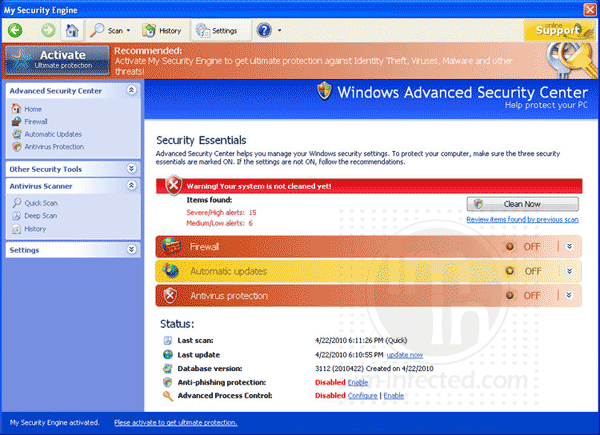
What are the Symptoms of ”My Security Engine” Infection?
It will modify Windows Registry and add the following entries:
- HKEY_CURRENT_USER\Software\5
- HKEY_CLASSES_ROOT\CLSID\{3F2BBC05-40DF-11D2-9455-00104BC936FF}
- HKEY_CLASSES_ROOT\CU345d.DocHostUIHandler
- HKEY_USERS\.DEFAULT\Software\Microsoft\Internet Explorer\SearchScopes “URL” = http://findgala . com/?&uid=195&q={searchTerms}
- HKEY_CURRENT_USER\Software\Classes\Software\Microsoft\Internet Explorer\SearchScopes “URL” = “http://findgala . com/?&uid=195&q={searchTerms}”
- HKEY_CURRENT_USER\Software\Microsoft\Internet Explorer “PRS” = “http://127.0.0.1:27777/?inj=%ORIGINAL%”
- HKEY_CURRENT_USER\Software\Microsoft\Internet Explorer\Download “RunInvalidSignatures” = “1”
- HKEY_CURRENT_USER\Software\Microsoft\Windows\Current Version\Internet Settings\5.0\User Agent\Post Platform “Library1.00195”
- HKEY_CURRENT_USER\Software\Microsoft\Windows\CurrentVersion\Run “My Security Engine”
- HKEY_CLASSES_ROOT\Software\Microsoft\Internet Explorer\SearchScopes “URL” = “http://findgala.com/?&uid=195&q={searchTerms}”
- HKEY_LOCAL_MACHINE\SYSTEM\ControlSet001\Services\SharedAccess\Parameters\Firewall Policy\Standard Profile\AuthorizedApplications\List “C:\Documents and Settings\All Users\Application Data\587d114\MSE354r.exe”
- HKEY_LOCAL_MACHINE\SYSTEM\CurrentControlSet\Services\SharedAccess\Parameters\FirewallPolicy\StandardProfile\AuthorizedApplications\List “C:\Documents and Settings\All Users\Application Data\587d114\MSE354r.exe”
- HKEY_CURRENT_USER\Software\Microsoft\Internet Explorer\Download “CheckExeSignatures” = “no”
The threat will drop the following malicious files:
- c:\Documents and Settings\All Users\Application Data\CUCAISTUA\
- c:\Documents and Settings\All Users\Application Data\CUCAISTUA\CUEWA.cfg
- c:\Program Files\Mozilla Firefox\searchplugins\search.xml
- %UserProfile%\Application Data\My Security Engine
- %UserProfile%\Application Data\My Security Engine\cookies.sqlite
- %UserProfile%\Application Data\My Security Engine\Instructions.ini
- %UserProfile%\Application Data\Microsoft\Internet Explorer\Quick Launch\My Security Engine.lnk
- %UserProfile%\Desktop\My Security Engine.lnk
- %UserProfile%\Recent\cb.tmp
- %UserProfile%\Recent\CLSV.tmp
- %UserProfile%\Recent\DBOLE.dll
- %UserProfile%\Recent\DBOLE.sys
- %UserProfile%\Recent\eb.tmp
- %UserProfile%\Recent\exec.tmp
- %UserProfile%\Recent\FS.dll
- %UserProfile%\Recent\grid.exe
- %UserProfile%\Recent\pal.drv
- %UserProfile%\Recent\pal.tmp
- %UserProfile%\Recent\PE.exe
- %UserProfile%\Recent\tempdoc.drv
- %UserProfile%\Recent\tempdoc.tmp
- %UserProfile%\Recent\tjd.sys
- %UserProfile%\Recent\tjd.tmp
- %UserProfile%\Start Menu\My Security Engine.lnk
- %UserProfile%\Start Menu\Programs\My Security Engine.lnk
How to Remove ”My Security Engine” Manually
1. Restart your computer in SafeMode
– After Power-On the computer, just before Windows start, press F8
– From the selections, Select SafeMode
2. Remove Registry entries that the threat added. You MUST BACKUP YOUR REGISTRY FIRST.
– Click Start > Run
– Type in the field, regedit
– Navigate and look for the registry entries mentioned above and delete if necessary
3. Delete malicious files that the threat added:
– Base on the given location above, browse and delete the file
– If no location is given, click Start>Search> and search for the files.
– If cannot be deleted, press Ctrl+Alt+Del to access Task Manager, see if the file is running in the process. If it is, select the file and click End Process. Perform file delete again.
4. Scan computer with Antivirus Program
– Update antivirus program
– Scan computer and delete all detected threats.
How to Easily Remove My Security Engine
1. Download and run removal tool to delete this computer threat.
