

XJR Antivirus is rogue computer anti-virus software that will be installed without user’s knowledge via Trojan infection. This fake security tool will also disguise as a legitimate program and will be installed by user under deceptive pretences. Coming from the same author who initiated the propagation of AKM Antivirus, both shares the same graphical user interface. Both use the same scary tactics to mislead its victims into acquiring the XJR Antivirus registration key. Above all, you must know that both programs are not worth buying for.
While residing on the computer, XJR Antivirus will showcase a continuous security alerts and pop-up messages alarming users of multiple infections. A prompt to purchase the program will be the first option in order to get rid of detected infections. When convince, victims will be redirected to an online payment website where a fraudulent transaction will take place. After having the registered program, infection and computer annoyances will remain and this is the time that users will realize that all of these activities were part of a scam perpetuated by cyber-criminals.
You can remove XJR Antivirus from the infected computer without the need for its full version. All you have to do is get and scan the computer with powerful anti-malware tool. For the rest of the guide, please see complete instructions on this page. Scanning the computer while on Safe Mode of Windows may also help remove memory-resident infections.
What are the Symptoms of XJR Antivirus Infection?
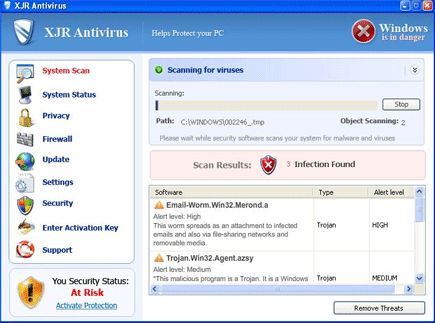
A local virus scan will be exhibited with dozens of detected threats and prompt users to purchase the XJR Antivirus activation key.
It will modify Windows Registry and add the following entries:
- HKEY_CURRENT_USER\Software\XJR Antivirus
- HKEY_CLASSES_ROOT\CLSID\{149256D5-E103-4523-BB43-2CFB066839D6}
- HKEY_LOCAL_MACHINE\SOFTWARE\Microsoft\Windows\Current Version\Explorer\Browser Helper Objects\{149256D5-E103-4523-BB43-2CFB066839D6}
- HKEY_LOCAL_MACHINE\SYSTEM\CurrentControlSet\Services\AdbUpd
The threat will drop the following malicious files:
- %Program Files%\adc_w32.dll
- %Program Files%\alggui.exe
- %Program Files%\nuar.old
- %Program Files%\skynet.dat
- %Program Files%\svchost.exe
- %Program Files%\wp3.dat
- %Program Files%\wp4.dat
- %Program Files%\wpp.exe
- %Program Files%\XJR Antivirus
- %Program Files%\XJR Antivirus\XJR Antivirus.exe
- %UserProfile%\Desktop\XJR Antivirus.lnk
- %UserProfile%\Local Settings\Temp\win1.tmp
- %UserProfile%\Local Settings\Temp\win2.tmp
- %UserProfile%\Start Menu\Programs\XJR Antivirus
- %UserProfile%\Start Menu\Programs\XJR Antivirus\XJR Antivirus.lnk
How to Remove XJR Antivirus Manually
1. Restart your computer in SafeMode
– After Power-On the computer, just before Windows start, press F8
– From the selections, Select SafeMode
2. Remove Registry entries that the threat added. You MUST BACKUP YOUR REGISTRY FIRST.
– Click Start > Run
– Type in the field, regedit
– Navigate and look for the registry entries mentioned above and delete if necessary
3. Delete malicious files that the threat added:
– Base on the given location above, browse and delete the file
– If no location is given, click Start>Search> and search for the files.
– If cannot be deleted, press Ctrl+Alt+Del to access Task Manager, see if the file is running in the process. If it is, select the file and click End Process. Perform file delete again.
4. Scan computer with Antivirus Program
– Update antivirus program
– Scan computer and delete all detected threats.
How to Easily Remove XJR Antivirus
1. Download and run Removal Tool to remove this computer threat.
