

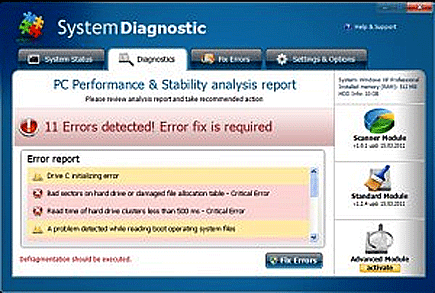
System Diagnostic is a harmful computer program that was identified as fake Windows system optimization tool. System Diagnostic was developed in the main purpose of promoting and selling a fake program to earn a profit for its authors. Either the unregistered or paid version of this program will provide a falsified system scanner that detects non-existent computer error and hard drive problems. In fact, System Diagnostic has no capabilities at all to protect a computer neither resolve hard drive and system issues. This is a must remove program that is considered useless and unwanted.
A Trojan was tasked to spread System Diagnostic by means of fake online scanners and other unknown web sites. Malicious files were also uploaded on file-sharing servers that will disguise as games and executable programs. When these programs are downloaded and installed on the system. System Diagnostic will also be loaded in the background without users knowledge. This is a deadly application that may cause severe irregularities on the infected system. It is a must to remove System Diagnostic immediately to avoid additional damage on the contracted computer.
What are the Symptoms of System Diagnostic Infection?
It will modify Windows Registry and add the following entries:
HKEY_CURRENT_USER\Software\Microsoft\Internet Explorer\Download “CheckExeSignatures” = ‘no’
HKEY_CURRENT_USER\Software\Microsoft\Internet Explorer\Main “Use FormSuggest” = ‘yes’
HKEY_CURRENT_USER\Software\Microsoft\Windows\CurrentVersion\Internet Settings “WarnonBadCertRecving” = ‘0’
HKEY_CURRENT_USER\Software\Microsoft\Windows\CurrentVersion\Policies\System “DisableTaskMgr” = ‘1’
HKEY_CURRENT_USER\Software\Microsoft\Windows\CurrentVersion\Run “[random].exe”
HKEY_CURRENT_USER\Software\Microsoft\Windows\CurrentVersion\Run “[random]”
HKEY_CURRENT_USER\Software\Microsoft\Windows\CurrentVersion\Policies\Associations “LowRiskFileTypes” = ‘/{hq:/s`s:/ogn:/uyu:/dyd:/c`u:/bnl:/ble:/sdf:/lrh:/iul:/iulm:/fhg:/clq:/kqf:/`wh:/lqf:/lqdf:/lnw:/lq2:/l2t:/v`w:/rbs:’
HKEY_CURRENT_USER\Software\Microsoft\Windows\CurrentVersion\Policies\Attachments “SaveZoneInformation” = ‘1’
The threat will drop the following malicious files:
%AllUsersProfile%\Application Data\[random].exe
%AllUsersProfile%\Application Data\[random].dll
%AllUsersProfile%\Application Data\[random].exe
%AllUsersProfile%\Application Data\~[random]
%AllUsersProfile%\Application Data\~[random]
%AllUsersProfile%\Application Data\[random]
How to Remove System Diagnostic Manually
1. Restart your computer in SafeMode
– After Power-On the computer, just before Windows start, press F8
– From the selections, Select SafeMode
2. Remove Registry entries that the threat added. You MUST BACKUP YOUR REGISTRY FIRST.
– Click Start > Run
– Type in the field, regedit
– Navigate and look for the registry entries mentioned above and delete if necessary
3. Delete malicious files that the threat added:
– Base on the given location above, browse and delete the file
– If no location is given, click Start>Search> and search for the files.
– If cannot be deleted, press Ctrl+Alt+Del to access Task Manager, see if the file is running in the process. If it is, select the file and click End Process. Perform file delete again.
4. Scan computer with Antivirus Program
– Update antivirus program
– Scan computer and delete all detected threats.
How to Easily Remove System Diagnostic
1. Download and run Removal Tool to remove this computer threat.
