

CheckDisk or sometimes called as Check Disk Virus, is another unsafe program from the same family of fake Windows tools. CheckDisk will camouflage itself as optimization software to fix computer errors particularly those that were found related to hard disk and system performance. This potentially unwanted program frequently displays fake alerts and error warnings urging users to get the licensed version of the program. Every time you try to fix identified errors, the rogue program prompts for the registration code that you must buy from their own web site.
Aside from resolving computer issues, CheckDisk also promises to protect the computer against future hard disk difficulties. It is hard to believe this promotional and misleading tactics because during the evaluation of the program, it was found out that CheckDisk is lacking of necessary files and data to perform as it claimed. Installation folder of this fake program contains files that will be able to play a fake scan. It also holds several items to issue fake warnings and alerts.
All the while, CheckDisk intention was to make victim believe that some irregularities are happening on the PC. This is very evident by the trial version detection. This is the first step to convince people that a commercial version must be purchase to be able to bring back computer to its normal operation and fix whatever error has detected. No matter what, keep in mind that rogue program will not help in any way to patch up computer issues. Remove CheckDisk immediately as instructed. We suggest running both anti-virus and anti-malware scan to ensure that no more data of the malware is left behind.
What are the Symptoms of CheckDisk Infection?
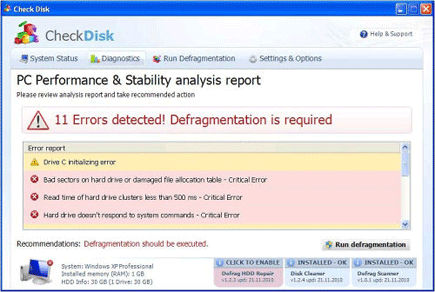
It will modify Windows Registry and add the following entries:
HKEY_CURRENT_USER\Software\Microsoft\Windows\CurrentVersion\Run “[random]“
HKEY_CURRENT_USER\Software\Microsoft\Windows\CurrentVersion\Run “[random].exe”
The threat will drop the following malicious files:
%Temp%\[random]
%Temp%\[random].exe
%Temp%\[random].dll
%Temp%\dfrg
%Temp%\dfrgr
%Documents and Settings%\[User_Name]\Desktop\Check Disk.lnk
%Documents and Settings%\[User_Name]\Start Menu\Programs\Check Disk
%Documents and Settings%\[User_Name]\Start Menu\Programs\Check Disk\Check Disk.lnk
%Documents and Settings%\[User_Name]\Start Menu\Programs\Check Disk\Uninstall Check Disk.lnk
How to Remove CheckDisk Manually
1. Restart your computer in SafeMode
– After Power-On the computer, just before Windows start, press F8
– From the selections, Select SafeMode
2. Remove Registry entries that the threat added. You MUST BACKUP YOUR REGISTRY FIRST.
– Click Start > Run
– Type in the field, regedit
– Navigate and look for the registry entries mentioned above and delete if necessary
3. Delete malicious files that the threat added:
– Base on the given location above, browse and delete the file
– If no location is given, click Start>Search> and search for the files.
– If cannot be deleted, press Ctrl+Alt+Del to access Task Manager, see if the file is running in the process. If it is, select the file and click End Process. Perform file delete again.
4. Scan computer with Antivirus Program
– Update antivirus program
– Scan computer and delete all detected threats.
How to Easily Remove CheckDisk
1. Download and run Removal Tool to remove this computer threat.
