

Antivirus Action is a harmful computer application that was tagged as rogue software. Meaning, you have to keep distance from this program if you don’t want to mess up your PC. At first, Antivirus Action will look and promoted like a real security program, but in fact, it was developed primarily to be spread and sold in a fraudulent manner. Its general purpose is to generate revenue by selling the registration key online. If executed on the computer, Antivirus Action issues exaggerated pop-up warning messages from your Windows task bar. An unexpected virus scan will run from time to time showing fake scan results with dozens of detected Trojans and viruses. These dirty tactics were purposely exhibited to influence users to activate the full version for a certain amount.
If you only knew how this malicious program can enter a computer, perhaps you will have a better idea on how to block it. First and foremost, Antivirus Action uses a Trojan to spread itself by exploiting software that were outdated or with glitches in security. This weakness will be taken as advantage to plant Antivirus Action on the system without user’s knowledge. Also, a number of fake security web sites hosting a JavaScript file run a drive-by-download method on visitor’s computer, in which Antivirus Action will be installed instantly without asking for your permission.
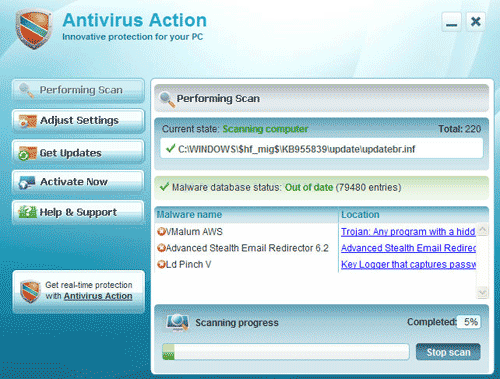
To be able to get rid of this malware, simply execute the steps on this page. Scan the computer with suggested tool to complete the removal process for Antivirus Action.
What are the Symptoms of Antivirus Action Infection?
It will modify Windows Registry and add the following entries:
HKEY_CURRENT_USER\Software\Antivirus Action
HKEY_LOCAL_MACHINE\Software\Microsoft\Windows\CurrentVersion\Run “Antivirus Action”
HKEY_LOCAL_MACHINE\SOFTWARE\Microsoft\Windows\CurrentVersion\Uninstall\Antivirus Action
The threat will drop the following malicious files:
%Documents and Settings%\All Users\Start Menu\Programs\Antivirus Action\AVAction.exe
%Documents and Settings%\All Users\Desktop\Antivirus Action.lnk
%Documents and Settings%\All Users\Application Data\Antivirus Action
How to Remove Antivirus Action Manually
1. Restart your computer in SafeMode
– After Power-On the computer, just before Windows start, press F8
– From the selections, Select SafeMode
2. Remove Registry entries that the threat added. You MUST BACKUP YOUR REGISTRY FIRST.
– Click Start > Run
– Type in the field, regedit
– Navigate and look for the registry entries mentioned above and delete if necessary
3. Delete malicious files that the threat added:
– Base on the given location above, browse and delete the file
– If no location is given, click Start>Search> and search for the files.
– If cannot be deleted, press Ctrl+Alt+Del to access Task Manager, see if the file is running in the process. If it is, select the file and click End Process. Perform file delete again.
4. Scan computer with Antivirus Program
– Update antivirus program
– Scan computer and delete all detected threats.
How to Easily Remove Antivirus Action
1. Download and run removal tool to remove this threat from the computer. Click here to start downloading the tool.

OK, I picked up Antivirus Action yesterday and it effectively shut me down. I then booted up in Safe mode and did a system restore which seemed to fix the problem. Then an online guru told me that wouldn’t fix the problem and asked me to reboot into Safe mode with networking… this I did now I can’t get anything at all. No desktop. If I boot in any of the Safe modes all I get is a screen listing all drivers. If I boot normally it goes through to the Windows screen with the blue progress bar and stays there for 10 minutes before rebooting itself. This just goes on forever.
Any ideas would be most welcome as it’s a 3 hour round trip to my nearest repair shop.
Cheers, John