

Antispyware XP is a rogue anti-virus program that usually spreads by means of a Trojan infection. The Trojan can manipulate an infected computer so that it will redirect to a website where users will acquire Antispyware XP without their knowledge. Computers infected with this virus will have difficulty in browsing the Internet because it will hijack web pages and instead display a fake warning page. A continuous warning and task bar messages will be exhibited by Antispyware XP to scare users about presence of viruses on the PC.
Once the malware have convinced computer user about existing Trojan and virus infection, it recommends buying the licensed version of Antispyware XP. It insists that this is the only solution to remove the threats. One thing to remember – you can only remove rogue programs by scanning PC with real anti-malware tool and not with the infection itself. Thus, you must know that having the registered version of the rogue program is worthless. You will gain nothing in purchasing Antispyware XP. Aside from spending money for this useless tool, your credit card details, which you used in paying for this fake product is at risk. Malware author may avail of any products and services online using your own account.
Remove Antispyware XP using a recommended program below and follow the procedure to completely get rid of this malware. It is suggested to run a scan also in safe mode of Windows. While in safe mode, viruses do not reside in the memory, thus, it will not have the capability to block security programs from running.
What are the Symptoms of Antispyware XP Infection?
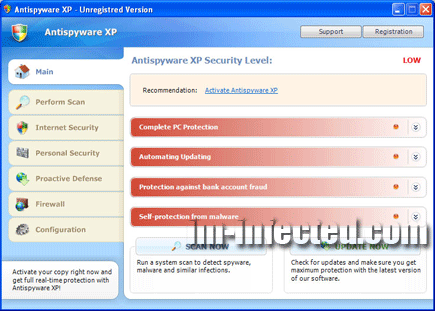
A security scan will be provided by this rogue program and fake detection will be displayed in order to persuade users into buying the Antispyware XP registration key.
It will modify Windows Registry and add the following entries:
- HKEY_CURRENT_USER\Software\Classes\.exe\shell\open\command “(Default)” = “av.exe” /START “%1? %*
- HKEY_CURRENT_USER\Software\Classes\secfile\shell\open\command “(Default)” = “av.exe” /START “%1? %*
- HKEY_CLASSES_ROOT\.exe\shell\open\command “(Default)” = “av.exe” /START “%1? %*
- HKEY_CLASSES_ROOT\secfile\shell\open\command “(Default)” = “av.exe” /START “%1? %*
- HKEY_LOCAL_MACHINE\SOFTWARE\Clients\StartMenuInternet\FIREFOX.EXE\shell\open\command “(Default)” = “av.exe” /START “firefox.exe”
- HKEY_LOCAL_MACHINE\SOFTWARE\Clients\StartMenuInternet\FIREFOX.EXE\shell\safemode\command “(Default)” = “av.exe” /START “firefox.exe” -safe-mode
- HKEY_LOCAL_MACHINE\SOFTWARE\Clients\StartMenuInternet\IEXPLORE.EXE\shell\open\command “(Default)” = “av.exe” /START “iexplore.exe”
- HKEY_LOCAL_MACHINE\SOFTWARE\Microsoft\Security Center “AntiVirusOverride” = “1?
- HKEY_LOCAL_MACHINE\SOFTWARE\Microsoft\Security Center “FirewallOverride” = “1?
The threat will drop the following malicious file:
- %UserProfile%\AppData\Local\av.exe
How to Remove Antispyware XP Manually
1. Restart your computer in SafeMode
– After Power-On the computer, just before Windows start, press F8
– From the selections, Select SafeMode
2. Remove Registry entries that the threat added. You MUST BACKUP YOUR REGISTRY FIRST.
– Click Start > Run
– Type in the field, regedit
– Navigate and look for the registry entries mentioned above and delete if necessary
3. Delete malicious files that the threat added:
– Base on the given location above, browse and delete the file
– If no location is given, click Start>Search> and search for the files.
– If cannot be deleted, press Ctrl+Alt+Del to access Task Manager, see if the file is running in the process. If it is, select the file and click End Process. Perform file delete again.
4. Scan computer with Antivirus Program
– Update antivirus program
– Scan computer and delete all detected threats.
How to Easily Remove Antispyware XP
1. To uninstall Antispyware XP virus easily from computer without the hassle of editing registry and system files, please download a removal tool. Click this link to begin the download. Once completed, install it and run a scan on the computer.
