

Personal Anti Malware if not registered and rename itself to Personal Anti Malware Center if registered, is a potentially unwanted program that was developed by the same persons who created and spread numerous malicious programs before. Personal Anti Malware is likewise propagated via Internet through the use of aggressive advertising and scam online antivirus websites. Malicious websites visited may download Personal Anti Malware on to computers without users knowledge. Once installed, a virus scan by Personal Anti Malware virus will be exhibited and a number of computer viruses will be displayed on its scan results. This result only show fabricated contents, none of them is truly infected, in fact the only threats present on your computer is Personal Anti Malware itself.
While this program is still residing on computer, it will continuously display different warnings and alert messages just to persuade you into purchasing the Personal Anti Malware registration key. One of the message can be shown as:
Personal Anti Malware
Your system is infected with version of Spy-1840.
This malicious program is a Trojan.
It infected capinfos.exe.
This Trojan attempts to steal and corrupt your private information.
Click here to save your private information!
Critical System Warning!
What are the Symptoms of Personal Anti Malware Infection?
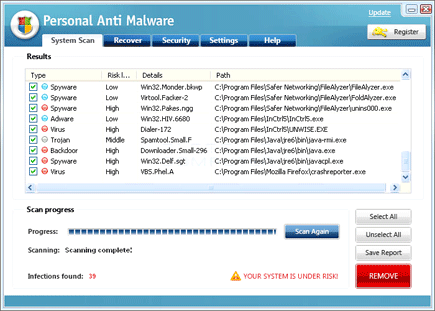
A virus scan will display falsified information regarding present viruses found on computer to induce users to obtain the Personal Anti Malware activation key.
It will modify Windows Registry and add the following entries:
If non-registered:
- HKEY_LOCAL_MACHINE\SOFTWARE\Microsoft\Windows\CurrentVersion\Internet Settings\User Agent\Post Platform “AVP09”
- HKEY_CURRENT_USER\Software\AV2009
- HKEY_CURRENT_USER\Software\AVP09
- HKEY_CURRENT_USER\Software\Microsoft\Windows\CurrentVersion\Run “Personal Anti Malware”
- HKEY_CURRENT_USER\Software\Microsoft\Windows\CurrentVersion\Run “Windows applications server”
If registered:
- HKEY_CURRENT_USER\Software\Microsoft\Windows\CurrentVersion\Uninstall\AMC
- HKEY_CURRENT_USER\Software\Microsoft\Windows\CurrentVersion\Run “Personal Anti Malware Center”
- HKEY_CURRENT_USER\Software\Microsoft\Windows\CurrentVersion\RunOnce “C:\DOCUME~1\Bleeping\LOCALS~1\Temp\delav2009.bat”
- HKEY_CURRENT_USER\Software\Microsoft\Windows\CurrentVersion\RunOnce “C:\DOCUME~1\Bleeping\LOCALS~1\Temp\delInstavp2009.bat”
- HKEY_CURRENT_USER\Software\Microsoft\Windows\CurrentVersion\RunOnce “C:\DOCUME~1\Bleeping\LOCALS~1\Temp\delUpdav2009.bat”
The threat will drop the following malicious files:
If non-registered:
- c:\Documents and Settings\All Users\Start Menu\Personal Anti Malware
- c:\Documents and Settings\All Users\Start Menu\Personal Anti Malware\Personal Anti Malware.lnk
- c:\Documents and Settings\All Users\Start Menu\Personal Anti Malware\Support.lnk
- c:\Program Files\Personal Anti Malware
- c:\Program Files\Personal Anti Malware\add.exe
- c:\Program Files\Personal Anti Malware\AVP_Update.exe
- c:\Program Files\Personal Anti Malware\PAM.exe
- c:\Program Files\Personal Anti Malware\scanopt.sys
- c:\Program Files\Personal Anti Malware\Support.url
- c:\Program Files\Personal Anti Malware\svo.scf
- c:\Program Files\Personal Anti Malware\sysdata.sys
- c:\Program Files\Personal Anti Malware\SysShield.exe
- c:\Program Files\Personal Anti Malware\Uninstall.exe
- c:\Program Files\Personal Anti Malware\vlist
- c:\Program Files\Personal Anti Malware\warning.mht
- c:\Program Files\Personal Anti Malware\bitmaps
- c:\Program Files\Personal Anti Malware\bitmaps\nagsr\[nag-].bmp
- c:\Program Files\Personal Anti Malware\bitmaps\payment\[pay-].bmp
- c:\Program Files\Personal Anti Malware\bitmaps\tray\[exit-].bmp
- c:\Program Files\Personal Anti Malware\bitmaps\windows\[files].bmp
If Registered:
- c:\Program Files\AMC
- c:\Program Files\AMC\Support.url
- c:\Program Files\AMC\Web.url
- c:\Program Files\AMC\bin\AMC.exe
- c:\Program Files\AMC\bin\CreateProcessLib.dll
- c:\Program Files\AMC\bin\libclamav.dll
- c:\Program Files\AMC\bin\pthreadVC2.dll
- c:\Program Files\AMC\bin\Uninstall.exe
- c:\Program Files\AMC\data\main.cvd
- c:\Program Files\AMC\data\ext
- c:\Program Files\AMC\data\ext\.dll
- c:\Program Files\AMC\data\ext\.exe
- c:\Program Files\AMC\data\ext\.sys
- c:\Program Files\AMC\data\help
- c:\Program Files\AMC\data\help\*.rtf
- c:\Program Files\AMC\data\temp\clamav-1ebcd6f302aff5add724ec7dca98d0d2
- c:\Program Files\AMC\quarantine\qinfo.dat
- c:\Documents and Settings\All Users\Start Menu\Personal Anti Malware Center
- c:\Documents and Settings\All Users\Start Menu\Personal Anti Malware Center\On the Web.lnk
- c:\Documents and Settings\All Users\Start Menu\Personal Anti Malware Center\Personal Anti Malware Center.lnk
- c:\Documents and Settings\All Users\Start Menu\Personal Anti Malware Center\Support.lnk
- c:\Documents and Settings\All Users\Start Menu\Personal Anti Malware Center\Uninstall Anti Malware Center.lnk
- %UserProfile%\Desktop\Personal Anti Malware Center.lnk
How to Remove Personal Anti Malware Manually
1. Restart your computer in SafeMode
– After Power-On the computer, just before Windows start, press F8
– From the selections, Select SafeMode
2. Remove Registry entries that the threat added. You MUST BACKUP YOUR REGISTRY FIRST.
– Click Start > Run
– Type in the field, regedit
– Navigate and look for the registry entries mentioned above and delete if necessary
3. Delete malicious files that the threat added:
– Base on the given location above, browse and delete the file
– If no location is given, click Start>Search> and search for the files.
– If cannot be deleted, press Ctrl+Alt+Del to access Task Manager, see if the file is running in the process. If it is, select the file and click End Process. Perform file delete again.
4. Scan computer with Antivirus Program
– Update antivirus program
– Scan computer and delete all detected threats.
How to Easily Remove Personal Anti Malware
1. Download and run Removal Tool to remove Personal Anti Malware
