

PC Live Guard is yet another fake antivirus program that may interfere with current computer security settings by ending security-related process. PC Live Guard is smart enough to install itself on computers and prevent the compromised PC from removing it, thus forcing users to acquire the registered version of the program. It must be the only option PC Live Guard will give to its victim to be able to stop annoyances it brings.
When inside the computer, PC Live Guard virus connects to a remote server and pull down additional components that strengthen the malware. This includes blocking of Internet access and browser hijacking. PC Live Guard alters the system settings and Windows registry so that it will automatically loaded when the system is started.
What are the Symptoms of PC Live Guard Infection?
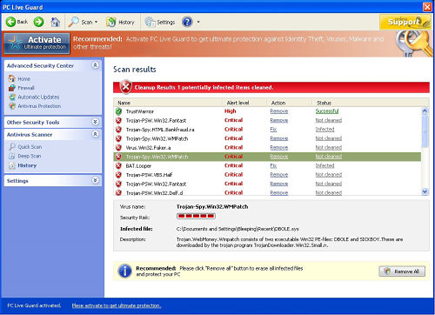
PC Live Guard will run a fabricated virus scan on victims computer and misinform by producing fake detection.
PC Live Guard will modify Windows Registry and add the following entries:
- HKEY_LOCAL_MACHINE\SOFTWARE\Microsoft\Windows\CurrentVersion\Run “PC Live Guard”
- HKEY_CURRENT_USER\Software\3
- HKEY_CLASSES_ROOT\CLSID\{3F2BBC05-40DF-11D2-9455-00104BC936FF}
- HKEY_CLASSES_ROOT\xp_edb11.DocHostUIHandler
- HKEY_CURRENT_USER\Software\Classes\Software\Microsoft\Internet Explorer\SearchScopes “URL” = “http://search-gala.com/?&uid=7&q={searchTerms}”
- HKEY_CURRENT_USER\Software\Microsoft\Internet Explorer “IIL”
- HKEY_CURRENT_USER\Software\Microsoft\Internet Explorer\Download “RunInvalidSignatures” = “1?
- HKEY_CURRENT_USER\Software\Microsoft\Windows\CurrentVersion\Internet Settings\5.0\User Agent\Post Platform “[xSP_2:117fc3395e69e29f71abba93a68c4181_7]“
- HKEY_CLASSES_ROOT\Software\Microsoft\Internet Explorer\SearchScopes “URL” = “http://search-gala.com/?&uid=7&q={searchTerms}”
PC Live Guard will drop the following malicious files:
- %UserProfile%\Application Data\Microsoft\Internet Explorer\Quick Launch\PC Live Guard.lnk
- %UserProfile%\Application Data\PC Live Guard
- %UserProfile%\Application Data\PC Live Guard\cookies.sqlite
- %UserProfile%\Desktop\PC Live Guard.lnk
- %UserProfile%\Recent\gid.tmp
- %UserProfile%\Recent\SICKBOY.tmp
- %UserProfile%\Recent\sld.drv
- %UserProfile%\Start Menu\PC Live Guard.lnk
- %UserProfile%\Start Menu\Programs\PC Live Guard.lnk
- %Program Files%\Mozilla Firefox\searchplugins\search.xml
- %Documents and Settings%\All Users\Application Data\117fc\
- %Documents and Settings%\All Users\Application Data\117fc\PC339.exe
- %Documents and Settings%\All Users\Application Data\117fc\PCLG.ico
- %Documents and Settings%\All Users\Application Data\117fc\573.mof
- %Documents and Settings%\All Users\Application Data\117fc\mozcrt19.dll
- %Documents and Settings%\All Users\Application Data\117fc\sqlite3.dll
- %Documents and Settings%\All Users\Application Data\117fc\PCLGSys
- %Documents and Settings%\All Users\Application Data\117fc\PCLGSys\vd952342.bd
- %Documents and Settings%\All Users\Application Data\117fc\BackUp\
- %Documents and Settings%\All Users\Application Data\117fc\Quarantine Items\
- %Documents and Settings%\All Users\Application Data\PCYZDUHBELG
- %Documents and Settings%\All Users\Application Data\PCYZDUHBELG\PCAWWLG.cfg
How to Remove PC Live Guard Manually
1. Restart your computer in SafeMode
– After Power-On the computer, just before Windows start, press F8
– From the selections, Select SafeMode
2. Remove Registry entries that the threat added. You MUST BACKUP YOUR REGISTRY FIRST.
– Click Start > Run
– Type in the field, regedit
– Navigate and look for the registry entries mentioned above and delete if necessary
3. Delete malicious files that the threat added:
– Base on the given location above, browse and delete the file
– If no location is given, click Start>Search> and search for the files.
– If cannot be deleted, press Ctrl+Alt+Del to access Task Manager, see if the file is running in the process. If it is, select the file and click End Process. Perform file delete again.
4. Scan computer with Antivirus Program
– Update antivirus program
– Scan computer and delete all detected threats.
How to Easily Remove PC Live Guard
1. Download and run Removal Tool to remove PC Live Guard
