

My Security Wall is a bogus security product that uses deceptive method to elude its victim into acquiring the registered version of the program. Prior to that, rogue developers will utilize different techniques to spread a Trojan that will lead users to My Security Wall fake security websites. A multimedia website will also be created that will host My Security Wall installation files. This malware is intended to be dropped on visitors computer without their knowledge. When installed on victims computer, My Security Wall will alter system settings and add its own entry on the registry to make itself run when Windows is initiated. It will leave only one solution and that is to obtain the My Security Wall activation code which in return will give profit to developer of this fake security program.
What are the Symptoms of My Security Wall Infection?
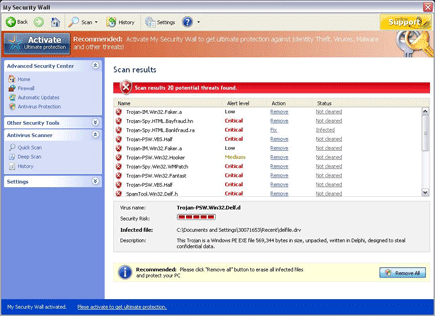
A fake scan results will be displayed to convince users into purchasing the My Security Wall activation key. Aside from this, continuous pop-up alerts and warning messages will be exhibited informing about the present security risks on the computer.
It will modify Windows Registry and add the following entries:
- HKEY_USERS\.DEFAULT\Software\Microsoft\Internet Explorer\SearchScopes “URL” = “http://findgala.com/?&uid=7&q={searchTerms}”
- HKEY_CURRENT_USER\Software\Classes\Software\Microsoft\Internet Explorer\SearchScopes “URL” = “http://findgala.com/?&uid=7&q={searchTerms}”
- HKEY_CURRENT_USER\Software\Microsoft\Internet Explorer\Download “RunInvalidSignatures” = “1?
- HKEY_CURRENT_USER\Software\Microsoft\Windows\Current Version\Internet Settings\5.0\User Agent\Post Platform “Build/13.00007?
- HKEY_CURRENT_USER\Software\Microsoft\Windows\Current Version\Run “My Security Wall”
- HKEY_CLASSES_ROOT\Software\Microsoft\Internet Explorer\SearchScopes “URL” = “http://findgala.com/?&uid=7&q={searchTerms}”
- HKEY_CLASSES_ROOT\xp_5f014.DocHostUIHandler
“My Security Wall” threat will drop the following malicious files:
- %Documents and Settings%\[UserName]\Application Data\My Security Wall
- %Documents and Settings%\[UserName]\Application Data\My Security Wall\cookies.sqlite
- %Documents and Settings%\[UserName]\Application Data\Microsoft\Internet Explorer\Quick Launch\My Security Wall.lnk
- %Documents and Settings%\[UserName]\Desktop\My Security Wall.lnk
- %Documents and Settings%\[UserName]\Recent\ANTIGEN.tmp
- %Documents and Settings%\[UserName]\Recent\dudl.sys
- %Documents and Settings%\[UserName]\Recent\energy.drv
- %Documents and Settings%\[UserName]\Recent\exec.dll
- %Documents and Settings%\[UserName]\Recent\exec.drv
- %Documents and Settings%\[UserName]\Recent\grid.drv
- %Documents and Settings%\[UserName]\Recent\hymt.drv
- %Documents and Settings%\[UserName]\Recent\kernel32.exe
- %Documents and Settings%\[UserName]\Recent\pal.drv
- %Documents and Settings%\[UserName]\Recent\PE.drv
- %Documents and Settings%\[UserName]\Recent\ppal.exe
- %Documents and Settings%\[UserName]\Recent\tempdoc.dll
- %Documents and Settings%\[UserName]\Recent\tempdoc.drv
- %Documents and Settings%\[UserName]\Recent\tjd.tmp
- %Documents and Settings%\[UserName]\Start Menu\My Security Wall.lnk
- %Documents and Settings%\[UserName]\Start Menu\Programs\My Security Wall.lnk
- %Documents and Settings%\All Users\Application Data\221tb
- %Documents and Settings%\All Users\Application Data\221tb\MS339.exe
- %Documents and Settings%\All Users\Application Data\221tb\MSW.ico
- %Documents and Settings%\All Users\Application Data\221tb\7463.mof
- %Documents and Settings%\All Users\Application Data\221tb\mozcrt19.dll
- %Documents and Settings%\All Users\Application Data\221tb\sqlite3.dll
- %Documents and Settings%\All Users\Application Data\221tb\BackUp\Adobe Reader Speed Launch.lnk
- %Documents and Settings%\All Users\Application Data\221tb\BackUp
- %Documents and Settings%\All Users\Application Data\221tb\BackUp\Adobe Reader Synchronizer.lnk
- %Documents and Settings%\All Users\Application Data\117fc\MSWSys
- %Documents and Settings%\All Users\Application Data\117fc\MSWSys\vd952342.bd
- %Documents and Settings%\All Users\Application Data\117fc\Quarantine Items
- %Documents and Settings%\All Users\Application Data\MSEAIVCW
- %Documents and Settings%\All Users\Application Data\MSEAIVCW\MSGWBQLMRPW.cfg
- %Program Files%\Mozilla Firefox\searchplugins\search.xml
How to Remove My Security Wall Manually
1. Restart your computer in SafeMode
– After Power-On the computer, just before Windows start, press F8
– From the selections, Select SafeMode
2. Remove Registry entries that the threat added. You MUST BACKUP YOUR REGISTRY FIRST.
– Click Start > Run
– Type in the field, regedit
– Navigate and look for the registry entries mentioned above and delete if necessary
3. Delete malicious files that the threat added:
– Base on the given location above, browse and delete the file
– If no location is given, click Start>Search> and search for the files.
– If cannot be deleted, press Ctrl+Alt+Del to access Task Manager, see if the file is running in the process. If it is, select the file and click End Process. Perform file delete again.
4. Scan computer with Antivirus Program
– Update antivirus program
– Scan computer and delete all detected threats.
How to Easily Remove My Security Wall
1. Download and run Removal Tool to remove My Security Wall
