

Live Enterprise Suite is a dreadful fake anti-virus program developed solely for the purpose of gaining revenue from this fraudulent activity. With Live Enterprise Suite’s capability to install itself on computer via Trojan, users may be blinded by its fake warnings and alerts messages. User sees a variety of warning alerts and messages that will be so irritating. Thinking that it was coming from legitimate Windows alert, people can easily persuade to proceed to payment processing web site and obtain the licensed version. Keep in mind that even with registered version of Live Enterprise Suite; you will still see the same annoyances on computer. It’s too late that you may realized that the transactions were counterfeit.
You must know that Live Enterprise Suite and other malware of the same kind arrive on the PC through various security weaknesses. Thus, to prevent infection, you must download and install latest updates for all programs running on the computer. If in case, the PC is already infected with Live Enterprise Suite, do not buy this rogue program. It will not help in resolving the current issue. What you need to do is remove Live Enterprise Suite virus right away. Proceed to removal section below and download suggested tools. Run a full scan on the computer to delete all harmful elements of Live Enterprise Suite.
What are the Symptoms of Live Enterprise Suite Infection?
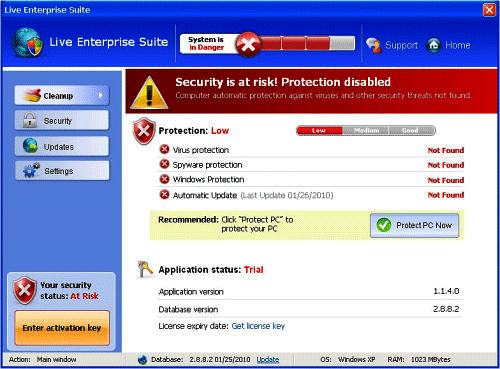
A computer scan will be launched by Live Enterprise Suite and display fake reports to mislead computer users.
It will modify Windows Registry and add the following entries:
- HKEY_CURRENT_USER\Software\Microsoft\Windows\CurrentVersion\Run “Live Enterprise Suite”
- HKEY_LOCAL_MACHINE\SOFTWARE\Microsoft\Windows\Current Version\Uninstall\567 1.4.2.0_is1
- HKEY_LOCAL_MACHINE\SOFTWARE\Microsoft\Windows\Current Version\Uninstall\Live Enterprise Suite_is1
- HKEY_LOCAL_MACHINE\SOFTWARE\Microsoft\Windows NT\Current Version\Image File Execution Options\taskmgr.exe
- HKEY_LOCAL_MACHINE\SYSTEM\ControlSet001\Enum\Root\LEGACY_HTGRDENGINE
- HKEY_LOCAL_MACHINE\SYSTEM\ControlSet001\Services\HTGrdEngine
- HKEY_LOCAL_MACHINE\SYSTEM\CurrentControlSet\Enum\Root\LEGACY_HTGRDENGINE
- HKEY_LOCAL_MACHINE\SYSTEM\CurrentControlSet\Services\HTGrdEngine
- HKEY_CURRENT_USER\Software\Microsoft\Windows\CurrentVersion\Run “Microsoft Windows logon process”
- HKEY_LOCAL_MACHINE\SOFTWARE\Microsoft\Internet Explorer\Main\FeatureControl\FEATURE_BROWSER_EMULATION “svchost.exe”
The threat will drop the following malicious files:
- %Program Files%\Common Files\char.exe
- %Program Files%\Common Files\calc.exe
- %Documents and Settings%\[UserName]\Application Data\Live Enterprise Suite
- %Documents and Settings%\[UserName]\Application Data\Live Enterprise Suite\settings.ini
- %Documents and Settings%\[UserName]\Application Data\Live Enterprise Suite\uill.ini
- %Documents and Settings%\[UserName]\Application Data\Live Enterprise Suite\unins000.exe
- %Documents and Settings%\[UserName]\Application Data\Live Enterprise Suite\updateloadlist.ini
- %Documents and Settings%\[UserName]\Application Data\Live Enterprise Suite\db
- %Documents and Settings%\[UserName]\Application Data\Live Enterprise Suite\db\config.cfg
- %Documents and Settings%\[UserName]\Application Data\Live Enterprise Suite\db\Timeout.inf
- %Documents and Settings%\[UserName]\Application Data\Live Enterprise Suite\db\Urls.inf
- %Documents and Settings%\[UserName]\Application Data\Microsoft\Windows\winlogon.exe
- %Documents and Settings%\[UserName]\Local Settings\Application Data\Microsoft\Windows\log.txt
- %Documents and Settings%\[UserName]\Local Settings\Application Data\Microsoft\Windows\pguard.ini
- %Documents and Settings%\[UserName]\Local Settings\Application Data\Microsoft\Windows\services.exe
- %Documents and Settings%\[UserName]\My Documents\My Pictures\atbyin.exe
How to Remove Live Enterprise Suite Manually
1. Restart your computer in SafeMode
– After Power-On the computer, just before Windows start, press F8
– From the selections, Select SafeMode
2. Remove Registry entries that the threat added. You MUST BACKUP YOUR REGISTRY FIRST.
– Click Start > Run
– Type in the field, regedit
– Navigate and look for the registry entries mentioned above and delete if necessary
3. Delete malicious files that the threat added:
– Base on the given location above, browse and delete the file
– If no location is given, click Start>Search> and search for the files.
– If cannot be deleted, press Ctrl+Alt+Del to access Task Manager, see if the file is running in the process. If it is, select the file and click End Process. Perform file delete again.
4. Scan computer with Antivirus Program
– Update antivirus program
– Scan computer and delete all detected threats.
How to Easily Remove Live Enterprise Suite
1. Download and run Removal Tool to remove Live Enterprise Suite
