

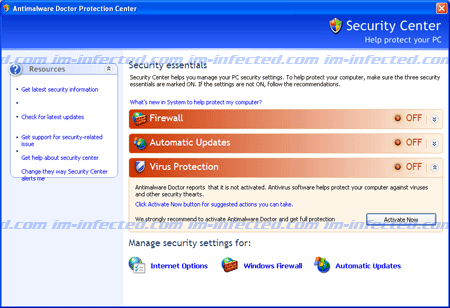
Antimalware Doctor Protection Center is nothing but a total scam that will propagate on to computers that are vulnerable to Trojan attack. It can be dropped and installed on computer unknown to users. It targets outdated web browser with security lapses. Just like its predecessor, Antimalware Doctor, this new version will alter system registry to make itself run each time Windows is started. A Windows Security Center-like icon will be placed on the task bar that monitors system activities. It represents as a real-time anti-virus, firewall and automatic updates. It may look like genuine security tool so beware.
While still on the computer, Antimalware Doctor Protection Center will always display fake warning messages attempting to convince victims into purchasing the registered version of it. Off course this is not free; after all it was created as a money-making program for its authors. The fake program will scan the computer each time you log-on to Windows. It mimics what real antivirus software does. However, results shown by Antimalware Doctor Protection Center are unreal. It was revealed to mislead computer users. Malware authors are hopeful that every victim will obtain the registration code to generate profit for them.
Immediately remove Antimalware Doctor Protection Center, all of its files, and system process with a powerful anti-malware program. Please see the complete solution below.
What are the Symptoms of Antimalware Doctor Protection Center Infection?
It will modify Windows Registry and add the following entries:
- HKEY_CURRENT_USER\Software\Antimalware Doctor Inc\Antimalware Doctor
HKEY_CURRENT_USER\Software\Microsoft\Windows\CurrentVersion\Uninstall\Antimalware Doctor
HKEY_CURRENT_USER\Software\Microsoft\Windows\CurrentVersion\Run “Antimalware Doctor.exe”
The threat will drop the following malicious files:
- %APPDATA%\mozilla\firefox\profiles\[PROFILE NAME]\gsl.dll
- C:\Windows\System32\enemies-names.txt
- C:\Windows\System32\Antimalware Doctor.exe
- C:\Documents and Settings\malwarehelp.org\My Documents\New Folder\setupapp6262205323364.exe
- C:\Documents and Settings\malwarehelp.org\My Documents\New Folder\enemies-names.txt
- C:\Documents and Settings\malwarehelp.org\My Documents\New Folder\hookdll.dll
How to Remove Antimalware Doctor Protection Center Manually
1. Restart your computer in SafeMode
– Press F8 on keyboard as soon as you turn on the computer
– Select SafeMode to start the computer loading only minimal resources
2. Delete Windows registry entries the malware created. It is important to BACKUP YOUR REGISTRY FIRST.
– On Windows Start Menu, Click Start > Run
– Type in the field, regedit
– Find registry entries mentioned above and delete if necessary
3. Files related to Antimalware Doctor Protection Center must be deleted:
– Browse and delete malicious files detected above.
– Some files cannot be deleted instantly. Press Ctrl+Alt+Del to open Windows Task Manager, look for any virus-related files mentioned on this page and highlight it, click End Process. Try to delete the file once more.
4. Run Antivirus Program
– You must be connected to Internet to be able to update your anti-virus program. This is needed to have the latest database available and detect newer threats.
– Thoroughly scan the computer and clean or delete all detected threats.
How to Easily Remove Antimalware Doctor Protection Center
1. Print this procedure as we need to close all running programs later.
2. Download AntiMalware Application here and save it to your Desktop.
3. Close all open applications.
4. Double-Click on the downloaded mbam-setup.exe to start the installation. If unable to execute, infections on computer is preventing it from running, rename the file mbam-setup.exe to anything (like myfile.exe)
5. Run the installation on the default settings. No changes are necessary.
6. Just before completing the installation, make sure that the following are marked check.
– Update the program
– Launch the program
7. The tool will run and update itself after installation. Close it after the update.
8. Restart your computer in SafeMode
– After Power-On the computer, just before Windows start, press F8
– From the selections, Select SafeMode
9. Click on the icon and start to Perform Full Scanto begin scanning your computer for Antimalware Doctor Protection Center related files.
10. After scanning, a message will appear stating that the scan is completed successfully. Click OK.
11. Click Show Results and detected threats will be displayed.
12. Make sure that all threats are marked check, then click Remove Selected to begin removal of the malicious files.
13. Exit AntiMalware Apps and restart your computer.
14. Antimalware Doctor Protection Center and all its files are now removed from your computer. To guard your computer from this threat and avoid future infections, you may want real-time protection from a full version of anti-malware program..

My antivirus solution platinum is gone from my desktop.