

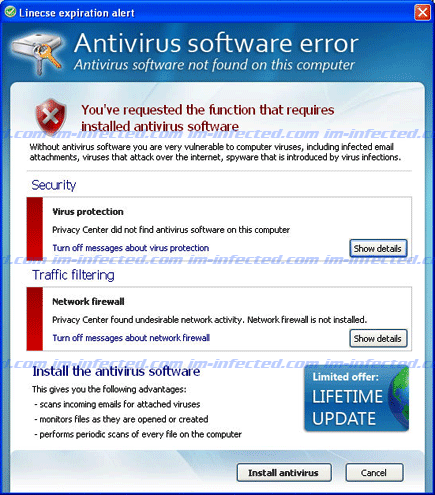
“Antivirus Software Error” warning is another misleading alert of Privacy Center rogue antivirus program. It was obvious that this was issued as a scare tactics to force its victim into acquiring the licensed version that expires as it shows in the screenshot image below. As a matter of fact, ”Antivirus Software Error” insists that you are the one who requested to install this program as stated on its message:
“License expiration alert
Antivirus software error
Antivirus software not found on this computer
You’ve requested the function that requires installed antivirus software.
Without antivirus software you are very vulnerable to computer viruses, including infected email attachments, viruses that attack over the internet, spyware that is introduced by virus infections.”
Virus Protection
Privacy Center did not find antivirus software on this computer.
Be aware the fake warning like this one tries to endorse fake antivirus software. It aims to steal money from your credit card account by pretending to be a useful tool that is required by the system. Once you pay for the software, “Antivirus Software Error” will no longer appear on the computer. However, there is a possibility that malware author have recorded you credit card details. It may be use for online fraud at your expense.
So, the next time you will see “Antivirus Software Error” or similar alerts that are unfamiliar, just ignore it. What you need to do is run a full scan of anti-malware program. Scanning the computer with anti-rootkit might also help find other viruses and Trojans on the computer.
What are the Symptoms of Antivirus Software Error Infection?
It will modify Windows Registry and add the following entries:
HKEY_CURRENT_USER\Software\Microsoft\Windows\CurrentVersion\Run “agent.exe”
HKEY_CLASSES_ROOT\CLSID\{D032570A-5F63-4812-A094-87D007C23012}
HKEY_CLASSES_ROOT\spbho.TIEBHO
HKEY_LOCAL_MACHINE\SOFTWARE\Microsoft\Windows\CurrentVersion\Explorer\Browser Helper Objects\{D032570A-5F63-4812-A094-87D007C23012}
HKEY_LOCAL_MACHINE\SOFTWARE\Microsoft\Windows\CurrentVersion\Uninstall\Privacy center
The threat will drop the following malicious files:
c:\Program Files\Privacy center
c:\Program Files\Privacy center\agent.exe
c:\Program Files\Privacy center\pc.exe
c:\Program Files\Privacy center\uninstall.exe
c:\Program Files\Privacy center\tools\sc\ca.crt
c:\Program Files\Privacy center\tools\sc\libeay32.dll
c:\Program Files\Privacy center\tools\sc\libssl32.dll
c:\Program Files\Privacy center\tools\sc\OemWin2k.inf
c:\Program Files\Privacy center\tools\sc\openvpn.exe
c:\Program Files\Privacy center\tools\sc\tap0801.sys
c:\Program Files\Privacy center\tools\sc\tapinstall.exe
c:\Program Files\Privacy center\tools\sp\spbho.dll
%UserProfile%\Application Data\Privacy center\dbases\cg.dat
%UserProfile%\Application Data\Privacy center\dbases\mw.dat
%UserProfile%\Application Data\Privacy center\dbases\rd.dat
%UserProfile%\Application Data\Privacy center\dbases\sc.dat
%UserProfile%\Application Data\Privacy center\dbases\sm.dat
%UserProfile%\Application Data\Privacy center\dbases\sp.dat
%UserProfile%\Application Data\Privacy center\keys\cg.key
%UserProfile%\Application Data\Privacy center\keys\rd.key
%UserProfile%\Application Data\Privacy center\keys\sc.key
%UserProfile%\Application Data\Privacy center\keys\sp.key
%UserProfile%\Application Data\Privacy center\temp\settings.ini
%UserProfile%\Application Data\Privacy center\temp\spfilter
How to Remove Antivirus Software Error Manually
1. Restart your computer in SafeMode
– After Power-On the computer, just before Windows start, press F8
– From the selections, Select SafeMode
2. Remove Registry entries that the threat added. You MUST BACKUP YOUR REGISTRY FIRST.
– Click Start > Run
– Type in the field, regedit
– Navigate and look for the registry entries mentioned above and delete if necessary
3. Delete malicious files that the threat added:
– Base on the given location above, browse and delete the file
– If no location is given, click Start>Search> and search for the files.
– If cannot be deleted, press Ctrl+Alt+Del to access Task Manager, see if the file is running in the process. If it is, select the file and click End Process. Perform file delete again.
4. Scan computer with Antivirus Program
– Update antivirus program
– Scan computer and delete all detected threats.
How to Easily Remove Antivirus Software Error
1. Download and run Removal Tool to stop this fake alert. Click here to begin downloading the file.
