

Having HDD Control ( HDDControl ) in the computer is just like having contaminated with a potentially unwanted program. This is because HDD Control virus will never have a positive effect once installed on the computer. It is just part of a large group of programs that pretends to be a computer optimization tool. This is not the same legitimate program that was developed by Ashampoo, instead it was found out to be related to CheckDisk and UltraDefragger. When installed on the computer, user will experience a pop-up of alert messages sending false reports on a number of errors detected and requires to run a defragmentation of the hard drive. Unexpectedly, defragmentation cannot be run with the current installation, it will prompt to purchase the registration key first.
As mentioned, this is a rogue program that must be avoided. Ignore anything that it offers and do not follow any prompts. Remove HDD Control as soon as possible to prevent computer from getting severely infected. Provided below are simple, free and easy to follow removal guidelines. Most of the time, required program for the removal of HDD Control will be blocked by a Trojan. You need to download the tool from a different computer and install it on the compromised system.
What are the Symptoms of HDD Control Infection?
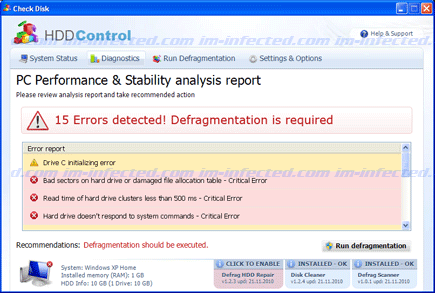
It will modify Windows Registry and add the following entries:
HKEY_CURRENT_USER\Software\Microsoft\Windows\CurrentVersion\Run “[random characters]“
HKEY_CURRENT_USER\Software\Microsoft\Windows\CurrentVersion\Run “[random characters].exe”
The threat will drop the following malicious files:
%Temp%\[random characters]
%Temp%\[random characters].exe
%Temp%\[random characters].dll
%Temp%\dfrg
%Temp%\dfrgr
%Documents and Settings%\[User_Name]\Desktop\HDD Control.lnk
%Documents and Settings%\[User_Name]\Start Menu\Programs\HDD Control
%Documents and Settings%\[User_Name]\Start Menu\Programs\HDD Control\HDD Control.lnk
%Documents and Settings%\[User_Name]\Start Menu\Programs\HDD Control\Uninstall HDD Control.lnk
How to Remove HDD Control Manually
1. Restart your computer in SafeMode
– After Power-On the computer, just before Windows start, press F8
– From the selections, Select SafeMode
2. Remove Registry entries that the threat added. You MUST BACKUP YOUR REGISTRY FIRST.
– Click Start > Run
– Type in the field, regedit
– Navigate and look for the registry entries mentioned above and delete if necessary
3. Delete malicious files that the threat added:
– Base on the given location above, browse and delete the file
– If no location is given, click Start>Search> and search for the files.
– If cannot be deleted, press Ctrl+Alt+Del to access Task Manager, see if the file is running in the process. If it is, select the file and click End Process. Perform file delete again.
4. Scan computer with Antivirus Program
– Update antivirus program
– Scan computer and delete all detected threats.
How to Easily Remove HDD Control
1. Download and run Removal Tool to remove this computer threat.
