

MAC Defender is a rogue security application designed for Mac OS X system. This threat was not as contagious as Trojans and Worms, but it has a potential to deceive inexperienced users to pay for the licensed version of the program and end up giving credit card information to a fraudulent payment web site. Credit card are expected to be charge higher that what was stated in its promotion.
This MAC Defender virus can be acquired by innocent victims when a search page is redirected to a contaminated web site where a malicious JavaScript will be executed upon visit. This technique is called drive-by-download method. An installation file of MAC Defender will be downloaded as a Zipped file. Loading it on the computer requires users interaction when a user’s password is prompted. Inexperienced users may think of it as a legitimate Macintosh security program because of a well-designed graphical user interface.
There is a possibility to prevent this thing from being installed automatically by setting the Safari “Open safe files after downloading” to OFF. Any prompt to automatically open downloaded files must be ignored. It is best to scan the file first before executing to avoid virus infection.
What are the Symptoms of Mac Defender Infection?
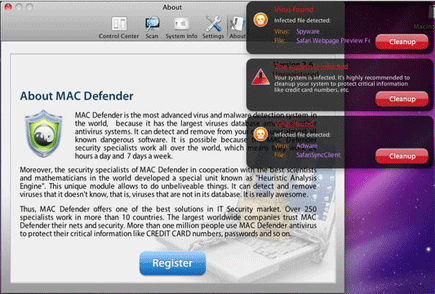
It will display fake alerts and warning messages:
Virus found
Infected file detected:
Virus: Spyware
File: Safari Webpage Perview
The system is infected
Your system is infected. It is highly recommended to cleanup your system to protect creitical information like credit card numbers, etc.
Virus found
Infected file detected:
Virus: Adware
File: SafariSyncClient
MAC Defender Removal
1. Open the Terminal application from the Utilities folder.
2. Type the following command in the Terminal (excluding quotes) ‘ps -ax | grep -i MacDefender’ then hit the Return key.
3. Take note of the process ID that is related to MacDefender program. These are the first digits listed in the result.
4. Go back to Terminal and type the following command (excluding quotes) ‘kill XXXX’. Where XXXX is the process ID noted earlier. This will unload the MAC Defender program.
5. Drag the MacDefender program (usually installed inside the Applications folder) to the Trash.
6. Empty the Trash.
7. Remove MacDefender program from the Login Items for your Account in the OS X System Preferences (if it exists).
