

Omega AntiVir program can be considered untrusted because of its virus scanning pattern similar to rogue programs. It will perform a virus scan on the computer and detects threats even if the installation package does not include scan engine, virus pattern files and a legitimate website for software updates and technical information. Omega AntiVir may be present on your computer without a consent on its installation because it can be implanted on to your system with an infection of a Trojan. This malware is also responsible if you are experiencing Internet browser redirection to unwanted websites and also pop-up warning alerts. Not only that, Omega AntiVir can also disable system functionalities on victims computer, to avoid troubleshooting, it will malfunction Task Manager, Registry Editor and Folder Options. A removal for this rogue program must carry out without delay before if can do additional harm and download other malware on computer.
What are the Symptoms of this Rogue Program Infection?
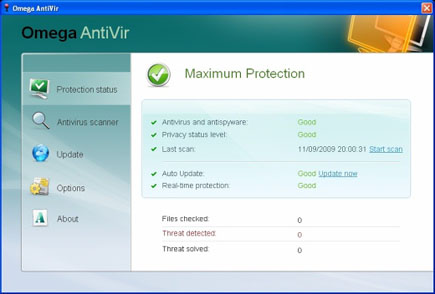
Here is the screenshot of the virus scanner window.
It will modify Windows Registry and add the following entries:
- HKEY_CURRENT_USER\Software\Microsoft\Windows\Current Version\Uninstall\Omega AntiVir
- HKEY_CLASSES_ROOT\CLSID\{3F2BBC05-40DF-11D2-9455-00104BC936FF}
- HKEY_CLASSES_ROOT\SetupPack.DocHostUIHandler
- HKEY_CURRENT_USER\Software\Microsoft\Windows\Current Version\Internet Settings\5.0\User Agent\Post Platform “8789107703”
- HKEY_CURRENT_USER\Software\Microsoft\Windows\Current Version\Run “Omega AntiVir”
The threat will drop the following malicious files and folders:
- c:\Documents and Settings\All Users\Application Data\OAV
- c:\Documents and Settings\All Users\Application Data\OAV\oav.cfg
- c:\Documents and Settings\Bleeping\Application Data\Microsoft\Internet Explorer\Quick Launch\Omega AntiVir.lnk
- c:\Documents and Settings\Bleeping\Application Data\Omega AntiVir
- c:\Documents and Settings\Bleeping\Application Data\Omega AntiVir\cookies.sqlite
- c:\Documents and Settings\Bleeping\Desktop\Omega AntiVir.lnk
- c:\Documents and Settings\All Users\Application Data\61a60
- c:\Documents and Settings\All Users\Application Data\61a60\mozcrt19.dll
- c:\Documents and Settings\All Users\Application Data\61a60\OM83b.exe
- c:\Documents and Settings\All Users\Application Data\61a60\OMEGA-AV.ico
- c:\Documents and Settings\All Users\Application Data\61a60\sqlite3.dll
- c:\Documents and Settings\Bleeping\Start Menu\Omega AntiVir.lnk
- c:\Documents and Settings\Bleeping\Start Menu\Programs\Omega AntiVir.lnk
How to Remove Omega AntiVir Manually
1. Restart your computer in SafeMode
– After Power-On the computer, just before Windows start, press F8
– From the selections, Select SafeMode
2. Remove Registry entries that the threat added. You MUST BACKUP YOUR REGISTRY FIRST.
– Click Start > Run
– Type in the field, regedit
– Navigate and look for the registry entries mentioned above and delete if necessary
3. Delete malicious files that the threat added:
– Base on the given location above, browse and delete the file
– If no location is given, click Start>Search> and search for the file.
– If cannot be deleted, press Ctrl+Alt+Del to access Task Manager, see if the file is running in the process. If it is, select the file and click End Process. Perform file delete again.
4. Scan computer with Antivirus Program
– Update antivirus program
– Scan computer and delete all detected threats.
