

Matrix is a file-encrypting virus. It restricts victims from accessing files stored on infected machine. This ransom virus uses .matrix extension to all encrypted files. It observes that the prime targets of this virus are Russian and PC users from English speaking countries. As it shows a ransom note written in Russian and English languages.
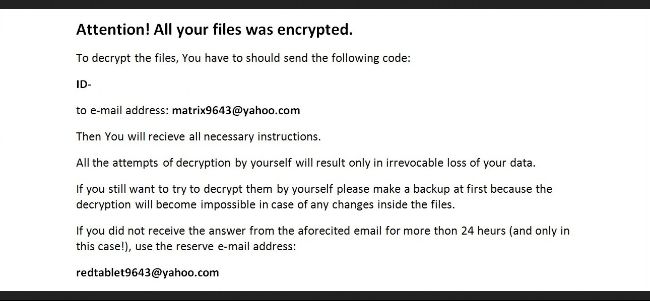
Matrix ransom note declares that your files have been encrypted. You have to pay for a ransom in order to decrypt your files. This is in exchange for the private key that victims needs for file decryption. The amount that needs to be paid was not yet given. However, you may expect that ransom must be paid through Bitcoins currency, since most crooks typically use this mode of payment to keep their identity hidden. It instructs victims to contact Matrix authors via email at matrix9643@yahoo.com or redtablet9643@yahoo.com. Once you contact them, further details including ransom amount will be disclosed.
We highly encourage you not to contact cyber crooks or even think to deal with Matrix virus authors. Matrix virus is merely created to collect money from its victims. Their aim is to steal as much more money as possible. In case your PC is hit by Matrix virus, do not expect crooks to release your files as they will never do it. The best thing you can do now to retrieve your data is to depend from your backup files.
Matrix virus can be easily acquired but still this can be prevented. Matrix is commonly served as malicious email attachment. When opening an email, make sure that it is came from known or trusted source. Download and install files only from trusted sources, as Matrix virus also comes packed with free downloads. Also, use reliable anti-virus software to help guard your system from virus attack.
Threat Summary
| Threat: | Matrix |
| Type: | Ransomware |
| Brief Description: | This ransom virus encrypts selected files on the computer and prompts user to pay for decryption key. |
| Protection Tool: | ▼ DOWNLOAD MalwareFox |
Description
Matrix is a file-encrypting virus. It restricts victims from accessing files stored on infected machine. This ransom virus uses .matrix extension to all encrypted files. It observes that the prime targets of this virus are Russian and PC users from English speaking countries. As it shows a ransom note written in Russian and English languages.
Matrix ransom note declares that your files have been encrypted. You have to pay for a ransom in order to decrypt your files. This is in exchange for the private key that victims needs for file decryption. The amount that needs to be paid was not yet given. However, you may expect that ransom must be paid through Bitcoins currency, since most crooks typically use this mode of payment to keep their identity hidden. It instructs victims to contact Matrix authors via email at matrix9643@yahoo.com or redtablet9643@yahoo.com. Once you contact them, further details including ransom amount will be disclosed.
We highly encourage you not to contact cyber crooks or even think to deal with Matrix virus authors. Matrix virus is merely created to collect money from its victims. Their aim is to steal as much more money as possible. In case your PC is hit by Matrix virus, do not expect crooks to release your files as they will never do it. The best thing you can do now to retrieve your data is to depend from your backup files.
Matrix virus can be easily acquired but still this can be prevented. Matrix is commonly served as malicious email attachment. When opening an email, make sure that it is came from known or trusted source. Download and install files only from trusted sources, as Matrix virus also comes packed with free downloads. Also, use reliable anti-virus software to help guard your system from virus attack.
Procedures to Remove Matrix
Download FREE Removal Tool
Removal steps on this page will help you get rid of the threat effectively using tools and virus scanners. Please make sure that you will carry out the guide in exact order.
Procedure 1: Scan Computer in Safe Mode Using Installed Anti-virus Program
1. First, we will try to remove Remove Matrix Ransomware Virus by running a virus scan under Safe Mode with Networking. To perform this task, please complete these procedures.
Start in Safe Mode with Networking (Windows XP/Vista/7 Instruction)
- Please restart the computer and just before Windows start, press F8 on your keyboard repeatedly. You will be presented with Advanced Options Menu.
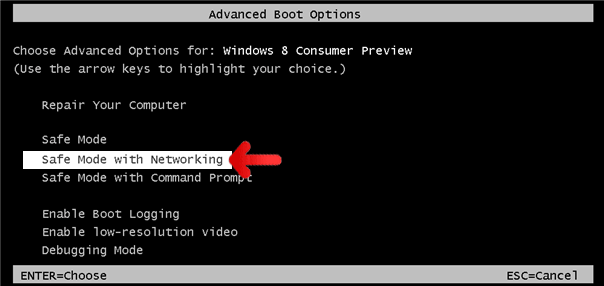
- From the selections, choose Safe Mode with Networking. Please use keyboard's arrow up/down to navigate between selections and press Enter to proceed.

Start Windows 8 in Safe Mode with Networking
- Please restart the computer and as soon as it begins to start, please press Shift+F8 keys.
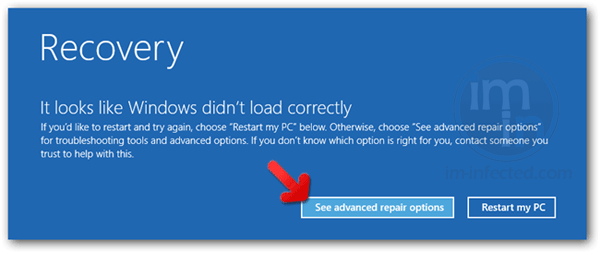
- Instead of seeing Advance Boot Options, Windows 8 will display Recovery Mode. Continue with the given steps until you reach Safe Mode function.
- Click on 'See advanced repair options'.
- Then, click on Troubleshoot.
- Next, please select Advanced options.
- On the next window, please choose Windows Startup Settings.
- Lastly, click on Restart button. Windows 8 will now restart and boot into Advanced Boot Option wherein you can run the system in Safe Mode with Networking.
2. Open your installed anti-virus programs and update it to the most recent version by automatically downloading necessary updates.
3. Thoroughly scan the computer and remove all identified threats. Do not restart or turn off the computer after the scan process. You still need to run another scan. Please follow the next procedure.
Procedure 2: Scan and remove Matrix files with MalwareBytes Anti-Malware
To remove Matrix, download Malwarebytes Anti-Malware. This tool is effective in getting rid of Trojans, viruses and malware.

1. After downloading, please install the program using the default settings.
2. At the end of the installation, please make sure that it will download necessary updates.
3. Once update has completed, MBAM will launch.

4. Select SCAN from the top menu. Then, click on Threat Scan (Recommended) section.
5. Click on Start Scan to thoroughly scan the computer. Remove all threats detected by this anti-malware program after the process.
Procedure 3: Run Microsoft Safety Scanner to remove Matrix components.
MS Safety Scanner is a free security tool that offers on-demand virus scanning and helps remove threats from the infected computer. It is a stand-alone program that works even with existing antivirus program.
Important: Each download of Microsoft Safety Scanner expires 10 days after the acquisition date. If this period lapses, you need to download the same program from the same location again. New download contains newer virus definition and database to detect and clean most recent viruses.
To use this tool in removing Matrix, please follow this procedure.
1. Download Microsoft Safety Scanner from official web site. Click on the button below.

2. Save the file to a convenient location such as Desktop.
3. Once the download completes, browse the folder and double-click on the file msert.exe. Icon for this file looks like this.

4. If Windows prompts for a security warning and ask if you want to run the file, click on Run. For Windows Vista/7 users, you may right-click on the file and select Run as administrator from the selection.

5. On initial run, the tool will display End User License Agreement, please accept the terms and click Next. Continue on the process until you reach the Scan Type window.
6. Select on Full scan to entire the system and detect any presence of Matrix. Then, click Next button to begin the scan process. Scanning may take a while, please be patient.

7. Once Microsoft Safety Scanner finished on scanning the computer, it will display the result. If it finds presence of Matrix and other malware, the tool removes them automatically.
8. Click on Finish button to close the tool.
Recover Matrix Encrypted Files
Matrix Decryption Tool
At this time, there is no definite way to decrypt files encrypted by Matrix. We are waiting for decryption tool from various computer security developers. You will see update on this area as soon as Matrix decryptor was made available.Use ShadowExplorer to Recover Files
Recovering Matrix encrypted files using this tool may only be possible if the virus did not erased the Shadow Copies of files on your computer. Volume Shadow Service is a Windows feature and is a component of Windows Backup and System Restore. Backup data are kept automatically in the system after enabling System Restore. Therefore, you may never use this feature when System Restore not active on the computer.
1. Download the most recent version of ShadowExplorer from their official website. Click the button below.

2. Install this program on your computer. It should initialize after the installation process. You may also double-click the created icon to run ShadowExplorer.

3. On main interface, click on the Drive Path at upper left corner to list all Volume Shadow Copies kept on your computer.

4. Select preferred time and date you wish to restore. It is suggested to select the most recent copy before the Matrix infection.
5. Right-click on the folder you wish to restore. Then, click on Export.

6. ShadowExplorer will prompt for the new location of files to recover. Please specify the path where you want to save copies of your files.