

Fake MS Removal Tool is the same rogue application that was originated from the developers of Security Tool. This new variant is included in the list of unwanted and dangerous application because it will disguise as a useful anti-virus application, but actually it is a program that will issue fake alert messages in an attempt to attract computer users into obtaining the licensed version of it. Fake MS Removal Tool can be installed on the computer without users consent through the use of a Trojan that are able to sneak into the system without being detected by AV software. When inside the system MS Removal Tool virus will create a random name as its executable file and place it in user’s Application Data folder. MS Removal Tool is configured to start automatically and will completely manipulate systems operation.
Just as any other rogue application, Fake MS Removal Tool will display several warnings from Windows task bar and are designed to scare users and make them believe that computer is infected and under attack:
MS Removal Tool Warning
Your PC is infected with dangerous viruses. Activate antivirus protection to prevent data loss and avoid the theft of your credit card details.
Click here to activate protection.
MS Removal Tool Warning
Intercepting programs that may compromise your private and harm your system have been detected on your PC.
Click here to remove them immediately with MS Removal Tool.
This unwanted application will also modify desktop background of the contracted computer and display this alarming messages:
Warning!
Your’re in Danger!
Your Computer is infected with Spyware!All you do with your computer is stored forever in your hard disk. When you visit sites, send emails… All your actions are logged. And it is impossible to remove them with standard tools. Your data is still available for forensics, and in some cases
For your boss, your friends, your wife, your children. Every site you or somebody or even something, like spyware, opened in your browsers, with all the images, and all the downloaded and maybe later removed movies or mp3 songs – ARE STILL THERE and could break your life!
Secure yourself right now!
Removal all spyware from your PC!
Keep in mind that all of these alerts are falsified. It was just a promotional tactics to sell the unwanted program. Do not buy this fake AV software. In fact, waste no time in removing fake MS Removal Tool before it can connect to a remote computer and download additional threats that will further harm the system. Below is a simple instruction and free tool to help remove MS Removal Tool virus and all of its components.
What are the Symptoms of Fake MS Removal Tool Infection?
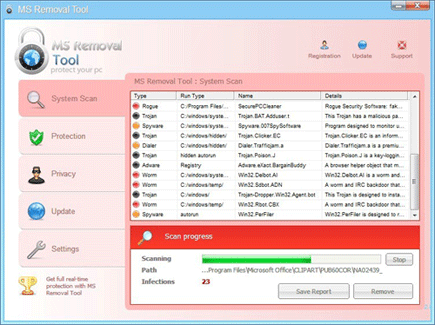
It will modify Windows Registry and add the following entries:
KEY_CURRENT_USER\Software\Microsoft\Windows\CurrentVersion\RunOnce “”
The threat will drop the following malicious files:
c:\Documents and Settings\All Users\Application Data\<random>\
c:\Documents and Settings\All Users\Application Data\<random>\<random>
c:\Documents and Settings\All Users\Application Data\<random>\<random>.exe
How to Remove Fake MS Removal Tool Manually
1. Restart your computer in SafeMode
– After Power-On the computer, just before Windows start, press F8
– From the selections, Select SafeMode
2. Remove Registry entries that the threat added. You MUST BACKUP YOUR REGISTRY FIRST.
– Click Start > Run
– Type in the field, regedit
– Navigate and look for the registry entries mentioned above and delete if necessary
3. Delete malicious files that the threat added:
– Base on the given location above, browse and delete the file
– If no location is given, click Start>Search> and search for the files.
– If cannot be deleted, press Ctrl+Alt+Del to access Task Manager, see if the file is running in the process. If it is, select the file and click End Process. Perform file delete again.
4. Scan computer with Antivirus Program
– Update antivirus program
– Scan computer and delete all detected threats.
How to Easily Remove Fake MS Removal Tool
1. Download and run Removal Tool to remove this computer threat.

I used your instructions to remove MS Removal Tool and it worked like a charm. Thank You