

Good Memory with an alias GoodMemory virus is just a clone of other rogue programs that are considered one of the most propagated malware to date. Coming from the same group as Fast Disk and My Disk, this another variant will also attempt to force victims into having the paid version of the program by showing fabricated scan results. This false scan will identify system errors and hard drive failure in an attempt to deceive victims. Every attempt to fix computer troubles will lead to a purchase of Good Memory registration key.
Ignore Good Memory and all of its illegal activities projected on the contracted PC. These were all fake and was employed to persuade victims to spend for the useless application. Remove Good Memory without getting its licensed. In fact it is not recommended at all. All it requires to remove Good Memory is a legitimate and effective anti-malware solutions. Follow the remove procedure below to get rid of this threat in an instant.
What are the Symptoms of Good Memory Infection?
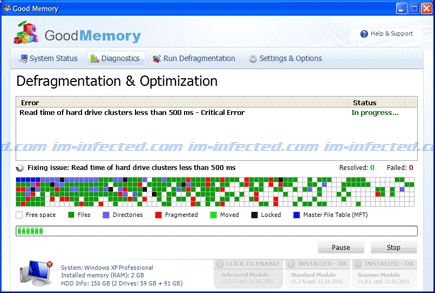
It will modify Windows Registry and add the following entries:
HKEY_CURRENT_USER\Software\Microsoft\Windows\Current Version\Run “[random characters].exe”
HKEY_CURRENT_USER\Software\Microsoft\Windows\Current Version\Run “[random characters]”
The threat will drop the following malicious files:
%AllUsersProfile%\[random].exe
%AllUsersProfile%\[random].dll
%AllUsersProfile%\dfrg
%AllUsersProfile%\dfrgr
%UserProfile%\Desktop\Good Memory.lnk
%UserProfile%\Start Menu\Programs\Good Memory\
%UserProfile%\Start Menu\Programs\Good Memory\Good Memory.lnk
%UserProfile%\Start Menu\Programs\Good Memory\Uninstall Good Memory.lnk
How to Remove Good Memory Manually
1. Restart your computer in SafeMode
– After Power-On the computer, just before Windows start, press F8
– From the selections, Select SafeMode
2. Remove Registry entries that the threat added. You MUST BACKUP YOUR REGISTRY FIRST.
– Click Start > Run
– Type in the field, regedit
– Navigate and look for the registry entries mentioned above and delete if necessary
3. Delete malicious files that the threat added:
– Base on the given location above, browse and delete the file
– If no location is given, click Start>Search> and search for the files.
– If cannot be deleted, press Ctrl+Alt+Del to access Task Manager, see if the file is running in the process. If it is, select the file and click End Process. Perform file delete again.
4. Scan computer with Antivirus Program
– Update antivirus program
– Scan computer and delete all detected threats.
How to Easily Remove Good Memory
1. Download and run Removal Tool to remove this computer threat.
