

AntiVirus System 2011 is a fake application developed to infiltrate a computer by finding its software vulnerabilities and security holes. With this method, AntiVirus System 2011 will be able to get installed on the computer without a detection of user. There are also instances that a website pretending to exhibit explicit video will require a multimedia player to view its content. Visitors may not know that a recommended player is infected with a malware that will install AntiVirus System 2011 on to the system invisibly. After penetration, it will be configured to run automatically by placing its entries on the Windows registry. Internet browser may also modified to produce unwanted redirection to a different web sites.
AntiVirus System 2011 always demand for the registration of itself. This is completed by displaying fake alert messages declaring possible virus infection. In the end, a licensed version is endorsed and open up a registration page where one can pay for the full version using their credit card information. Beware of this scam, it will just steal you money but will never perform any virus removal and security protection.
What are the Symptoms of AntiVirus System 2011 Infection?
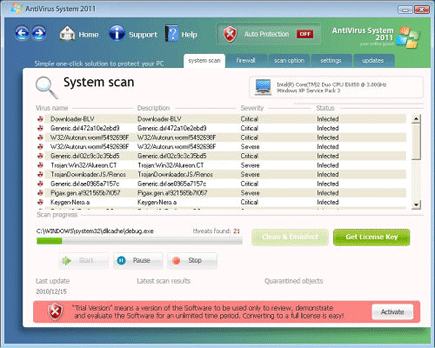
It will modify Windows Registry and add the following entries:
HKEY_CURRENT_USER\Software\Microsoft\Windows\CurrentVersion\Run “[random]”
HKEY_CURRENT_USER\Software\Microsoft\Windows\CurrentVersion\Run “AntiVirus System 2011”
HKEY_CURRENT_USER\Software\Microsoft\Windows\CurrentVersion\Run “Security Manager”
HKEY_CURRENT_USER\Software\Microsoft\Windows\CurrentVersion\Uninstall\AntiVirus System 2011
HKEY_CURRENT_USER\Software\AntiVirus System 2011
The threat will drop the following malicious files:
%UserProfile%\Desktop\AntiVirus System 2011.lnk
%UserProfile%\Start Menu\Programs\AntiVirus System 2011\
%UserProfile%\Start Menu\Programs\AntiVirus System 2011.lnk
%UserProfile%\Start Menu\Programs\AntiVirus System 2011\Activate AntiVirus System 2011.lnk
%UserProfile%\Start Menu\Programs\AntiVirus System 2011\AntiVirus System 2011.lnk
%UserProfile%\Start Menu\Programs\AntiVirus System 2011\Help AntiVirus System 2011.lnk
%UserProfile%\Start Menu\Programs\AntiVirus System 2011\How to Activate AntiVirus System 2011.lnk
%AppData%\AntiVirus System 2011\
%AppData%\AntiVirus System 2011\AntiVirus_System_2011.exe
%AppData%\AntiVirus System 2011\IcoActivate.ico
%AppData%\AntiVirus System 2011\IcoHelp.ico
%AppData%\AntiVirus System 2011\IcoUninstall.ico
%AppData%\AntiVirus System 2011\securityhelper.exe
%AppData%\AntiVirus System 2011\securitymanager.exe
%AppData%\Microsoft\Internet Explorer\Quick Launch\AntiVirus System 2011.lnk
%Temp%\_2.tmp
%Temp%\[random].exe
%Temp%\ae0965a7157cd.exe
%Temp%\alerfa.exe
%Temp%\destroyer.exe
%Temp%\df-.exe
How to Remove AntiVirus System 2011 Manually
1. Restart your computer in SafeMode
– Press F8 on keyboard as soon as you turn on the computer
– Select SafeMode to start the computer loading only minimal resources
2. Delete Windows registry entries the malware created. It is important to BACKUP YOUR REGISTRY FIRST.
– On Windows Start Menu, Click Start > Run
– Type in the field, regedit
– Find registry entries mentioned above and delete if necessary
3. Files related to AntiVirus System 2011 must be deleted:
– Browse and delete malicious files detected above.
– Some files cannot be deleted instantly. Press Ctrl+Alt+Del to open Windows Task Manager, look for any virus-related files mentioned on this page and highlight it, click End Process. Try to delete the file once more.
4. Run Antivirus Program
– You must be connected to Internet to be able to update your anti-virus program. This is needed to have the latest database available and detect newer threats.
– Thoroughly scan the computer and clean or delete all detected threats.
How to Easily Remove AntiVirus System 2011
1. Print this procedure as we need to close all running programs later.
2. Download AntiMalware Application here and save it to your Desktop.
3. Close all open applications.
4. Double-Click on the downloaded mbam-setup.exe to start the installation. If unable to execute, infections on computer is preventing it from running, rename the file mbam-setup.exe to anything (like myfile.exe)
5. Run the installation on the default settings. No changes are necessary.
6. Just before completing the installation, make sure that the following are marked check.
– Update the program
– Launch the program
7. The tool will run and update itself after installation. Close it after the update.
8. Restart your computer in SafeMode
– After Power-On the computer, just before Windows start, press F8
– From the selections, Select SafeMode
9. Click on the icon and start to Perform Full Scanto begin scanning your computer for AntiVirus System 2011 related files.
10. After scanning, a message will appear stating that the scan is completed successfully. Click OK.
11. Click Show Results and detected threats will be displayed.
12. Make sure that all threats are marked check, then click Remove Selected to begin removal of the malicious files.
13. Exit AntiMalware Apps and restart your computer.
14. AntiVirus System 2011 and all its files are now removed from your computer. To guard your computer from this threat and avoid future infections, you may want real-time protection from a full version of anti-malware program..

Thank you so much! I’m not a dumb user….but I’m an idiot for letting this get on my system.
Appreciate the step by step
System very slow because of this virus.