

Memory Fixer is nothing but a counterfeit program that will scam users with fabricated system scan finding. Also known as MemoryFixer virus, this risky software will pretend as a tool to fix hard drive problems and system errors. In fact, it provides PC Performance and Stability Analysis Report every time Windows is started. The scan will contain false detection and report errors even though computer certified in good state. This tactic is being employed in order to deceive victims into fixing computer troubles with the paid version of Memory Fixer.
It is not advisable to obtain the registered version of this fake tool. As a matter of fact, security experts advise the immediate removal of Memory Fixer whenever a presence was observed on the PC. The longer it stayed on the computer, the more damage it can bring. Registry will be altered by Memory Fixer to be able to run itself without user’s intervention. Constant pop-up alerts will flood the screen trying to scare victims.
Visiting websites related to computer security will be obstructed with a fake web page stating that irregularities in the system must be fixed first. There is little chance that you may open security web sites while Memory Fixer is present. The only way to resolve computer difficulties related to this malware is to remove Memory Fixer itself. A free tool is provided on this page to help get rid of the threat. Do a full scan on the infected computer while Windows is in Safe Mode to bypass blockade action from Memory Fixer.
What are the Symptoms of Memory Fixer Infection?
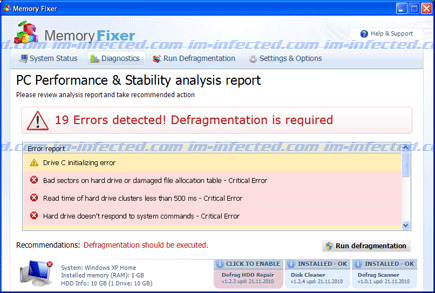
It will modify Windows Registry and add the following entries:
HKEY_CURRENT_USER\Software\Microsoft\Windows\CurrentVersion\Run “[mixed alpha-numeric]“
HKEY_CURRENT_USER\Software\Microsoft\Windows\CurrentVersion\Run “[mixed alpha-numeric].exe”
The threat will drop the following malicious files:
%Documents and Settings%\[User_Name]\Desktop\Memory Fixer.lnk
%Documents and Settings%\[User_Name]\Start Menu\Programs\Memory Fixer
%Documents and Settings%\[User_Name]\Start Menu\Programs\Memory Fixer\Memory Fixer.lnk
%Documents and Settings%\[User_Name]\Start Menu\Programs\Memory Fixer\Uninstall Memory Fixer.lnk
%Temp%\[mixed alpha-numeric]
%Temp%\[mixed alpha-numeric].exe
%Temp%\[mixed alpha-numeric].dll
%Temp%\dfrg
%Temp%\dfrgr
How to Remove Memory Fixer Manually
1. Restart your computer in SafeMode
– After Power-On the computer, just before Windows start, press F8
– From the selections, Select SafeMode
2. Remove Registry entries that the threat added. You MUST BACKUP YOUR REGISTRY FIRST.
– Click Start > Run
– Type in the field, regedit
– Navigate and look for the registry entries mentioned above and delete if necessary
3. Delete malicious files that the threat added:
– Base on the given location above, browse and delete the file
– If no location is given, click Start>Search> and search for the files.
– If cannot be deleted, press Ctrl+Alt+Del to access Task Manager, see if the file is running in the process. If it is, select the file and click End Process. Perform file delete again.
4. Scan computer with Antivirus Program
– Update antivirus program
– Scan computer and delete all detected threats.
How to Easily Remove Memory Fixer
1. Download and run our suggested removal program from this page. Save the file to your hard drive and install it using the default settings. Update the database before running a full scan to ensure complete removal of the malware.
