

Iron Defender also known as the IronDefender virus will be spread over the Internet by means of Trojan Downloader. It may also arrive on the computer disguising as an antivirus program from fake online virus scanner web pages. Drive-by-download method is used on this web site to instantly download and install the malware without requiring for user’s consent. Other ways used by malware author to deploy Iron Defender includes spam emails, social networking sites, and instant messaging programs.
Once inside the computer, Iron Defender will begin a display a barrage of fake warning messages to scare users and force them to get the registered version of the rogue software. This program will have no positive advantage when installed on computer, so don’t hesitate to remove it as soon as possible. It may advise you to get the registered version from time to time. All you have to do is ignore it and focus on removing Iron Defender malware. Because once you fall into the trick of malware authors, there is a tendency that they may steal your credit card account especially if you fill-up details to buy this worthless program.
In removing Iron Defender, all you have to do is download efficient anti-malware program. This can be use for free and is enough to scan computer and remove detected threats. Please be reminded that tools we recommend are scanners and virus removers. They are not designed to protect your system against attack, so it is safe to remove it after the procedure. If you find the program worthy and need the complete protection, you have to activate the tool into full version.
What are the Symptoms of Iron Defender Infection?
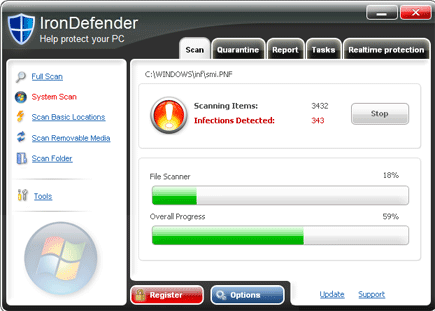
It will modify Windows Registry and add the following entries:
HKEY_CURRENT_USER\Software\IronDefender
HKEY_LOCAL_MACHINE\SOFTWARE\IronDefender
HKEY_LOCAL_MACHINE\SOFTWARE\Microsoft\Windows\CurrentVersion\Uninstall\IronDefender
HKEY_CURRENT_USER\Software “Install_Dir” = “C:\Program Files\FDFCA”
HKEY_CURRENT_USER\Software\Microsoft\Windows\CurrentVersion\Run “vur4.exe”
HKEY_LOCAL_MACHINE\SOFTWARE\Microsoft\Windows\CurrentVersion\Run “F0E84.exe”
The threat will drop the following malicious files:
%Program Files%\FDFCA\F0E84.exe
%Program Files%\FDFCA\Uninstall.exe
%WINDOWS%\{random}.exe
%WINDOWS%\{random}.bin
%WINDOWS%\{random}.dll
%WINDOWS%\{random}.cpl
%WINDOWS%\system32\[random].exe
%WINDOWS%\system32\[random].bin
%WINDOWS%\system32\[random].dll
%WINDOWS%\system32\[random].cpl
%UserProfile%\Desktop\hash
%UserProfile%\Desktop\IronDefender.lnk
%UserProfile%\Local Settings\Temp\[random].exe
How to Remove Iron Defender Manually
1. Restart your computer in SafeMode
– After Power-On the computer, just before Windows start, press F8
– From the selections, Select SafeMode
2. Remove Registry entries that the threat added. You MUST BACKUP YOUR REGISTRY FIRST.
– Click Start > Run
– Type in the field, regedit
– Navigate and look for the registry entries mentioned above and delete if necessary
3. Delete malicious files that the threat added:
– Base on the given location above, browse and delete the file
– If no location is given, click Start>Search> and search for the files.
– If cannot be deleted, press Ctrl+Alt+Del to access Task Manager, see if the file is running in the process. If it is, select the file and click End Process. Perform file delete again.
4. Scan computer with Antivirus Program
– Update antivirus program
– Scan computer and delete all detected threats.
How to Easily Remove Iron Defender
1. Download and run the suggested removal tool from this link. Run a full scan to ensure complete detection and removal of the malware from infected computer.
