

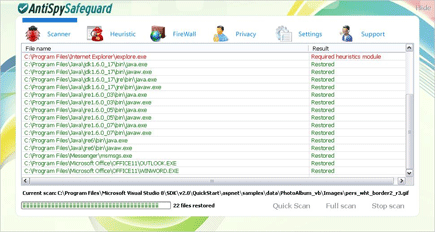
AntiSpy Safeguard is part of a fake Microsoft Security Essentials Alert that keeps on distributing assorted rogue programs. AntiSpy Safeguard will exhibit fake virus scan results on victims computer and persuade them to obtain the registered version if they want to remove all threats detected locally. In order to get this program loaded on to the computer, one must execute and install it manually. It has a very convincing way to attract users from getting the unregistered version and this is by pretending to be a legitimate software from Microsoft.
Ignore AntiSpy Safeguard’s warning and threat detection, these are all fake and created with misleading intentions. Its purpose was not to secure a computer but to destroy and create annoyances for the sake of money. Installation folder contains no database and executable files that will prove its worth in protecting a computer or even removing Trojan, virus and worms. Immediately remove AntiSpy Safeguard with you own anti-virus or anti-malware application and disconnect the PC from the Internet to avoid it from downloading additional threats.
What are the Symptoms of AntiSpy Safeguard Infection?
It will modify Windows Registry and add the following entry/entries:
HKEY_CURRENT_USER\Software\PAV
HKEY_CURRENT_USER\Software\Microsoft\Windows\CurrentVersion\Internet Settings “WarnonBadCertRecving” = “0”
HKEY_CURRENT_USER\Software\Microsoft\Windows\CurrentVersion\Internet Settings “WarnOnPostRedirect” = “0”
HKEY_CURRENT_USER\Software\Microsoft\Windows\CurrentVersion\Run “tmp”
HKEY_CURRENT_USER\Software\Microsoft\Windows\CurrentVersion\RunOnce “SelfdelNT”
HKEY_CURRENT_USER\Software\Microsoft\Windows NT\CurrentVersion\Winlogon “Shell” = “%UserProfile%\Application Data\antispy.exe”
The threat will drop the following malicious file/files:
%UserProfile%\Application Data\tmp.exe
%UserProfile%\Application Data\defender.exe
%UserProfile%\Application Data\antispy.exe
%UserProfile%\Application Data\tmp.exe
%UserProfile%\Local Settings\Temp\[random]
%UserProfile%\Application Data\PAV\
How to Remove AntiSpy Safeguard Manually
1. Restart your computer in SafeMode
– After Power-On the computer, just before Windows start, press F8
– From the selections, Select SafeMode
2. Remove Registry entries that the threat added. You MUST BACKUP YOUR REGISTRY FIRST.
– Click Start > Run
– Type in the field, regedit
– Navigate and look for the registry entries mentioned above and delete if necessary
3. Delete malicious files that the threat added:
– Base on the given location above, browse and delete the file
– If no location is given, click Start>Search> and search for the files.
– If cannot be deleted, press Ctrl+Alt+Del to access Task Manager, see if the file is running in the process. If it is, select the file and click End Process. Perform file delete again.
4. Scan computer with Antivirus Program
– Update antivirus program
– Scan computer and delete all detected threats.
How to Easily Remove AntiSpy Safeguard
1. Download and run Removal Tool to remove this computer threat.
