

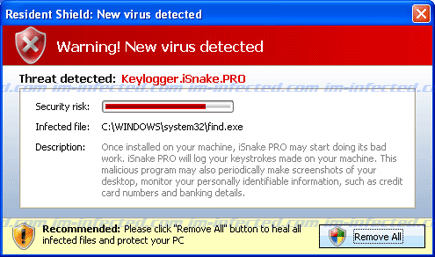
Keylogger.iSnake.PRO is a detection of an imaginable threat that aims to deceive computer users and force them to acquire a registered version of AntivirusGT. There is a real Keylogger.iSnake.PRO virus but coming from an unknown program, rest assure that this keylogger does not reside on the computer. If there is one thing you have to remove, it is the rogue program that detected it. The message content will be:
Resident Shield: New virus detected
Threat detected: Keylogger.iSnake.PRO
Infected file: C;\WINDOWS\System32\find.exe
Description: Once installed on your machine, iSnake PRO may start doing its bad work. iSnake PRO will log you keystrokes made on your machine. This malicious program may also periodically make screenshots of your desktop, monitor your personally identifiable information, such as credit card numbers and banking details.
If in case that Keylogger.iSnake.PRO was detected by your antivirus program, then you have to take actions right away. Run a full scan on the computer at once. Downloading and scanning the PC with anti-malware tool also helps find and delete hidden files and registry entries. For effective removal of Keylogger.iSnake.PRO, we suggest running also a complete scan after restarting Windows in Safe Mode.
Once PC is clean, it is important to prevent future infection by protecting the computer with both antivirus and anti-malware tool. These two security programs should have no conflict when installed together on the computer.
How to Easily Remove Keylogger.iSnake.PRO
1. Print this procedure as we need to close all programs running later.
2. Download AntiMalware Application here and save it to your Desktop.
3. Close all open applications.
4. Double-Click on the downloaded mbam-setup.exe to start the installation. If unable to execute, infections on computer is preventing it from running, rename the file mbam-setup.exe to anything (like myfile.exe)
5. Run the installation on the default settings. No changes are necessary.
6. Just before completing the installation, make sure that the following are marked check.
– Update the program
– Launch the program
7. The tool will run and update itself after installation. Close it after the update.
8. Restart your computer in SafeMode
– After Power-On the computer, just before Windows start, press F8
– From the selections, Select SafeMode
9. Click on the icon and start to Perform Full Scan to begin scanning your computer for malicious files.
10. After scanning, a message will appear stating that the scan is completed successfully. Click OK.
11. Click Show Results and detected threats will be displayed.
12. Make sure that all threats are marked check, then click Remove Selected to begin removal of the malicious files.
13. Exit AntiMalware Apps and restart your computer.
14. Keylogger.iSnake.PRO and all its files are now removed from your computer. To guard your computer from this threat and avoid future infections, you may want real-time protection from a full version of anti-malware program..
