

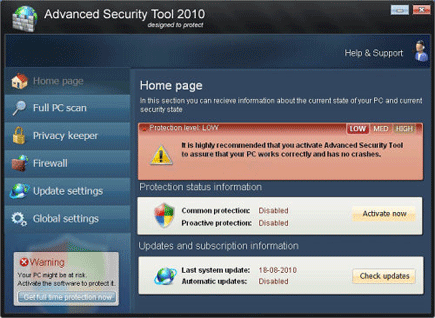
Advanced Security Tool 2010 will immediately spread over the Internet and promoted as a Windows anti-virus program. Its slogan “designed to protect” will surely deceive those who can notice it aside from having an attractive graphical user interface. Advanced Security Tool 2010 claims to have functions such as Full PC Scan, Privacy Keeper, Firewall and so on. Since it was dubbed as rogue, you should never trust your computer’s security from Advanced Security Tool 2010.
Victims can be mistakenly deem Advanced Security Tool 2010 as a program that can remove virus and threats particularly if it begins to display excessive warnings and alert messages. These alerts are a product of its developer’s broad imagination on misleading computer users. A full virus scan by Advanced Security Tool 2010 will scare users with dozens of detected threats. Similarly, a couple of unwanted product registration page is presented hoping that users will use their credit card account in obtaining the registered version. Some users who fall into this trick protest over an over-charging committed by the authors of this fake antivirus tool.
Never obtain a copy of this useless program. If presence was spotted on the computer, don’t be hesitant to remove it using an effective anti-malware program. There are free tools available over the Internet that can remove Advanced Security Tool 2010 automatically without spending a single penny. Finally, we advised you to install a security program that has the ability to protect your computer in real-time to block malicious Internet traffic.
What are the Symptoms of Advanced Security Tool 2010 Infection?
After installation, a GUI will pop-up and recommend to activate the program assuring that computer will work correctly without any system crashes.
It will modify Windows Registry and add the following entries:
HKEY_LOCAL_MACHINE\SOFTWARE\Microsoft\Windows\CurrentVersion\policies\system “EnableLUA” = “0?
HKEY_LOCAL_MACHINE\SOFTWARE\Microsoft\Windows\CurrentVersion\Run “rundll32? = “”
HKEY_LOCAL_MACHINE\SOFTWARE\Microsoft\Windows NT\CurrentVersion\Winlogon “Shell” = “explorer.exe C:\WINDOWS\system32\ntload.exe”
HKEY_LOCAL_MACHINE\SOFTWARE\Microsoft\Windows\CurrentVersion\Explorer\Browser Helper Objects\{80c10400-59cb-4c79-97ce-cc693103afca}
HKEY_CURRENT_USER\Software\Advanced Security
HKEY_CLASSES_ROOT\BrcWizApp.BrcWiz
HKEY_CLASSES_ROOT\BrcWizApp.BrcWiz.1
HKEY_CLASSES_ROOT\CLSID\{80c10400-59cb-4c79-97ce-cc693103afca}
HKEY_CLASSES_ROOT\Interface\{4B66E1DF-4DE3-4CDA-83B5-11673EADAB0B}
HKEY_CLASSES_ROOT\Interface\{9692BE2F-EB8F-49D9-A11C-C24C1EF734D5}
HKEY_CLASSES_ROOT\TypeLib\{58B4E0F5-F122-4C02-B038-C482D998486A}
HKEY_CURRENT_USER\Software\Microsoft “adver_id” = “29?
HKEY_CURRENT_USER\Software\Microsoft\Windows\CurrentVersion\Policies\Associations “LowRiskFileTypes” = “.exe;”
HKEY_CURRENT_USER\Software\Microsoft\Windows\CurrentVersion\Run “AdvSecTool”
HKEY_CURRENT_USER\Software\Microsoft\Windows\CurrentVersion\Run “rundll32? = “”
HKEY_CURRENT_USER\Software\Microsoft\Windows NT\CurrentVersion\Winlogon “Shell” = “%UserProfile%\Application Data\asectool.exe” /sn”
The threat will drop the following malicious files:
%Documents and Settings%\[User Name]\asr.dat
%Documents and Settings%\[User Name]\Application Data\1tmp.bat
%Documents and Settings%\[User Name]\Application Data\asectool.exe
%Documents and Settings%\[User Name]\Application Data\scan.dll
%Documents and Settings%\[User Name]\Application Data\secmof.tmp
%Documents and Settings%\[User Name]\Desktop\Advanced Security Tool 2010.lnk
%Documents and Settings%\[User Name]\Start Menu\Advanced Security Tool 2010.lnk
How to Remove Advanced Security Tool 2010 Manually
1. Restart your computer in SafeMode
– After Power-On the computer, just before Windows start, press F8
– From the selections, Select SafeMode
2. Remove Registry entries that the threat added. You MUST BACKUP YOUR REGISTRY FIRST.
– Click Start > Run
– Type in the field, regedit
– Navigate and look for the registry entries mentioned above and delete if necessary
3. Delete malicious files that the threat added:
– Base on the given location above, browse and delete the file
– If no location is given, click Start>Search> and search for the files.
– If cannot be deleted, press Ctrl+Alt+Del to access Task Manager, see if the file is running in the process. If it is, select the file and click End Process. Perform file delete again.
4. Scan computer with Antivirus Program
– Update antivirus program
– Scan computer and delete all detected threats.
How to Easily Remove Advanced Security Tool 2010
1. Print this procedure as we need to close all programs running later.
2. Download AntiMalware Application here and save it to your Desktop.
3. Close all open applications.
4. Double-Click on the downloaded mbam-setup.exe to start the installation. If unable to execute, infections on computer is preventing it from running, rename the file mbam-setup.exe to anything (like myfile.exe)
5. Run the installation on the default settings. No changes are necessary.
6. Just before completing the installation, make sure that the following are marked check.
– Update the program
– Launch the program
7. The tool will run and update itself after installation. Close it after the update.
8. Restart your computer in SafeMode
– After Power-On the computer, just before Windows start, press F8
– From the selections, Select SafeMode
9. Click on the icon and start to Perform Full Scan to begin scanning your computer for related files.
10. After scanning, a message will appear stating that the scan is completed successfully. Click OK.
11. Click Show Results and detected threats will be displayed.
12. Make sure that all threats are marked check, then click Remove Selected to begin removal of the malicious files.
13. Exit AntiMalware Apps and restart your computer.
14. Advanced Security Tool 2010 and all its files are now removed from your computer. To guard your computer from this threat and avoid future infections, you may want real-time protection from a full version of anti-malware program..
