

Defense Center or sometimes called as Defence Center virus will be installed on computers without user permission through the use of Trojan that will download and execute it automatically on the target machine. Defense Center will emulates a virus scanner and detect threats that does not exists on the computer to deceive user about the current security status. A prompt to register the program will follow and insists that Defense Center activation or registration code is necessary to remove all the threats it detected. It’s not surprising to known that this malicious security program will attempt to convince users from buying it and will do anything including making the affected computer a hostage. It will only allow users to remove Defense Center after the licensed version was purchased. Automatic removal is prohibited since it did not include an entry on Windows Add/Remove program. Manually getting rid of Defense Center may be impossible for non-technical users since most of the files were hidden and buried under system files.
Security experts advise a use of legitimate, updated and powerful anti-malware application to remove Defense Center and all of its associated files. Ignore all alerts coming from this useless program and never visit its own website to avoid downloading of additional threats on to computer.
What are the Symptoms of Defense Center Infection?
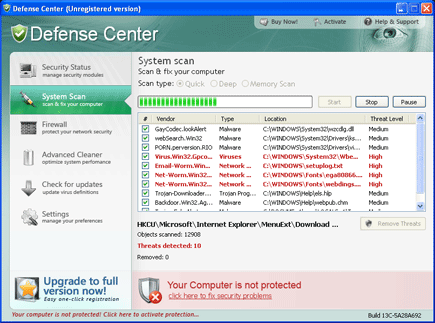
Rogue programs like Defense Center is promoted on fake security website. It will run a fabricated virus scan on the target computer and advise user to purchase the full version of the software.
It will modify Windows Registry and add the following entries:
- hklm\SOFTWARE\Defense Center
- hklm\SOFTWARE\Microsoft\Windows\CurrentVersion\Uninstall\Defense Center
- hkcu\Software\Microsoft\Windows\CurrentVersion\Run “Defense Center”
- hkcr\CLSID\{5E2121EE-0300-11D4-8D3B-444553540000}
Defense Center threat will drop the following malicious files:
- %appdata%\microsoft\internet explorer\quick launch\Defense Center.lnk
- %desktop%\Defense Center support.lnk
- %desktop%\Defense Center.lnk
- %commonprograms%\Defense Center\about.lnk
- %commonprograms%\Defense Center\activate.lnk
- %commonprograms%\Defense Center\buy.lnk
- %commonprograms%\Defense Center\Defense Center support.lnk
- %commonprograms%\Defense Center\Defense Center.lnk
- %commonprograms%\Defense Center\scan.lnk
- %commonprograms%\Defense Center\settings.lnk
- %commonprograms%\Defense Center\update.lnk
- %programfiles\Defense Center\about.ico
- %programfiles\Defense Center\activate.ico
- %programfiles\Defense Center\buy.ico
- %programfiles\Defense Center\def.db
- %programfiles\Defense Center\defext.dll
- %programfiles\Defense Center\defhook.dll
- %programfiles\Defense Center\defcnt.exe
- %programfiles\Defense Center\help.ico
- %programfiles\Defense Center\scan.ico
- %programfiles\Defense Center\settings.ico
- %programfiles\Defense Center\splash.mp3
- %programfiles\Defense Center\uninstall.exe
- %programfiles\Defense Center\update.ico
- %programfiles\Defense Center\virus.mp3
How to Remove Defense Center Manually
1. Restart your computer in SafeMode
– After Power-On the computer, just before Windows start, press F8
– From the selections, Select SafeMode
2. Remove Registry entries that the threat added. You MUST BACKUP YOUR REGISTRY FIRST.
– Click Start > Run
– Type in the field, regedit
– Navigate and look for the registry entries mentioned above and delete if necessary
3. Delete malicious files that the threat added:
– Base on the given location above, browse and delete the file
– If no location is given, click Start>Search> and search for the files.
– If cannot be deleted, press Ctrl+Alt+Del to access Task Manager, see if the file is running in the process. If it is, select the file and click End Process. Perform file delete again.
4. Scan computer with Antivirus Program
– Update antivirus program
– Scan computer and delete all detected threats.
How to Easily Remove Defense Center
1. Download and run Removal Tool to remove Defense Center

The story about Defence Center is nice but it also hijacks the web browser so the links go to random sites when you click on them. You can get around this by right mouse clicking on the link and do a copy shortcut then paste in the link bar and hit enter to go to the site you wanted in the link. This is good for finding and going to pages for help. The other thing it does is mark it so you can not go to the windows update page and so you can also not run Microsoft defender. This is what still does not work after the manual removal or the software remove you talk about. Need help getting browser back to full function. It looks like it may add a fake wmiprvse.exe but not sure at this point.
Is there any link to remove the defence center antivirus software please let me know about it
OK to remove rogue defence center virus restore the PC back to a date before this rogue hit then download superantispyware , or malwarebytes
install the av and check for updates do a full scan and remove the rogue then
reboot and scan the system with cc cleaner , if needs must and this rogue hasn’t gone run another scan with superantyspyware .
Many thanks really helpful. Will certainly share website with my buddies.
I ended up being inquisitive should you ever deemed adjusting the particular page layout of the site? Their very well composed; I like exactly what youve had got to state. Although you may may a little more when it comes to content material consequently people could possibly interact with this much better. You’ve bought so much connected with text for just having a single or 3 photographs. Maybe you can living space the item out and about superior?