

Data Protection is another piece of rogue security software that will pretend as anti-virus application. This unwanted program can be dropped on computers without users knowledge when executing prompts from a fake online virus scanner web sites. Data Protection malware will alter system settings and add its own value on the registry so that it will run when Windows is started. Changes will be made to installed Internet browser so that it will redirect to various malicious websites when a searched was made.
A never ending alerts and warning messages will be posted on computer to persuade its victims on purchasing the registered version of Data Protection. All of its activities while inside the computer is intended to sell the program by deceptive means.
What are the Symptoms of Data Protection Infection?
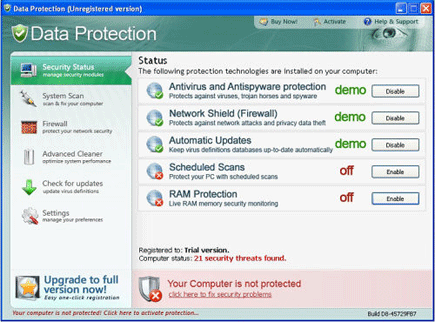
This program will pretend to be as Antivirus and Antispyware protection, Firewall and RAM Protection.
It will modify Windows Registry and add the following entries:
- HKEY_CLASSES_ROOT\CLSID\{5E2121EE-0300-11D4-8D3B-444553540000}
- HKEY_LOCAL_MACHINE\SOFTWARE\Data Protection
- HKEY_LOCAL_MACHINE\SOFTWARE\Microsoft\Windows\Current Version\Uninstall\Data Protection
- HKEY_LOCAL_MACHINE\SOFTWARE\Data Protection
- HKEY_CURRENT_USER\Software\Microsoft\Windows\Current Version\Policies\System “DisableTaskMgr” = “1?
- HKEY_CURRENT_USER\Software\Microsoft\Windows\Current Version\Run “Data Protection”
- HKEY_LOCAL_MACHINE\SOFTWARE\Microsoft\Windows\Current Version\policies\system “DisableTaskMgr” = “1?
- HKEY_LOCAL_MACHINE\SOFTWARE\Microsoft\Windows\Current Version\Shell Extensions\Approved “{5E2121EE-0300-11D4-8D3B-444553540000}”
The threat will drop the following malicious files:
- %Program Files\Data Protection\about.ico
- %Program Files\Data Protection\activate.ico
- %Program Files\Data Protection\buy.ico
- %Program Files\Data Protection\dat.db
- %Program Files\Data Protection\datext.dll
- %Program Files\Data Protection\dathook.dll
- %Program Files\Data Protection\datprot.exe
- %Program Files\Data Protection\help.ico
- %Program Files\Data Protection\scan.ico
- %Program Files\Data Protection\settings.ico
- %Program Files\Data Protection\splash.mp3
- %Program Files\Data Protection\Uninstall.exe
- %Program Files\Data Protection\update.ico
- %Program Files\Data Protection\virus.mp3
- %Documents and Settings%\All Users\Application Data\fiosejgfse.dll
- %Temp%\4otjesjty.mof
- %Temp%\MSWINSCK.exe
- %Temp%\wscsvc32.exe
- %UserProfile%\Application Data\Microsoft\Internet Explorer\Quick Launch\Data Protection.lnk
- %UserProfile%\Desktop\Data Protection Support.lnk
- %UserProfile%\Desktop\Data Protection.lnk
- %UserProfile%\Desktop\spam001.exe
- %UserProfile%\Desktop\spam002.exe
- %UserProfile%\Desktop\spam003.exe
- %UserProfile%\Desktop\troj000.exe
- %UserProfile%\Start Menu\Programs\Data Protection
- %UserProfile%\Start Menu\Programs\Data Protection\About.lnk
- %UserProfile%\Start Menu\Programs\Data Protection\Activate.lnk
- %UserProfile%\Start Menu\Programs\Data Protection\Buy.lnk
- %UserProfile%\Start Menu\Programs\Data Protection\Data Protection Support.lnk
- %UserProfile%\Start Menu\Programs\Data Protection\Data Protection.lnk
- %UserProfile%\Start Menu\Programs\Data Protection\Scan.lnk
- %UserProfile%\Start Menu\Programs\Data Protection\Settings.lnk
- %UserProfile%\Start Menu\Programs\Data Protection\Update.lnk
How to Easily Remove Data Protection
1. Download and run Removal Tool to remove Data Protection
