

Control Commander with alias CtrlCommander is a misleading security tool for Windows that was created to look and perform like a real antivirus program. However, security experts deemed the tool as harmful and therefore it was categorized as rogue or fake security software. Control Commander is being distributed on computers by a Trojan that can evade installed security software by exploiting its known weaknesses. Upon execution, the malware will alter system settings including registry to ensure itself a spot on Windows start-up. When loaded, victims will experience Control Commander anti-virus scan that will detect non-existent threat on the computer. This was intended to mislead users into buying the Control Commander registration code. Any attempt to remove the fabricated viruses on computer will direct users to a payment processing website and prompts for payment via credit card transaction.
Be careful not to get contaminated with Control Commander virus. It does not only affect Windows. Furthermore, it may steal some data from your PC like username, password, and credit card credentials. Avoid downloading executable files from unknown sources because those are common sources of malware infection. If Control Commander exists on the computer, use only your trusted security program to remove the rogue program. Buying it should not be an option since it was already proven that this rogue program has no capability in protecting a computer. For a complete removal solution, please browse below. Our recommended tools and procedures not only remove Control Commander, it is intended to delete relevant malware files as well.
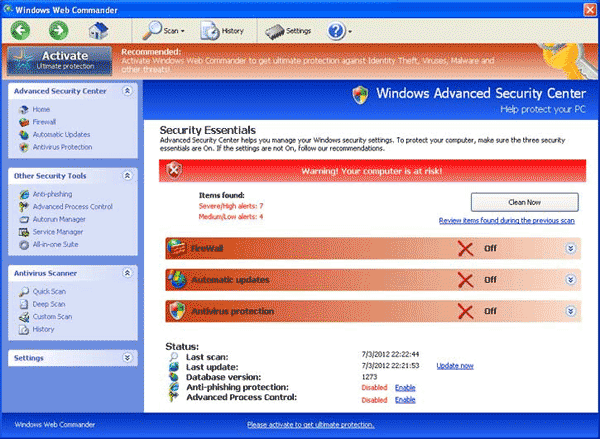
What are the Symptoms of Control Commander Infection?
It will modify Windows Registry and add the following entries:
- HKEY_LOCAL_MACHINE\SOFTWARE\Microsoft\Windows\Current Version\Uninstall\CtrlCommander
- [HKEY_LOCAL_MACHINE\SOFTWARE\Microsoft\Windows\Current Version\Uninstall\CtrlCommander] DisplayName = “CtrlCommander”
- [HKEY_CURRENT_USER\Software\Microsoft\Windows\Current Version\Run] ccagent.exe = “%AppData%\CtrlCommander\ccagent.exe”
- [HKEY_CURRENT_USER\Software\Microsoft\Windows NT\Current Version\Winlogon] Shell = “%AppData%\CtrlCommander\ccmain.exe”
The threat will drop the following malicious files:
- %AppData%\Control Commander\ccagent.exe
- %AppData%\Control Commander\ccmain.exe
- %AppData%\Control Commander\settings.ini
- %AppData%\Control Commander\uninstall.exe
- %DesktopDir%\Control Commander.lnk
- %AppData%\CtrlCommander\ccagent.exe
- %AppData%\CtrlCommander\ccmain.exe
- %AppData%\CtrlCommander\faq\guide.html
- %AppData%\CtrlCommander\faq\images\05.png
- %AppData%\CtrlCommander\faq\images\06.png
- %AppData%\CtrlCommander\faq\images\07.png
- %AppData%\CtrlCommander\faq\images\08.png
- %AppData%\CtrlCommander\faq\images\09.png
- %AppData%\CtrlCommander\faq\images\10.png
- %AppData%\CtrlCommander\settings.ini
- %AppData%\CtrlCommander\uninstall.exe
- %DesktopDir%\CtrlCommander.lnk
How to Remove Control Commander Manually
1. Restart your computer in SafeMode
– After Power-On the computer, just before Windows start, press F8
– From the selections, Select SafeMode
2. Remove Registry entries that the threat added. You MUST BACKUP YOUR REGISTRY FIRST.
– Click Start > Run
– Type in the field, regedit
– Navigate and look for the registry entries mentioned above and delete if necessary
3. Delete malicious files that the threat added:
– Base on the given location above, browse and delete the file
– If no location is given, click Start>Search> and search for the files.
– If cannot be deleted, press Ctrl+Alt+Del to access Task Manager, see if the file is running in the process. If it is, select the file and click End Process. Perform file delete again.
4. Scan computer with Antivirus Program
– Update antivirus program
– Scan computer and delete all detected threats.
How to Easily Remove Control Commander
1. To uninstall Control Commander virus easily from computer without the hassle of editing registry and system files, please download a removal tool. Click this link to begin the download. Once completed, install it and run a scan on the computer.
