

Online Protection Tool is a fake computer anti-virus application designed to spread by means of deceptive method pretending to be a useful program. Online Protection Tool will be promoted as an anti-virus software for Windows and automatically scans a computer when visiting their own online virus scanner. A false results will be displayed on the screen of the visiting computer aiming to persuade users into getting the Online Protection Tool registration key. Aside from that, Online Protection Tool will also display numerous alerts and warning messages on the computer as shown below.
Window Internet Security
Your browser is under the threat of infection. Windows requires your permission to install online protection tool.
Your browser is run in unsafe mode. Running the protection mode will help you to keep your computer safe. Staying at the suspicious website in unsafe mode may lead to the loss of personal data and computer breakage. To run the web browser in protected mode Windows requires installing the certified antivirus scanner software and online protection tool.
Name: Online Protection Tool
Publisher: Microsoft Windows
What are the Symptoms of Online Protection Tool Infection?
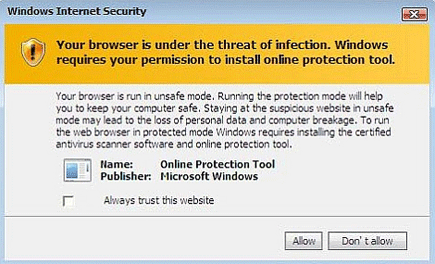
Fake security alerts will be issued and prompt users to purchase the Online Protection Tool activation key.
It will modify Windows Registry and add the following entry:
- HKEY_LOCAL_MACHINE\SOFTWARE\Microsoft\Windows\CurrentVersion\Run = “Online Protection Tool”
The threat will drop the following malicious file:
- \Program Files\Online Protection Tool\
How to Remove Online Protection Tool Manually
1. Restart your computer in SafeMode
– After Power-On the computer, just before Windows start, press F8
– From the selections, Select SafeMode
2. Remove Registry entries that the threat added. You MUST BACKUP YOUR REGISTRY FIRST.
– Click Start > Run
– Type in the field, regedit
– Navigate and look for the registry entries mentioned above and delete if necessary
3. Delete malicious files that the threat added:
– Base on the given location above, browse and delete the file
– If no location is given, click Start>Search> and search for the files.
– If cannot be deleted, press Ctrl+Alt+Del to access Task Manager, see if the file is running in the process. If it is, select the file and click End Process. Perform file delete again.
4. Scan computer with Antivirus Program
– Update antivirus program
– Scan computer and delete all detected threats.
How to Easily Remove Online Protection Tool
1. Download and run Removal Tool to remove Online Protection Tool
