

InSysSecure is a fraud antivirus application from the same group who also created APcDefender and PcsProtector. These malware were almost produce and spread daily and the latest we encounter is InSysSecure. In aid of a Trojan, InSysSecure can penetrate a computer by pretending to be an antivirus program promoted on a counterfeit security websites. Once on the computer, it generates alerts and warning messages that tricks users on the security status of the computer. InSysSecure Trojan also fabricate its own virus scan and reports imaginary threats that can only be removed if the registered version was purchased. No matter how InSysSecure misleads you, keep in mind that rogue programs such as this can be remove completely by a real anti-virus and anti-malware program. Desist from spending on lousy programs that insists on buying them before disinfecting a computer, an one of them is InSysSecure.
What are the Symptoms of InSysSecure Infection?
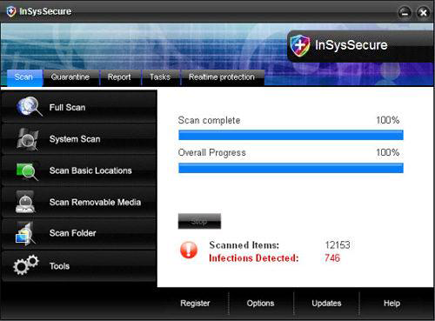
InSysSecure fake antivirus program will exhibit a fake virus scan with false detection
It will modify Windows Registry and add the following entries:
- HKEY_CURRENT_USER\Software\Microsoft\Windows\Current Version\Run “[random].exe”
- HKEY_LOCAL_MACHINE\SOFTWARE\Microsoft\Windows\Current Version\Run “InSysSecure”
- HKEY_CURRENT_USER\Software\InSysSecure
- HKEY_LOCAL_MACHINE\SOFTWARE\InSysSecure
- HKEY_LOCAL_MACHINE\SOFTWARE\Microsoft\Windows\Current Version\Uninstall\InSysSecure
InSysSecure threat will drop the following malicious files:
- %Documents and Settings%\All Users\Desktop\InSysSecure.lnk
- %Documents and Settings%\All Users\Start Menu\Programs\InSysSecure
- %Documents and Settings%\All Users\Start Menu\Programs\InSysSecure\1 InSysSecure.lnk
- %Documents and Settings%\All Users\Start Menu\Programs\InSysSecure\2 Homepage.lnk
- %Documents and Settings%\All Users\Start Menu\Programs\InSysSecure\3 Uninstall.lnk
- %Program Files%\InSysSecure Software
- %Program Files%\InSysSecure Software\InSysSecure
- %Program Files%\InSysSecure Software\InSysSecure\InSysSecure.exe
- %Program Files%\InSysSecure Software\InSysSecure\main_config.xml
- %Program Files%\InSysSecure Software\InSysSecure\uninstall.exe
- %WINDOWS%\system32\[random].exe
- %Temp%\[random].exe
How to Remove InSysSecure Manually
1. Restart your computer in SafeMode
– After Power-On the computer, just before Windows start, press F8
– From the selections, Select SafeMode
2. Remove Registry entries that the threat added. You MUST BACKUP YOUR REGISTRY FIRST.
– Click Start > Run
– Type in the field, regedit
– Navigate and look for the registry entries mentioned above and delete if necessary
3. Delete malicious files that the threat added:
– Base on the given location above, browse and delete the file
– If no location is given, click Start>Search> and search for the files.
– If cannot be deleted, press Ctrl+Alt+Del to access Task Manager, see if the file is running in the process. If it is, select the file and click End Process. Perform file delete again.
4. Scan computer with Antivirus Program
– Update antivirus program
– Scan computer and delete all detected threats.
How to Easily Remove InSysSecure
1. Download and run Removal Tool to remove InSysSecure
