

Originating from a group of rogue developer is the latest variant called IGuardPc. Just like other members of the family like SiteAdware, AntiTroy and AntiAdd,this new one shares the graphical user interface and method of propagation. It usually download by visiting a website that pretends to be an online virus scanner like “IGuardPc – Online Protection.” This malicious website is capable of installing IGuardPc on visitors computer either with or without users consent. Initially, IGuardPc will alter system setting and setup to run itself when Windows is started. It also tries to adjust security settings and disabling antivirus program.
While IGuardPc is busy on defrauding its victims to obtain the registered version by fake warnings and virus scan results, a IGuardPc Trojan connects to a remote website and further strengthen its presence on the system. Additional files will be downloaded to ensure that infected computers will have no other options in removing IGuardPc.
What are the Symptoms of IGuardPc Infection?
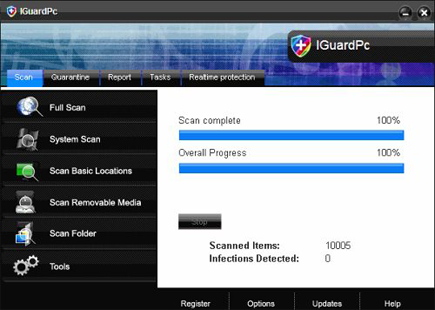
Aside from “IGuardPc – Online Protection,” this malware will also scan computer with installed fake scanner.
It will modify Windows Registry and add the following entries:
- HKEY_CURRENT_USER\Software\Microsoft\Windows\Current Version\Run “IGuardPc.exe”
- HKEY_CURRENT_USER\Software\IGuardPc
- HKEY_LOCAL_MACHINE\SOFTWARE\Microsoft\Windows\Current Version\Uninstall\IGuardPc
- HKEY_LOCAL_MACHINE\SOFTWARE\IGuardPc
IGuardPc will drop the following malicious files:
- %Program Files%\IGuardPc Software
- %Program Files%\IGuardPc Software\IGuardPc
- %Program Files%\IGuardPc Software\IGuardPc\IGuardPc.exe
- %Program Files%\IGuardPc Software\IGuardPc\uninstall.exe
- %Documents and Settings%\All Users\Desktop\IGuardPc.lnk
- %Documents and Settings%\All Users\Start Menu\Programs\IGuardPc
- %Documents and Settings%\All Users\Start Menu\Programs\IGuardPc\1 IGuardPc.lnk
- %Documents and Settings%\All Users\Start Menu\Programs\IGuardPc\2 Homepage.lnk
- %Documents and Settings%\All Users\Start Menu\Programs\IGuardPc\3 Uninstall.lnk
- %Temp%\nsv2.tmp
How to Remove IGuardPc Manually
1. Restart your computer in SafeMode
– After Power-On the computer, just before Windows start, press F8
– From the selections, Select SafeMode
2. Remove Registry entries that the threat added. You MUST BACKUP YOUR REGISTRY FIRST.
– Click Start > Run
– Type in the field, regedit
– Navigate and look for the registry entries mentioned above and delete if necessary
3. Delete malicious files that the threat added:
– Base on the given location above, browse and delete the file
– If no location is given, click Start>Search> and search for the files.
– If cannot be deleted, press Ctrl+Alt+Del to access Task Manager, see if the file is running in the process. If it is, select the file and click End Process. Perform file delete again.
4. Scan computer with Antivirus Program
– Update antivirus program
– Scan computer and delete all detected threats.
How to Easily Remove IGuardPc
1. Download and run Removal Tool to remove IGuardPc
