

RESpyware is a bogus computer security software created by the same authors who developed REAnti, SecureKeeper and LinkSafeness. The mentioned rogue security programs shares typical graphical user interface of a security program that will be launched once it was installed on victims computer. RESpyware will then display a vast number of detected security threats and asked user to buy the full version of the program before removing detected virus and threats.
Once installed on the computer, RESpyware virus will be very difficult to remove and is literally make sure that it was intact and running on victims computer. RESpyware will disable antivirus programs and block access to security websites to prevent users from downloading any RESpyware removal tool.
What are the Symptoms of RESpyware Infection?
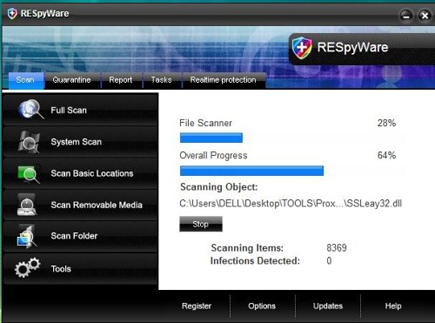
This screenshot image of RESpyware shows the graphical user interface that was also used on some of the variants.
It will modify Windows Registry and add the following entries:
- HKEY_CURRENT_USER\Software\RESpyWare
- HKEY_LOCAL_MACHINE\SOFTWARE\Microsoft\Windows\Current Version\Uninstall\RESpyWare
- HKEY_LOCAL_MACHINE\SOFTWARE\RESpyWare
- HKEY_CURRENT_USER\Software\Microsoft\Windows\Current Version\Run “.exe”
- HKEY_CURRENT_USER\Software\Microsoft\Windows\Current Version\Run “RESpyWare.exe”
The threat will drop the following malicious files:
- %Documents and Settings%\All Users\Start Menu\Programs\RESpyWare
- %Program Files%\RESpyWare Software
- %Program Files%\RESpyWare Software\RESpyWare
- %Documents and Settings%\All Users\Desktop\RESpyWare.lnk
- %Documents and Settings%\All Users\Start Menu\Programs\RESpyWare\1 RESpyWare.lnk
- %Documents and Settings%\All Users\Start Menu\Programs\RESpyWare\2 Homepage.lnk
- %Program Files%\RESpyWare Software\RESpyWare\RESpyWare.exe
- %Program Files%\RESpyWare Software\RESpyWare\uninstall.exe
- %WINDOWS%\1074w3tmb6u518.ocx
- %WINDOWS%\1023spasft724.bin
- %WINDOWS%\10d98j3lptool3pv.ocx
- %WINDOWS%\system32\1988lz2ware1925.bin
- %WINDOWS%\system32\1983pyware32c.ocx
- %WINDOWS%\system32\1927tealx621.cpl
- %Temp%\.exe
How to Remove RESpyware Manually
1. Restart your computer in SafeMode
– After Power-On the computer, just before Windows start, press F8
– From the selections, Select SafeMode
2. Remove Registry entries that the threat added. You MUST BACKUP YOUR REGISTRY FIRST.
– Click Start > Run
– Type in the field, regedit
– Navigate and look for the registry entries mentioned above and delete if necessary
3. Delete malicious files that the threat added:
– Base on the given location above, browse and delete the file
– If no location is given, click Start>Search> and search for the files.
– If cannot be deleted, press Ctrl+Alt+Del to access Task Manager, see if the file is running in the process. If it is, select the file and click End Process. Perform file delete again.
4. Scan computer with Antivirus Program
– Update antivirus program
– Scan computer and delete all detected threats.
How to Easily Remove RESpyware
1. Download and run Removal Tool to remove RESpyware
