HotShoppy is a potentially unwanted program that prime target is Mac computers. It can be added on Chrome, Firefox, and Safari even without user’s approval. HotShoppy was not listed as a computer virus. Yet, since it uses unfair ways of distribution and holds some unlikely behaviors, then it is just right to be flagged as an adware.
HotShoppy appears to be widely spread through bundled software. Instead of merely installing your chosen program, you may be surprised with HotShoppy inclusion. Once installed, you may notice odd functions of your web browser and Mac computer as well.
Ads may randomly appear on every web site you visit. It also shows some links that connects to promoter’s web site. HotShoppy adware indeed makes your online experience ruined. This is for a fact that its real aim is to gain revenue through online advertising.
In conclusion, HotShoppy is all about endorsing products and services online. It is just like all other adware that offer useful tools just to entice users. Yet in real, HotShoppy does not add any single value to enhance your online shopping experience. It merely caused unwanted browser redirect and too much display of ads. More so, its presence may only lead to add up other adware, malware, and other threats into your Mac OS X system.
After finding out that HotShoppy adware is the root of all issues, then there is no more reason not to remove it. We provided steps on how to fully remove this adware. Do follow as instructed below.

Threat Summary
| Threat: | HotShoppy |
| Type: | Adware |
| Brief Description: | Adware are unwanted programs that can pose serious threats on Mac computer. |
Description
HotShoppy is a potentially unwanted program that prime target is Mac computers. It can be added on Chrome, Firefox, and Safari even without user’s approval. HotShoppy was not listed as a computer virus. Yet, since it uses unfair ways of distribution and holds some unlikely behaviors, then it is just right to be flagged as an adware.
HotShoppy appears to be widely spread through bundled software. Instead of merely installing your chosen program, you may be surprised with HotShoppy inclusion. Once installed, you may notice odd functions of your web browser and Mac computer as well.
Ads may randomly appear on every web site you visit. It also shows some links that connects to promoter’s web site. HotShoppy adware indeed makes your online experience ruined. This is for a fact that its real aim is to gain revenue through online advertising.
In conclusion, HotShoppy is all about endorsing products and services online. It is just like all other adware that offer useful tools just to entice users. Yet in real, HotShoppy does not add any single value to enhance your online shopping experience. It merely caused unwanted browser redirect and too much display of ads. More so, its presence may only lead to add up other adware, malware, and other threats into your Mac OS X system.
After finding out that HotShoppy adware is the root of all issues, then there is no more reason not to remove it. We provided steps on how to fully remove this adware. Do follow as instructed below.
Procedures to Remove HotShoppy
Removal steps on this page will help you get rid of the threat effectively using tools and virus scanners. Please make sure that you will carry out the guide in exact order.
Remove HotShoppy from Safari browser
1. Open Safari browser.
2. Go to Safari menu.
3. Choose "Preferences".

4. This will open the Safari settings dialog box.
5. Please select "Extensions" tab to see list of installed extensions.
6. Select HotShoppy from the list. If not found, it may be hiding under a different name. Look for unknown or suspicious item.
7. Turn off the extension by removing the Check Mark on the box beside "Enable HotShoppy extension". You can also Uninstall the extension if you need to permanently remove it from the computer.
8. Please close Safari browser at the moment and proceed to the next procedure.
Manually delete all files dropped by the adware
1. Navigate the Apple Menu bar and click on "Go". Then, select "Go to Folder".

2. Copy and paste, or type the following line in the field and press Enter on your keyboard:
/Library/LaunchAgents
3. LaunchAgents folder should open at this point. Look for items with the following file name:
- HotShoppy.update.plist
- HotShoppy.AppRemoval.plist
- HotShoppy.download.plist
- HotShoppy.ltvbit.plist
- .com. HotShoppy.agent.plist
- .com.SoftwareUpdater.agent.plist
4. Move each file to the Trash. This action may require administrator privilege. If you are not logged in as administrator, you need to provide required password.
5. Go to a different folder again using procedure from Step 1 and copy and paste or type the following line:
~/Library/LaunchAgents
6. Do the same process as in Step 3 and move each file to the Trash.
7. Next, we need to look at Application Support folder. Using the same method as above. Go to this location:
~/Library/Application Support
8. Find the same files as in Step 3 and drag them to the Trash.
9. Go back to Apple Menu and then select Applications from the drop-down list.
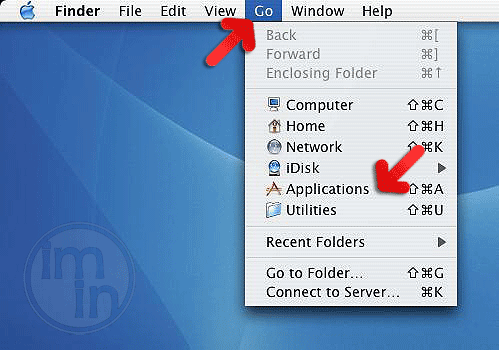
10. Delete the following folders just in case they do exist.
SoftwareUpdater HotShoppy
Note: Malware may use alternative names instead of HotShoppy to mislead security programs as well as users. If in case the above list is not present, please look for unfamiliar or suspicious items containing the same extension as update.plist, ltvbit.plist, and download.plist.
Scan with MBAM to easily get rid of HotShoppy
1. Download Malwarebytes Anti-Malware for Mac from the link below.

2. Drag the downloaded file MBAM-Mac-[version].dmg to Applications folder.
3. Under Applications folder, right-click on Malwarebytes Anti-Malware and select "Open" from the given choices.
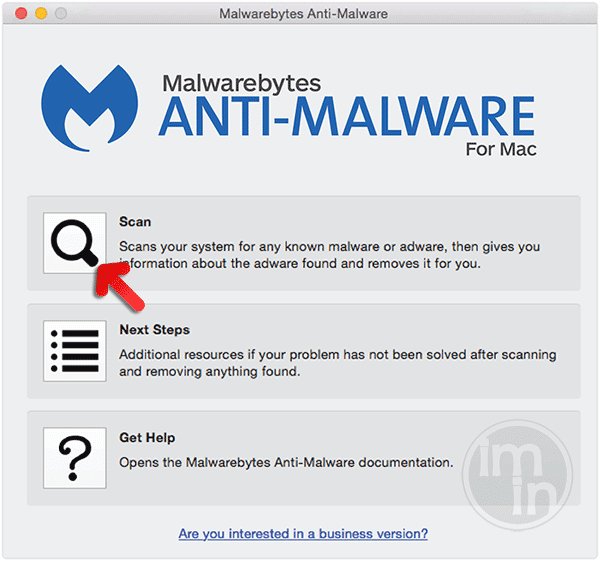
4. After opening the tool, click on the "Scan" button to start checking the computer for presence of HotShoppy and other malware.
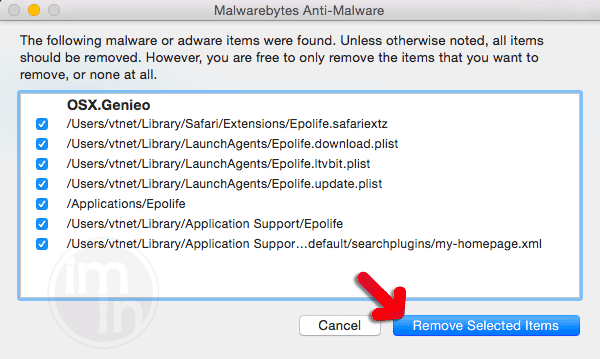
5. When scanning is done, the tool will display all identified threats. Be sure to select malicious items.
6. Click on "Remove Selected Items" to delete the threats.